Note
Access to this page requires authorization. You can try signing in or changing directories.
Access to this page requires authorization. You can try changing directories.
Unexpected errors can occur in any enterprise software deployment. Implement mechanisms to log and track these exceptions for investigation. The following section summarizes where admins can view a consolidated list of unexpected errors generated from either the Power Apps or Power Automate cloud flows. For more information on how to handle unexpected errors, see Extend canvas apps and Extend cloud flows.
Monitor for app and flow errors
All apps and flows catch and handle unexpected errors by using OnError and scoped action blocks that raise exceptions, respectively. If an exception is raised, the process creates a new SAP solution error Dataverse record. Admins can view this record within the SAP Template Administrator app. From here, an admin can view errors that are generated, assess for common problems, and take corrective action.
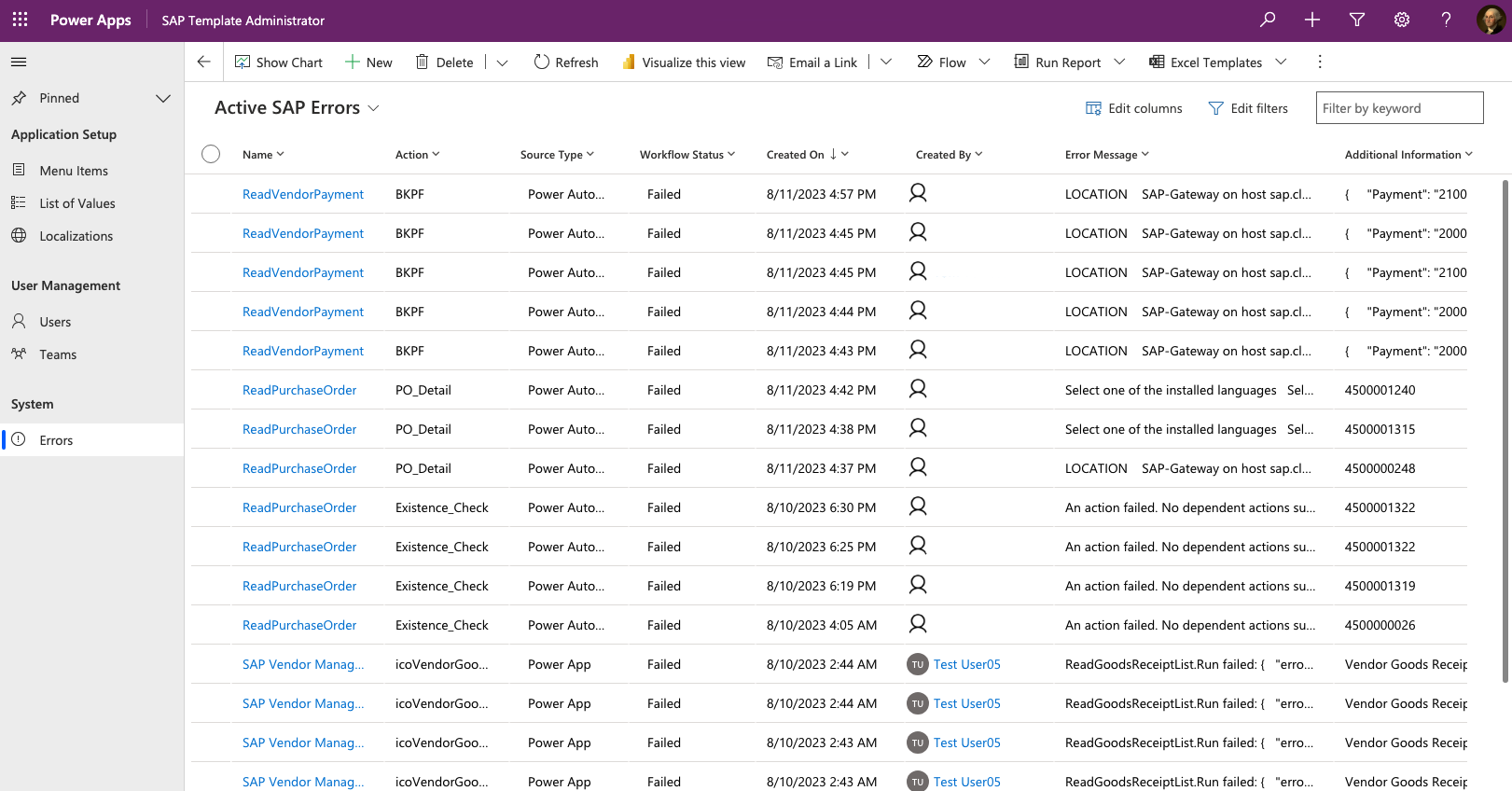
Steps to view solution errors
Open the SAP Template Administrator app that you installed as part of the SAP Base solution.
Go to Errors.
View integration error rows with the following attributes:
| Field | Examples | Description |
|---|---|---|
| Name | SAP Vendor Management, ReadVendor | The name of the app or flow that generated the error. |
| Action | Vendor Details Screen.OnVisible, LFAI | The app control or flow action step that generated the error. |
| Source type | Power App, Power Automate | The type of component that raised the unhandled exception. |
| Workflow status | Failed, Time Out | What type of exception the flow reported. |
| Generated by | The user who experienced the error. | |
| Created on | The date and time the error was generated. | |
| Error message | The unhandled error message raised. | |
| Additional information | Any additional information logged, typically the JSON payload that was passed in from the app that instantiated the flow instance. | |
| Workflow instance URL | A URL for the instance of the flow that failed that you can launch for further examination and root cause analysis. |
Tip
Use Power Automate to create a cloud flow that triggers off new SAP error record creations in Dataverse to alert the admin or integrate with your enterprise alerting and monitoring system.
Tip
Filter or drill into a user record associated in the Generated by field to see a full history of errors that a single user might be experiencing. This approach helps you troubleshoot issues reported by an individual.