Note
Access to this page requires authorization. You can try signing in or changing directories.
Access to this page requires authorization. You can try changing directories.
Part of the AKS cluster lifecycle involves performing periodic upgrades to the latest Kubernetes version. It's important you apply the latest security releases or upgrade to get the latest features. Before you learn about automatic upgrades, make sure you understand the AKS cluster upgrade fundamentals.
Tip
If you're using AKS Automatic, cluster upgrades are preconfigured to use the stable channel, automatically upgrading to the latest patch on minor version N-1 (where N is the latest supported version). No configuration is needed. For AKS Automatic clusters with specific maintenance requirements, you can set planned maintenance windows. To learn more, see What is Azure Kubernetes Service (AKS) Automatic? For AKS Standard clusters, continue reading to select the channel that best fits your requirements.
Note
Any upgrade operation, whether performed manually or automatically, upgrades the node image version if it's not already on the latest version. The latest version is contingent on a full AKS release and can be determined by visiting the AKS release tracker.
Autoupgrade first upgrades the control plane, and then upgrades agent pools one by one.
Why use cluster autoupgrade
Cluster autoupgrade provides a set once and forget mechanism that yields tangible time and operational cost benefits. You don't need to stop your workloads, redeploy your workloads, or create a new AKS cluster. By enabling autoupgrade, you can ensure your clusters are up to date and don't miss the latest features or patches from AKS and upstream Kubernetes.
For AKS Automatic clusters, this benefit comes built-in - cluster autoupgrades are preconfigured and enabled by default using the stable channel, eliminating the need for manual configuration or decision-making.
AKS follows a strict supportability versioning window. With properly selected autoupgrade channels, you can avoid clusters falling into an unsupported version. For more on the AKS support window, see Alias minor versions.
Customer versus AKS-initiated cluster autoupgrades
You can specify cluster autoupgrade specifics using the following guidance. The upgrades occur based on your specified cadence and are recommended to remain on supported Kubernetes versions.
- AKS automatically upgrades clusters in version N-3 (where N is the latest supported AKS GA minor version) that are about to fall to N-4, upgrading them to N-2 instead. This action ensures clusters remain in the AKS support window. For more information, see AKS support window.
- Stopped node pools are upgraded during an autoupgrade operation. The upgrade applies to nodes when the node pool is started. To minimize disruptions, set up maintenance windows.
Cluster autoupgrade limitations
Control plane upgrade constraints
If you're using cluster autoupgrade, you can no longer upgrade the control plane first, and then upgrade the individual node pools. Cluster autoupgrade always upgrades the control plane and the node pools together. You can't upgrade the control plane only. Running the az aks upgrade --control-plane-only command raises the following error:
NotAllAgentPoolOrchestratorVersionSpecifiedAndUnchanged: Using managed cluster api, all Agent pools' OrchestratorVersion must be all specified or all unspecified. If all specified, they must be stay unchanged or the same with control plane.
Node-image autoupgrade and unattended upgrades
If using the node-image cluster autoupgrade channel, which is now legacy and should no longer be used, or the NodeImage node image autoupgrade channel, Linux unattended upgrades are disabled by default.
Cluster autoupgrade channels
Automatically completed upgrades are functionally the same as manual upgrades. The selected autoupgrade channel determines the timing of upgrades. When making changes to autoupgrade, allow 24 hours for the changes to take effect. Automatically upgrading a cluster follows the same process as manually upgrading a cluster. For more information, see Upgrade an AKS cluster.
For AKS Automatic clusters
AKS Automatic clusters use the stable channel by default. This channel provides the recommended balance of staying current with the latest features and security updates while maintaining stability. Clusters automatically upgrade to the latest patch release on minor version N-1 (where N is the latest supported minor version).
No configuration is required - upgrades happen automatically within your maintenance window. You can set planned maintenance windows if needed to control when upgrades occur, but the channel choice is fixed to stable.
Why stable for AKS Automatic?
- Keeps clusters within the N-2 support window (safe and compliant)
- Balances innovation with stability
- Fully managed by AKS with safe deployment practices
- Aligned with AKS well-architected best practices
- Optimized for production workloads
For AKS Standard clusters
If you're using AKS Standard, choose the channel that best aligns with your operational requirements.
The following upgrade channels are available:
| Channel | Action | Example |
|---|---|---|
none |
Disables autoupgrades and keeps the cluster at its current version of Kubernetes. | Default setting if left unchanged. |
patch |
Automatically upgrades the cluster to the latest supported patch version when it becomes available while keeping the minor version the same. | For example, if a cluster runs version 1.17.7, and versions 1.17.9, 1.18.4, 1.18.6, and 1.19.1 are available, the cluster upgrades to 1.17.9. |
stable |
Automatically upgrades the cluster to the latest supported patch release on minor version N-1, where N is the latest supported minor version. | For example, if a cluster runs version 1.17.7 and versions 1.17.9, 1.18.4, 1.18.6, and 1.19.1 are available, the cluster upgrades to 1.18.6. |
rapid |
Automatically upgrades the cluster to the latest supported patch release on the latest supported minor version. | In cases where the cluster's Kubernetes version is an N-2 minor version, where N is the latest supported minor version, the cluster first upgrades to the latest supported patch version on N-1 minor version. For example, if a cluster runs version 1.17.7 and versions 1.17.9, 1.18.4, 1.18.6, and 1.19.1 are available, the cluster first upgrades to 1.18.6, then upgrades to 1.19.1. |
node-image(legacy) |
Automatically upgrades the node image to the latest version available. | Microsoft provides patches and new images for image nodes frequently (weekly), but your running nodes don't get the new images unless you do a node image upgrade. Turning on the node-image channel automatically updates your node images whenever a new version is available. If you use this channel, Linux [unattended upgrades] are disabled by default. Node image upgrades work on patch versions that are deprecated, so long as the minor Kubernetes version is still supported. This channel is no longer recommended and is planned for deprecation in future. For an option that can automatically upgrade node images, see the NodeImage channel in node image autoupgrade. |
Note
Keep the following information in mind when using cluster autoupgrade:
Cluster autoupgrade only updates to GA versions of Kubernetes and doesn't update to preview versions.
With AKS, you can create a cluster without specifying the exact patch version. When you create a cluster without designating a patch, the cluster runs the minor version's latest GA patch. To learn more, see AKS support window.
Autoupgrade requires the cluster's Kubernetes version to be within the AKS support window, even if using the
node-imagechannel.If you're using the preview API
11-02-previewor later, and you select thenode-imagecluster autoupgrade channel, the node image upgrade setting automatically switches to theNodeImagechannel.Each cluster can only be associated with a single autoupgrade channel. The reason is because your specified channel determines the Kubernetes version that runs on the cluster.
Cluster mode comparison
The following table summarizes cluster autoupgrade configuration by cluster mode:
| Aspect | AKS Automatic | AKS Standard |
|---|---|---|
| Default channel | stable (preconfigured) | Manual selection required |
| Upgrade cadence | Weekly (fixed to N-1) | Based on your selected channel |
| Configuration required | None - upgrades automatic | Yes - select channel and schedule |
| Recommended for | Most production workloads | Custom requirements or specific constraints |
| Maintenance window control | Optional | Highly recommended |
| Channel options available | stable only (fixed) | patch, stable, rapid, none |
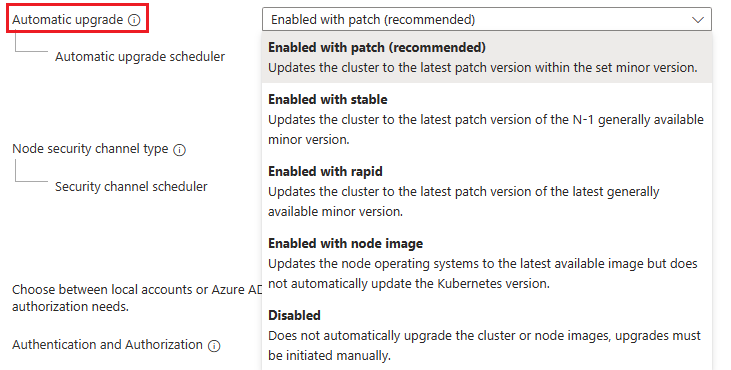
Use cluster autoupgrade with a new AKS cluster
Note
If you're creating an AKS Automatic cluster, skip these steps. The stable channel is already preconfigured for automatic upgrades. These steps apply to AKS Standard clusters only.
Set the autoupgrade channel when creating a new cluster using the az aks create command and the auto-upgrade-channel parameter.
az aks create \
  --resource-group <resource-group-name> \
  --name <cluster-name> \
  --auto-upgrade-channel stable \
  --generate-ssh-keys
Use cluster autoupgrade with an existing AKS cluster
Note
If you're using an AKS Automatic cluster, you can't change the cluster autoupgrade channel - it's preconfigured to use stable. These steps apply to AKS Standard clusters only. You can set planned maintenance windows for your AKS Automatic cluster if needed.
Set the autoupgrade channel on an existing cluster using the az aks update command with the auto-upgrade-channel parameter.
az aks update \
  --resource-group <resource-group-name> \
  --name <cluster-name> \
  --auto-upgrade-channel stable
Results:
{
  "id": "/subscriptions/aaaa6a6a-bb7b-cc8c-dd9d-eeeeee0e0e0e/resourceGroups/myResourceGroupabc123/providers/Microsoft.ContainerService/managedClusters/myAKSCluster",
  "properties": {
    "autoUpgradeChannel": "stable",
    "provisioningState": "Succeeded"
  }
}
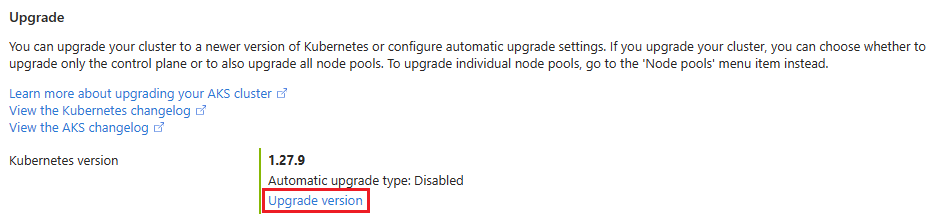
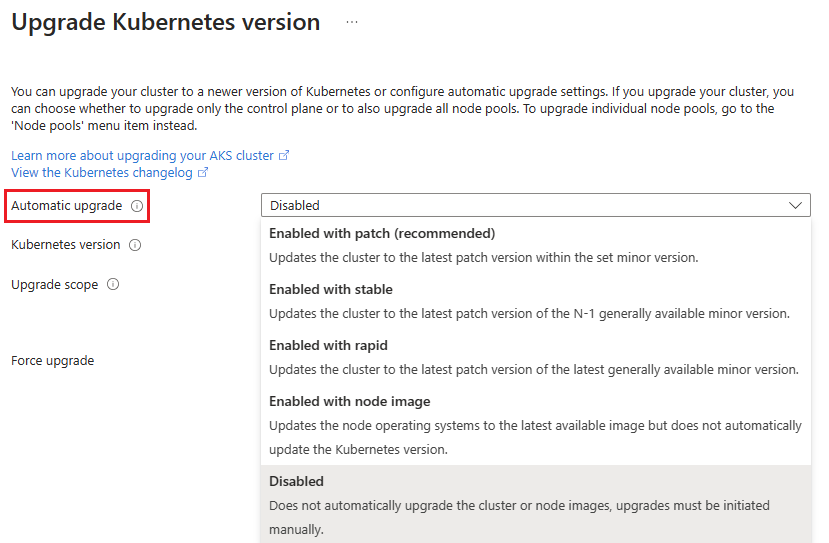
Use cluster autoupgrade with Planned Maintenance
If using Planned Maintenance and cluster autoupgrade, your upgrade starts during your specified maintenance window.
Note
To ensure proper functionality, use a maintenance window of four hours or more.
For more information on how to set a maintenance window with Planned Maintenance, see Use Planned Maintenance to schedule maintenance windows for your Azure Kubernetes Service (AKS) cluster.
Best practices for cluster autoupgrade
Use the following best practices to help maximize your success when using autoupgrade:
- To ensure your cluster is always in a supported version, such as within the N-2 rule, choose either the
stableorrapidchannels. (Note: AKS Automatic clusters usestableby default.) - If you want to get the latest patches as soon as possible, use the
patchchannel. - To automatically upgrade node images while using a different cluster upgrade channel, consider using the node image autoupgrade
NodeImagechannel. - Follow Operator best practices.
- Follow PodDisruptionBudget (PDB) best practices.
- For upgrade troubleshooting information, see the AKS troubleshooting documentation.
Is cluster autoupgrade configured differently for AKS Automatic?
Yes. AKS Automatic clusters are preconfigured to use the stable channel by default - you don't need to configure anything. This configuration provides:
- Automatic upgrades to the latest patch on minor version N-1
- Weekly upgrade cadence aligned with AKS best practices
- Fully managed by AKS with safe deployment practices
- Maintenance window control (optional)
- Production-ready defaults optimized for most workloads
AKS Standard clusters require you to select a channel based on your specific needs. To migrate from AKS Standard to AKS Automatic and benefit from these preconfigured defaults, see What is Azure Kubernetes Service (AKS) Automatic?
For a detailed discussion of upgrade best practices and other considerations, see AKS patch and upgrade guidance.
Related content
To learn more about AKS Automatic's preconfigured settings and production-ready defaults, see What is Azure Kubernetes Service (AKS) Automatic?