Note
Access to this page requires authorization. You can try signing in or changing directories.
Access to this page requires authorization. You can try changing directories.
Azure Databricks supports three primary table types (managed, external, and foreign) and two open storage formats (Delta Lake and Apache Iceberg). Choosing the right combination determines how data is stored, governed, and optimized.
A Azure Databricks table resides in a schema and contains rows of data. The default table type created in Azure Databricks is a Unity Catalog managed table.
Managed table example
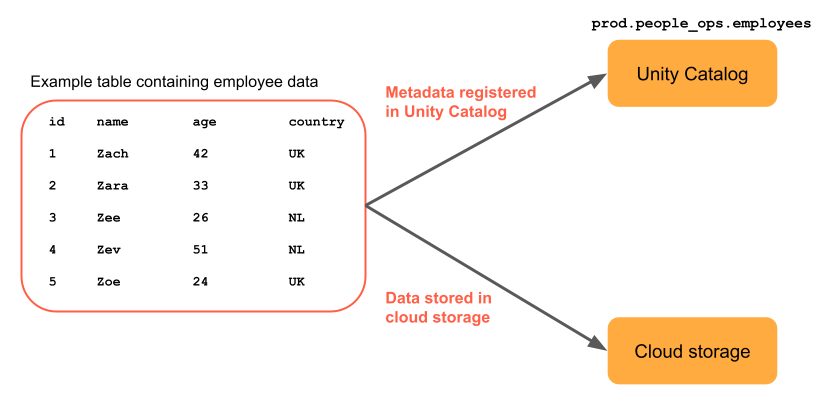
The following example shows a managed table named prod.people_ops_employees that contains data about five employees. For managed tables, the data files are stored in Unity Catalog's managed storage location in cloud storage.
Storage formats
Storage formats define how data is physically structured and tracked in object storage.
Azure Databricks supports two primary open table storage formats:
- Delta Lake is the default storage format for managed and external tables in Azure Databricks. Delta is also supported for foreign tables.
- Apache Iceberg is supported for managed and foreign tables in Azure Databricks. This format is useful when you're integrating with the Iceberg ecosystem.
Both formats add a transactional storage layer that tracks metadata and supports Atomicity, Consistency, Isolation, and Durability (ACID) compliance, time travel, and other features.
Table types
Table types in Azure Databricks define how data is owned and accessed.
Azure Databricks supports three primary table types. Table types are determined by which catalog owns and manages the underlying data files, as described in the following table:
| Table type | Managing catalog | Read/write support | Performance optimization | Storage cost optimization |
|---|---|---|---|---|
| Managed | Unity Catalog | Yes | Yes | Yes |
| Temporary | None (session-scoped managed table) | Yes | Yes | Yes |
| External | None (files only) | Yes | Manual only | Manual only |
| Foreign | An external system or catalog service | Read only | No | No |
Managed tables
For managed tables, Unity Catalog manages both the data files and the table metadata. Unity Catalog managed tables are the default when you create tables in Azure Databricks.
Databricks recommends that you use managed tables whenever you create a new table. Managed tables automatically implement performance improvements, reduce storage and compute costs, and enable access for external systems, such as Trino. See Managed tables.
External tables
External tables, sometimes called unmanaged tables, reference data stored in an external storage system such as cloud object storage. Azure Databricks registers the table metadata but doesn't manage the underlying data files. Unity Catalog supports external tables in several formats, including Delta Lake, which allows you to read them with external systems. See External tables.
Foreign tables
Foreign tables represent data stored in external systems connected to Azure Databricks through Lakehouse Federation. Foreign tables are read-only on Azure Databricks. See Foreign tables.
Temporary tables
Temporary tables are session-scoped tables that store data for the duration of a Azure Databricks session. They're useful for materializing intermediate results without creating permanent tables in your catalog. Azure Databricks automatically drops temporary tables when the session ends, and you don't need catalog or schema privileges to create them. See Temporary tables in Databricks SQL and Databricks Runtime.
Tables in Unity Catalog
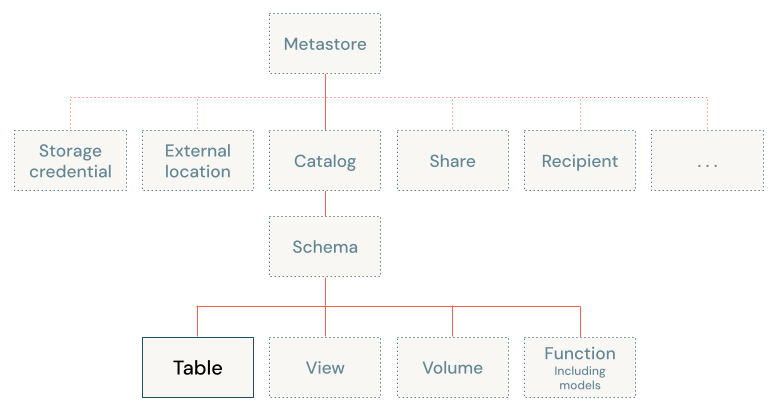
In Unity Catalog, tables exist in the third level of the three-level namespace (catalog.schema.table), as shown in the following diagram:
Basic table permissions
Most table operations require USE CATALOG and USE SCHEMA permissions on the catalog and schema containing a table.
The following table summarizes the additional permissions needed for common table operations in Unity Catalog:
| Operation | Permissions |
|---|---|
| Create a table | CREATE TABLE on the containing schema |
| Query a table | SELECT on the table |
| Update, delete, merge, or insert data to a table | SELECT and MODIFY on the table |
| Drop a table | MANAGE on the table |
| Replace a table | MANAGE on the table, CREATE TABLE on the containing schema |
For SQL syntax reference for these operations, see:
For more information about Unity Catalog permissions, see Manage privileges in Unity Catalog.