Note
Access to this page requires authorization. You can try signing in or changing directories.
Access to this page requires authorization. You can try changing directories.
Caution
The Kubernetes SIG Network and the Security Response Committee announced the upcoming retirement of the Ingress NGINX project, with maintenance ending in March 2026. There's no immediate action required today for AKS clusters using the application routing add-on with NGINX. Microsoft will provide official support for critical security patches for application routing add-on NGINX Ingress resources through November 2026.
AKS is aligning with upstream Kubernetes by moving to Gateway API as the long-term standard for ingress and L7 traffic management. We recommend you start planning your migration path based on your current setup:
- Application routing add-on users: Production workloads remain fully supported through November 2026. Migrate to the application routing Gateway API implementation for a Gateway API-based ingress traffic management experience.
- OSS NGINX users have several options:
- Migrate to the application routing add-on with NGINX to benefit from official support through November 2026 while planning your long-term Gateway API migration.
- Migrate to the application routing Gateway API implementation for a Gateway API-based ingress traffic management experience.
- Migrate to Application Gateway for Containers, which supports both Ingress API and Gateway API.
- Service mesh users: If you plan to adopt a service mesh, consider the Istio-based service mesh add-on. Use Istio Ingress today, and plan to migrate to Istio Gateway API support when it becomes GA.
Ingress in AKS is a Kubernetes resource that manages external HTTP-like traffic access to services within a cluster. An AKS ingress may provide services like load balancing, SSL termination, and name-based virtual hosting. For more information about Kubernetes Ingress, see the Kubernetes Ingress documentation.
For most production workloads, start with AKS Automatic. AKS Automatic is the recommended production-ready default in AKS and provides managed defaults for networking, scaling, security, monitoring, and upgrades. For ingress, that means you can start with the managed ingress path and only move to more specialized options when you need deeper control over topology, routing behavior, or service mesh integration.
Use AKS Standard when you need more explicit control over ingress controller selection, deployment topology, or advanced networking integration.
AKS cluster modes and ingress
AKS supports two cluster modes:
- AKS Automatic: Recommended starting point for most production workloads. It reduces operational overhead and gives you managed defaults for ingress and related networking components.
- AKS Standard: Best when you need explicit control over ingress controller hosting, service exposure, and advanced traffic management patterns.
The ingress guidance in this article applies to both modes. The main difference is who owns more of the platform defaults and how much customization you need to manage directly.
Ingress controllers
When managing application traffic, Ingress controllers provide advanced capabilities by operating at layer 7. They can route HTTP traffic to different applications based on the inbound URL, allowing for more intelligent and flexible traffic distribution rules. For example, an ingress controller can direct traffic to different microservices depending on the URL path, enhancing the efficiency and organization of your services.
On the other hand, a LoadBalancer-type Service, when created, sets up an underlying Azure load balancer resource. This load balancer works at layer 4, distributing traffic to the pods in your Service on a specified port. However, layer 4 services are unaware of the actual applications and can't implement these types of complex routing rules.
Understanding the distinction between these two approaches helps in selecting the right tool for your traffic management needs.
If you're using AKS Automatic, start with the managed ingress path first and use more specialized options only when your workload requires them. In AKS Standard, you have more flexibility to choose the ingress controller and topology that best matches your architecture.
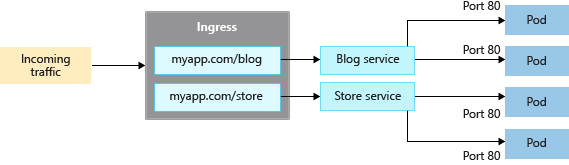
Compare ingress options
Feature comparison
The following table lists the feature differences between the different ingress controller options. For most production AKS workloads, the recommended default path is the managed ingress approach in AKS Automatic unless you specifically need custom routing, service mesh integration, or Azure-hosted ingress.
| Feature | Application Routing add-on | Application Gateway for Containers | Azure Service Mesh / Istio service mesh |
|---|---|---|---|
| Ingress/Gateway controller | NGINX ingress controller | Azure Application Gateway for Containers | Istio Ingress Gateway |
| API | Ingress API | Ingress API and Gateway API | Istio Ingress API |
| Hosting | In-cluster | Azure hosted | In-cluster |
| Scaling | Autoscaling | Autoscaling | Autoscaling |
| Load balancing | Internal/External | External | Internal/External |
| SSL termination | In-cluster | Yes: Offloading and E2E SSL | In-cluster |
| mTLS | N/A | Yes: frontend and backend | Yes |
| Static IP address | Yes | FQDN (no static IP) | N/A |
| Azure Key Vault stored SSL certificates | Yes | Yes | N/A |
| Azure DNS integration for DNS zone management | Yes | Yes | N/A |
When to use each ingress controller
The following table lists the different scenarios where you might use each ingress controller:
| Ingress option | When to use |
|---|---|
| Managed NGINX - Application Routing add-on | • In-cluster hosted, customizable, and scalable NGINX ingress controllers. • Basic load balancing and routing capabilities. • Internal and external load balancer configuration. • Static IP address configuration. • Integration with Azure Key Vault for certificate management. • Integration with Azure DNS Zones for public and private DNS management. • Supports the Ingress API. |
| Application Gateway for Containers | • Azure hosted ingress gateway. • Flexible deployment strategies managed by the controller or bring your own Application Gateway for Containers. • Advanced traffic management features such as automatic retries, availability zone resiliency, mutual authentication (mTLS) to backend target, traffic splitting / weighted round robin, and autoscaling. • Integration with Azure Key Vault for certificate management. • Integration with Azure DNS Zones for public and private DNS management. • Supports the Ingress and Gateway APIs. |
| Istio Ingress Gateway | • Based on Envoy, when using with Istio for a service mesh. • Advanced traffic management features such as rate limiting and circuit breaking. • Support for mTLS. |
Note
The Istio add-on currently doesn't support Gateway API for Istio ingress traffic.
Create an Ingress resource
The Application Routing add-on is the recommended way to configure an ingress controller in AKS, and it's the managed ingress path to start with in AKS Automatic for most workloads. The application routing add-on is a fully managed ingress controller for AKS that provides the following features:
- Easy configuration of managed NGINX ingress controllers based on Kubernetes NGINX Ingress controller.
- Integration with Azure DNS for public and private zone management.
- SSL termination with certificates stored in Azure Key Vault.
For most production workloads, this is the right default to begin with. If you need custom ingress topology, Azure-hosted ingress, or service mesh behavior, you can move to one of the other ingress options.
For more information about the Application Routing add-on, see Managed NGINX ingress with the Application Routing add-on.
Client source IP preservation
Configure your ingress controller to preserve the client source IP on requests to containers in your AKS cluster. When your ingress controller routes a client's request to a container in your AKS cluster, the original source IP of that request is unavailable to the target container. When you enable client source IP preservation, the source IP for the client is available in the request header under X-Forwarded-For.
If you're using client source IP preservation on your ingress controller, you can't use TLS pass-through. Client source IP preservation and TLS pass-through can be used with other services, such as the LoadBalancer type.
This remains an important design choice in both AKS Automatic and AKS Standard, because source IP handling affects observability, auditability, and application behavior regardless of the cluster mode.
To learn more about client source IP preservation, see How client source IP preservation works for LoadBalancer Services in AKS.