Note
Access to this page requires authorization. You can try signing in or changing directories.
Access to this page requires authorization. You can try changing directories.
This page explains where access requests can be sent and how to configure them. For an overview of request for access (RFA), including how users request access and how requests are tracked and reviewed, see Access requests.
To configure access requests with Slack, Microsoft Teams, or a different webhook, a workspace admin must first configure them as notification destinations. See Manage notification destinations.
Destination types
Destinations can be any of the following:
A redirect URL to your organization's external access request system. Only one redirect URL can be configured per object. If a URL is set, no other destinations can be set, and users are redirected to that URL instead of seeing the in-product request form.
Email addresses
Access request emails are sent from
azure-noreply@microsoft.com.Slack channels
Microsoft Teams channels
Webhook endpoints. For the request payload, see Integrate a webhook destination.
Access request destinations can be configured on the following objects in Unity Catalog: metastores, catalogs, schemas, tables, views, volumes, functions, models, storage credentials, service credentials, external locations, and connections.
Configure access request destinations for a metastore
Request for access is enabled on all metastores with requests sent to the object owner's email address by default. You can update the default destinations to include additional emails or webhooks, including Slack and Microsoft Teams channels, or route all requests through a redirect URL. Additionally, you can disable requests being sent to the object owner's email address and configure alternative destinations.
To update the default destinations for a metastore, you must be a metastore admin:
In your Azure Databricks workspace, click
 Catalog.
At the top of the Catalog pane, click the
 gear icon and select Metastore.
On the Details tab, click the edit icon next to Access requests.
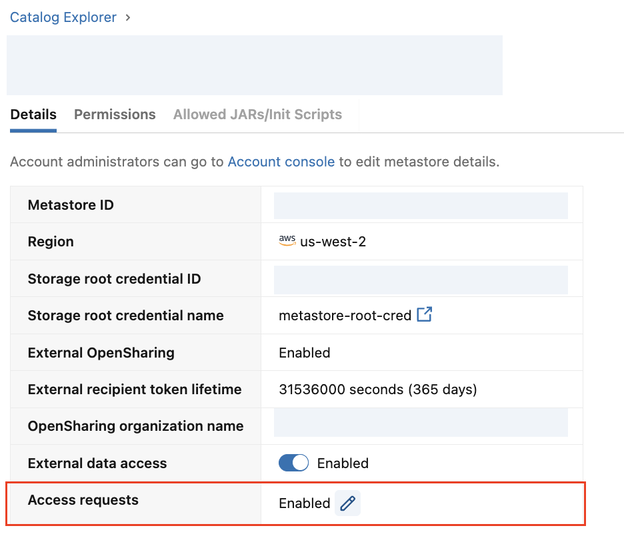
The Automatically send access requests to object owners setting is enabled by default. Uncheck this option to disable requests being sent to the object owner's email address.
Optionally, configure one of the following destination types:
- Email & Webhooks: Configure one or more email addresses and/or webhooks to receive requests. To send requests to Slack or Microsoft Teams channels, configure them as webhooks.
- Redirect URL: Configure a redirect URL to your organization's external access request system. By setting a redirect URL, no other destination types can be added.
Click Save.
Configure access request destinations on specific objects
Object owners, users with the MANAGE privilege on the object, and metastore admins can set explicit destinations on an object.
Note
You can deny MANAGE ACCESS CONTROL to prevent object owners and users with MANAGE from setting destinations. Metastore admins are not affected. See ABAC DENY policies (Beta).
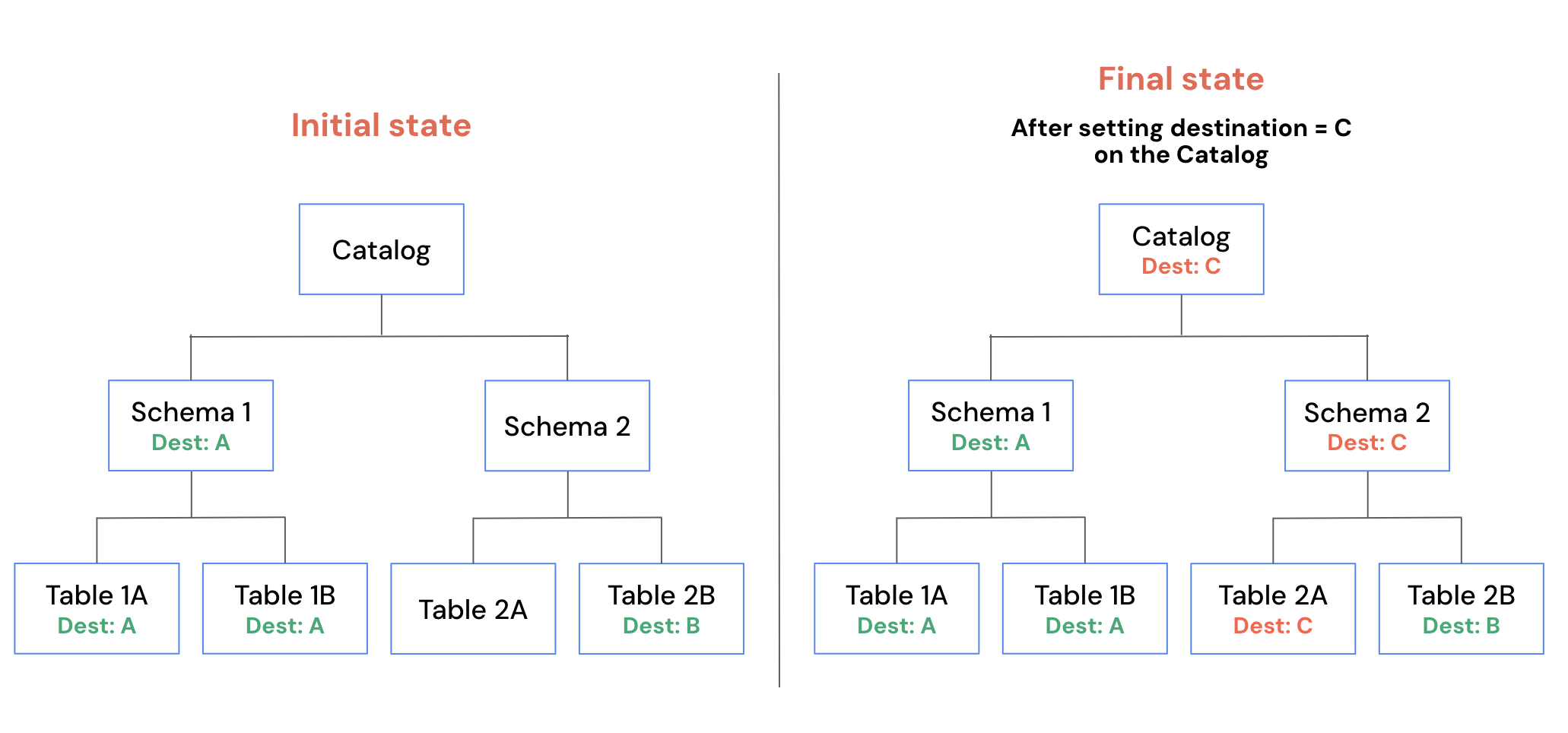
If an object has an explicit destination set, it overrides destinations inherited from parent objects. The explicit destination is also inherited by child objects that don't have their own destination set. See How destinations are resolved.
You can configure destinations using Catalog Explorer, the REST API, or Terraform.
Catalog Explorer
In your Azure Databricks workspace, click
Catalog.Select a securable object.
Click the
 kebab menu and select Manage access request destinations.
Select one or more email or external destinations, or configure a redirect URL. If a URL is selected, no other destination types can be added.
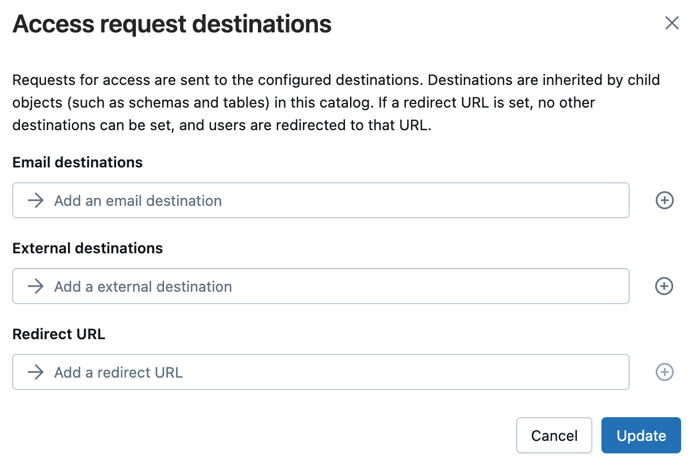
Click Update.
REST API
Use the Access Request Destinations API to set destinations on a securable. PATCH replaces the destinations on the securable. If none were previously set, it creates them.
curl -X PATCH \
  https://<workspace-url>/api/3.0/rfa/destinations \
  -H "Authorization: Bearer $DATABRICKS_TOKEN" \
  -H "Content-Type: application/json" \
  -d '{
    "destinations": [
      { "destination_id": "data-access@example.com", "destination_type": "EMAIL" }
    ],
    "securable": {
      "type": "TABLE",
      "full_name": "main.sales.orders"
    }
  }'
Terraform
Use the databricks_rfa_access_request_destinations resource.
resource "databricks_rfa_access_request_destinations" "orders" {
  destinations = [
    {
      destination_id   = "data-access@example.com"
      destination_type = "EMAIL"
    }
  ]
  securable = {
    type      = "TABLE"
    full_name = "main.sales.orders"
  }
}
Integrate a webhook destination
When a request routes to a webhook destination, Azure Databricks sends a payload like the following:
{
  "requesterName": "<first-name> <last-name>",
  "objectName": "<catalog>.<schema>.<table>",
  "objectType": "Table",
  "privileges": "SELECT",
  "principalName": "<user-name>",
  "onBehalfOf": "<user-name> (<email>)",
  "onBehalfOfType": "User Principal",
  "comment": "I need access to run queries on this table.",
  "databricksWorkspaceUrl": "https://<account>.databricks.com/explore/data/<catalog>/<schema>/<table>?o=<workspace-id>&activeTab=permissions&showGrantModal=true&requestedPrivileges=SELECT"
}
For user principals, onBehalfOf includes the email in parentheses after the name when an email is available. For group requests, onBehalfOf is the group name and onBehalfOfType is Group.
For information on how to integrate webhooks with common tools, see the following:
How destinations are resolved
Azure Databricks resolves the request destination for a given object in the following order:
- Object-level explicit destination: If the object has an explicit destination set, the request is sent there.
- Object owner's email: If the object owner is an individual user, the request is sent to their email address.
- Parent object destination: If the object owner is a group or service principal, Azure Databricks traverses up the object hierarchy and uses the first explicit destination or individual owner's email found.
- Metastore-level destination: If no destination is found in the object hierarchy, the request falls back to the metastore-level destination. If no metastore-level destination is set, users cannot request access to the object. See Configure access request destinations for a metastore.
Because of this order, a destination configured at a higher level of the Unity Catalog object hierarchy is inherited by all child objects that don't have their own destination set. An explicit destination on an object overrides destinations inherited from parent objects.