Note
Access to this page requires authorization. You can try signing in or changing directories.
Access to this page requires authorization. You can try changing directories.
With role-based access control (RBAC), users and service principals can assume a role in Azure Databricks, which replaces their active permissions with only that role's permissions for a session. Use roles to enforce exclusive access across projects, limit an agent's data access, or make workspace administrators assume a role to perform administrative tasks.
In Azure Databricks, a role is implemented as a group. You grant users, service principals, or other groups the Assume permission on that group. All members of a group automatically have the Assume permission on that group. You can also grant the Assume permission directly to non-members. For setup and enablement, see Get started with RBAC.
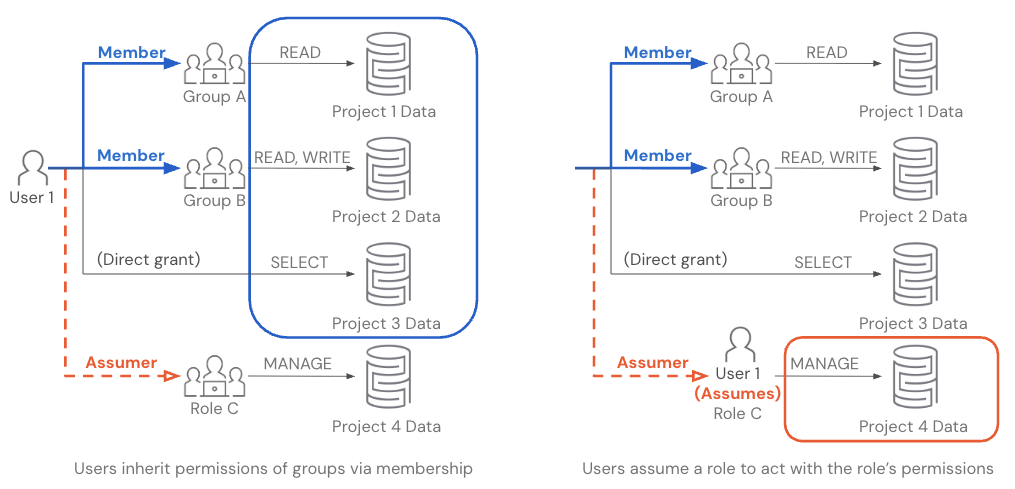
How role permissions apply
An identity has permissions granted directly to it, plus those inherited from the groups it belongs to and any ancestors of those groups. Assuming a role replaces those permissions with the role's direct and inherited permissions for the session.
When a user assumes a role:
- The assumed role's permissions replace the user's own permissions. While acting as the role, the user cannot access data or assets through their user identity.
- A user can only act as one role at a time.
- To act as a different role or return to their user identity, they must switch again. Users who aren't assigned to the workspace can't return to their user identity. See When you must assume a role to enter a workspace.
- Roles inherit permissions from their parent groups. By default, your roles also inherit permissions granted to the workspace's
userssystem group and the account'saccount userssystem group, which implicitly include all account groups. Permissions granted tousersapply to workspace objects and compute. Unity Catalog privileges can be granted toaccount users, but not tousers. To manage these grants, see Access control lists and Show, grant, and revoke privileges. - Audit events distinguish the initiating identity (
identity_metadata.run_by) from the identity used for authorization (identity_metadata.run_as). For interactive requests, these identify the user and the role respectively. See Verify audit attribution. - The role owns Unity Catalog securable objects and workspace objects that a user creates while acting as the role, such as tables, notebooks, SQL queries, SQL warehouses, and jobs.
- Genie One (at the workspace level), Genie Code, and Genie Agents support RBAC. While a user acts as a role, these features can access only the data and assets that the role can access. The role owns any Genie chats that the user creates while acting as the role.
Manage roles
Create roles, manage the Assume permission, and choose how users and workloads act as a role.
| Topic | Description |
|---|---|
| Get started | Create roles, configure access, and manage the Assume permission. |
| Switch roles | Assume a role using the workspace UI, dedicated compute, the Databricks CLI, the API, or third-party BI tools. |
| Use with ABAC | Understand how attribute-based access control (ABAC) policies evaluate the active role. |
Manage sharing
Control whether users acting as a role can share assets that the role owns.
| Topic | Description |
|---|---|
| Workspace asset sharing controls | Restrict selected roles from sharing workspace assets they own. |
Tutorials
Follow a complete setup and verification procedure for your access requirements.
| Tutorial | Description |
|---|---|
| Model exclusive access | Keep two clinical trials' data separate by requiring researchers to assume the role for each trial. |
| Require a role for workspace access | Require selected users to assume a role to enter a workspace. |
| Scope an AI agent's access | Limit an agent to a role's permissions using a role-scoped OAuth token. |
| Use a role for administrative tasks | Separate everyday work from administration using a workspace admin role. |
Limitations
Check feature support and known issues before using a role with your workloads.
| Topic | Description |
|---|---|
| Limitations | Review unsupported features, partial support, and workarounds when acting as a role. |