Note
Access to this page requires authorization. You can try signing in or changing directories.
Access to this page requires authorization. You can try changing directories.
Applies to: ✔️ Fleet Manager with hub cluster
Azure Kubernetes Fleet Manager can be used to set up layer 4 multi-cluster load balancing across workloads deployed across member clusters.
Important
Azure Kubernetes Fleet Manager preview features are available on a self-service, opt-in basis. Previews are provided "as is" and "as available," and they're excluded from the service-level agreements and limited warranty. Azure Kubernetes Fleet Manager previews are partially covered by customer support on a best-effort basis. As such, these features aren't meant for production use.
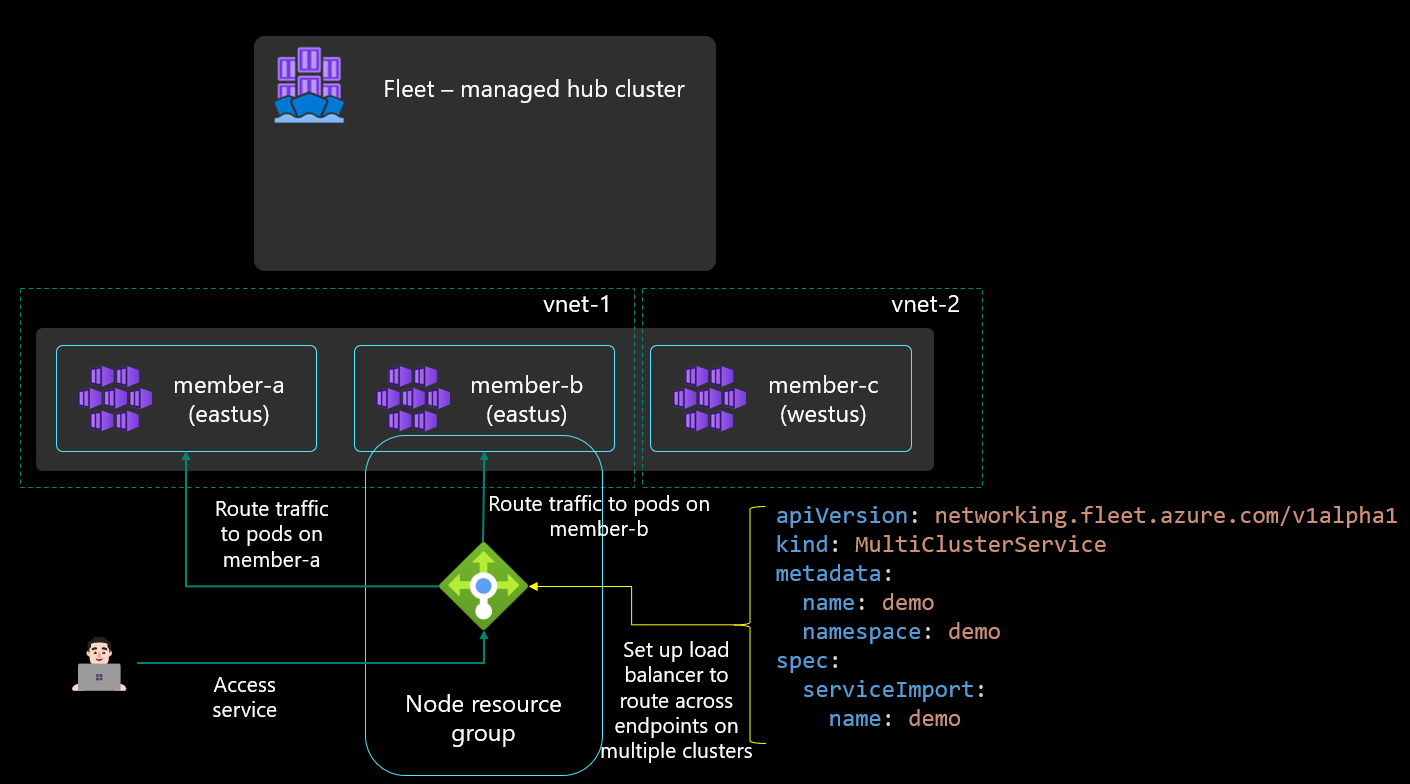
For multi-cluster load balancing, Fleet Manager requires target clusters to be using Azure CNI networking. Azure CNI networking enables pod IPs to be directly addressable on the Azure virtual network so that they can be routed to from the Azure Load Balancer.
The ServiceExport itself can be distributed from the Fleet Manager hub cluster to one or more member clusters using the Fleet Manager's resource placement feature, or it can be created directly on the member cluster. Once the ServiceExport is created, it results in a ServiceImport being created on the Fleet Manager hub cluster, and all other member clusters to build the awareness of the service.
The user can then create a MultiClusterService custom resource to indicate that they want to set up layer 4 multi-cluster load balancing. This MultiClusterService configures the Azure Load Balancer in each member cluster to distribute incoming layer 4 traffic across the service’s endpoints in multiple member clusters.