Note
Access to this page requires authorization. You can try signing in or changing directories.
Access to this page requires authorization. You can try changing directories.
In Azure AI Search, an index alias is a secondary name for a search index. You can create an alias that maps to a search index and substitute the alias name in places where you'd otherwise reference an index name. This feature provides flexibility if you need to change the index to which your application points. Instead of updating references to the index name in your production code, you can simply update the alias mapping.
You can create and manage aliases on a search service via HTTP requests (POST, GET, PUT, or DELETE) against a given alias resource. Aliases are service-level resources that are maintained independently from search indexes. After you create a search index, you can create an alias that maps to it.
Before using an alias, your application sends requests directly to hotel-samples-index.
POST /indexes/hotel-samples-index/docs/search?api-version=2026-04-01
{
    "search": "pool spa +airport",
    "select": "HotelId, HotelName, Category, Description",
    "count": true
}
After using an alias, your application sends requests to my-alias, which maps to hotel-samples-index.
POST /indexes/my-alias/docs/search?api-version=2026-04-01
{
    "search": "pool spa +airport",
    "select": "HotelId, HotelName, Category, Description",
    "count": true
}
Prerequisites
- An Azure AI Search service in any region and pricing tier.
- An existing search index to which you want to map the alias.
- Permissions to create an alias:
- For key-based authentication, an admin API key for your search service.
- For role-based authentication, the Search Service Contributor role.
Limitations and considerations
- You can only use an alias with document operations or to get and update an index definition.
- You can't use an alias to delete an index or test text tokenization.
- You can't reference an alias as the
targetIndexNameon an indexer or knowledge source.
Create an index alias
Creating an alias establishes a mapping between an alias name and an index name. If the request is successful, you can use the alias for indexing, querying, and other operations.
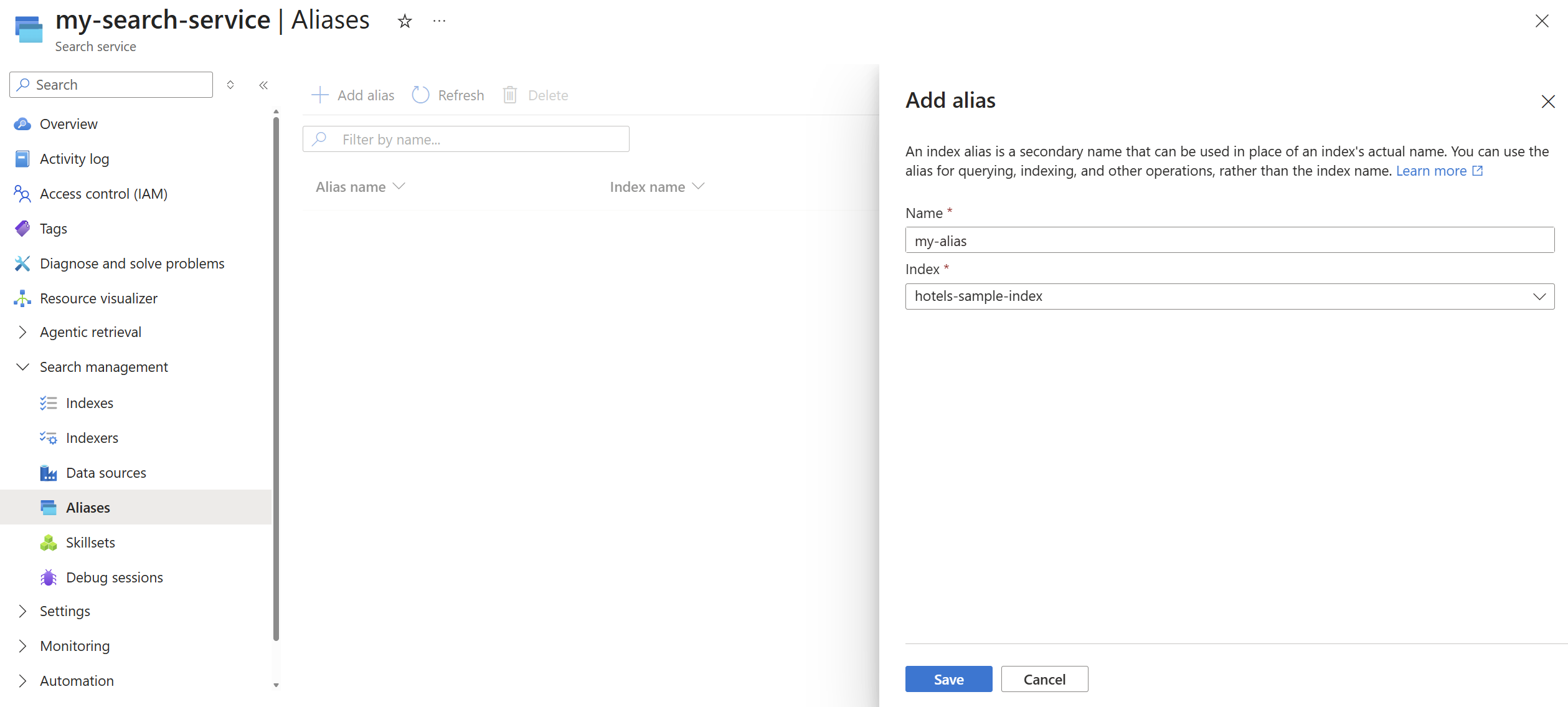
You can create an alias by using the REST API, Azure SDKs, or the Azure portal. An alias consists of the name of the alias and the name of the search index to which the alias maps. You can specify only one index name in the indexes array.
The maximum number of aliases that you can create varies by pricing tier. For more information, see Index alias limits.
Use the latest stable version of Aliases - Create (REST API) to create an index alias.
POST /aliases?api-version=2026-04-01
{
    "name": "my-alias",
    "indexes": ["hotel-samples-index"]
}
Send requests to an index alias
You can use an alias for all document operations, including querying, indexing, suggestions, and autocomplete.
The following query sends the request to my-alias, which is mapped to an actual index on your search service.
POST /indexes/my-alias/docs/search?api-version=2026-04-01
{
    "search": "pool spa +airport",
    "searchMode": "any",
    "queryType": "simple",
    "select": "HotelId, HotelName, Category, Description",
    "count": true
}
Get an alias definition
Use Aliases - List (REST API) to return a list of existing alias objects by name.
GET /aliases?api-version=2026-04-01&$select=name
Use Aliases - Get (REST API) to return the definition of a specific alias.
GET /aliases/my-alias?api-version=2026-04-01
Update an alias
The most common update to an alias is changing the index name when the underlying index is replaced with a newer version.
Use Aliases - Create or Update (REST API) to update an alias. The following example shows how to update my-alias to point to hotel-samples-index2 instead of hotel-samples-index.
PUT /aliases/my-alias?api-version=2026-04-01
{
    "name": "my-alias",
    "indexes": ["hotel-samples-index2"]
}
An update to an alias might take up to 10 seconds to propagate through the system, so wait at least 10 seconds before you delete the index to which the alias previously mapped.
If you attempt to delete an index that's currently mapped to an alias, the operation fails with 400 (Bad Request) and an error message stating that the alias(es) that's mapped to that index must be deleted or mapped to a different index before the index can be deleted.