Note
Access to this page requires authorization. You can try signing in or changing directories.
Access to this page requires authorization. You can try changing directories.
This article shows you how to use SynapseML to identify the best combination of hyperparameters for chosen classifiers in Microsoft Fabric. You perform distributed randomized grid search hyperparameter tuning to build a model that classifies breast cancer tumors as malignant or benign.
Hyperparameter tuning is the process of finding optimal configuration values (hyperparameters) for a machine learning algorithm that aren't learned from the training data. Examples include learning rate, number of trees, and regularization strength.
In this tutorial, you learn how to:
- Set up dependencies and load the breast cancer dataset.
- Define classifiers and a hyperparameter search space with SynapseML.
- Run distributed randomized grid search with cross-validation.
- Evaluate the best model with classification metrics.
Prerequisites
Get a Microsoft Fabric subscription. Or, sign up for a free Microsoft Fabric trial.
Sign in to Microsoft Fabric.
Switch to Fabric by using the experience switcher on the lower-left side of your home page.
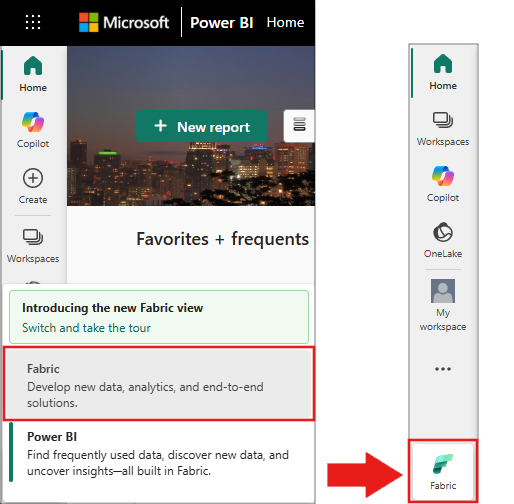
- Create a new notebook.
- Attach your notebook to a lakehouse. On the left side of your notebook, select Add to add an existing lakehouse or create a new one.
- A Fabric capacity of F4 or higher is recommended. Smaller capacities might encounter memory errors during hyperparameter tuning.
Note
SynapseML, PySpark, and pandas come preinstalled in Fabric notebooks. You don't need to install any packages.
Set up the dependencies
Import pandas and set up a Spark session:
import pandas as pd
from pyspark.sql import SparkSession

# Bootstrap Spark Session
spark = SparkSession.builder.getOrCreate()
Verify that the Spark session is active:
print(f"Spark version: {spark.version}")
# Expected output: Spark version: 3.x.x (for example, 3.4.1)
Load and explore the data
Read the Wisconsin Breast Cancer dataset from public blob storage. The dataset contains 10 numeric features derived from digitized images of fine needle aspirate (FNA) biopsies, with a binary Label column (0 = benign, 1 = malignant).
data = spark.read.parquet(
    "wasbs://publicwasb@mmlspark.blob.core.windows.net/BreastCancer.parquet"
).cache()
tune, test = data.randomSplit([0.80, 0.20])
tune.limit(10).toPandas()
Verify that the data loaded correctly:
print(f"Total rows: {data.count()}, Columns: {len(data.columns)}")
print(f"Tuning set: {tune.count()} rows, Test set: {test.count()} rows")
print(f"Label distribution:\n{data.groupBy('Label').count().toPandas()}")
# Expected output:
# Total rows: 683, Columns: 10
# Tuning set: 540-550 rows, Test set: 130-140 rows
# Label distribution: Label 0 (benign) 444, Label 1 (malignant) 239
Define the classifiers
Define three classifiers and wrap them in SynapseML's TrainClassifier. The TrainClassifier wrapper handles feature vectorization and label indexing automatically.
from synapse.ml.train import TrainClassifier
from pyspark.ml.classification import (
    LogisticRegression,
    RandomForestClassifier,
    GBTClassifier,
)

logReg = LogisticRegression()
randForest = RandomForestClassifier()
gbt = GBTClassifier()
smlmodels = [logReg, randForest, gbt]
mmlmodels = [TrainClassifier(model=model, labelCol="Label") for model in smlmodels]
Verify that the models are defined:
print(f"Models defined: {len(mmlmodels)}")
for i, model in enumerate(smlmodels):
    print(f"  {i+1}. {type(model).__name__}")
# Expected output:
# Models defined: 3
#   1. LogisticRegression
#   2. RandomForestClassifier
#   3. GBTClassifier
Build the hyperparameter search space
Import the SynapseML AutoML classes from synapse.ml.automl. Specify the hyperparameters by using HyperparamBuilder. Use DiscreteHyperParam for categorical choices and RangeHyperParam for continuous ranges. TuneHyperparameters randomly samples values from a uniform distribution.
from synapse.ml.automl import (
    HyperparamBuilder,
    RangeHyperParam,
    DiscreteHyperParam,
    RandomSpace,
)

paramBuilder = (
    HyperparamBuilder()
    .addHyperparam(logReg, logReg.regParam, RangeHyperParam(0.1, 0.3))
    .addHyperparam(randForest, randForest.numTrees, DiscreteHyperParam([5, 10]))
    .addHyperparam(randForest, randForest.maxDepth, DiscreteHyperParam([3, 5]))
    .addHyperparam(gbt, gbt.maxBins, RangeHyperParam(8, 16))
    .addHyperparam(gbt, gbt.maxDepth, DiscreteHyperParam([3, 5]))
)
searchSpace = paramBuilder.build()
# The search space is a list of params to tuples of estimator and hyperparam
print(searchSpace)
randomSpace = RandomSpace(searchSpace)
Verify the search space:
print(f"Hyperparameter entries: {len(searchSpace)}")
if len(searchSpace) == 5:
    print("✓ Search space has 5 entries as expected")
else:
    print(f"⚠ Expected 5 entries but found {len(searchSpace)}")
# Expected output: Hyperparameter entries: 5
Run hyperparameter tuning
Run TuneHyperparameters with two-fold cross-validation to find the best model. The numRuns parameter controls how many random configurations to evaluate (set to 6 = 3 models x 2 runs each).
from synapse.ml.automl import TuneHyperparameters

bestModel = TuneHyperparameters(
    evaluationMetric="accuracy",
    models=mmlmodels,
    numFolds=2,
    numRuns=len(mmlmodels) * 2,
    parallelism=1,
    paramSpace=randomSpace.space(),
    seed=0,
).fit(tune)
Tip
Increase parallelism to run multiple model evaluations simultaneously on larger clusters. Increase numRuns and numFolds for a more thorough search at the cost of longer runtime.
Verify that training completed:
print(f"Best model metric (accuracy): {bestModel.getBestMetric():.4f}")
if bestModel.getBestMetric() > 0.5:
    print("✓ Model performs better than random")
else:
    print("⚠ Model accuracy is below 0.5. Try a different seed or increase numRuns.")
# Expected output: Best model metric (accuracy): 0.92-0.97
Evaluate the best model
View the parameters of the best model and retrieve the underlying pipeline:
print("Best model info:")
print(bestModel.getBestModelInfo())
print("\nBest model pipeline:")
print(bestModel.getBestModel())
Score against the test set, and view the classification metrics:
from synapse.ml.train import ComputeModelStatistics

prediction = bestModel.transform(test)
metrics = ComputeModelStatistics().transform(prediction)
metrics.limit(10).toPandas()
Verify evaluation results:
metrics_df = metrics.toPandas()
print(f"Evaluation metrics columns: {list(metrics_df.columns)}")
print(f"Accuracy: {metrics_df['accuracy'].iloc[0]:.4f}")
print(f"Precision: {metrics_df['precision'].iloc[0]:.4f}")
print(f"Recall: {metrics_df['recall'].iloc[0]:.4f}")
print(f"AUC: {metrics_df['AUC'].iloc[0]:.4f}")
# Expected output: accuracy 0.92-0.97, precision/recall/AUC in similar range
if metrics_df['accuracy'].iloc[0] > 0.80:
    print("✓ Accuracy exceeds 80% as expected")
else:
    print("⚠ Accuracy is below 80%. Try a different seed or increase numRuns.")
Clean up
The cached data is released automatically when the Spark session ends.
If you created a notebook solely for this tutorial, delete it from your workspace:
- Go to your workspace in the Fabric portal.
- Select the ... (ellipsis) next to the notebook name.
- Select Delete.
Troubleshoot
| Issue | Cause | Resolution |
|---|---|---|
Py4JJavaError: ... java.io.IOException when reading parquet |
Network access to mmlspark.blob.core.windows.net is blocked |
Verify your workspace firewall rules allow outbound HTTPS to Azure Blob Storage. Alternatively, download the dataset and upload to your lakehouse. |
TuneHyperparameters runs for a long time |
Large numRuns or numFolds with parallelism=1 |
Reduce numRuns, reduce numFolds, or increase parallelism to use more cluster cores. |
| Low accuracy (< 0.80) | Random seed or data split produced an unfavorable configuration | Try a different seed value, increase numRuns for broader search, or add more hyperparameter ranges. |
IllegalArgumentException: Column Label does not exist |
Dataset schema mismatch or wrong labelCol value |
Verify column names with data.printSchema(). The label column must match the labelCol parameter in TrainClassifier. |
OutOfMemoryError during training |
Dataset cached in memory exceeds available Spark driver/executor memory | Remove .cache() or increase the Spark cluster capacity in your Fabric workspace settings. |