Note
Access to this page requires authorization. You can try signing in or changing directories.
Access to this page requires authorization. You can try changing directories.
ONNX (Open Neural Network Exchange) provides a portable, hardware-optimized runtime for machine learning models. By converting a model to ONNX format, you can run batch inference on Spark with lower latency and without depending on the original training framework at prediction time.
In this article, you train a LightGBM model with SynapseML, convert it to ONNX format, and then use the ONNX model to perform inference on Spark in Microsoft Fabric.
Prerequisites
Get a Microsoft Fabric subscription. Or, sign up for a free Microsoft Fabric trial.
Sign in to Microsoft Fabric.
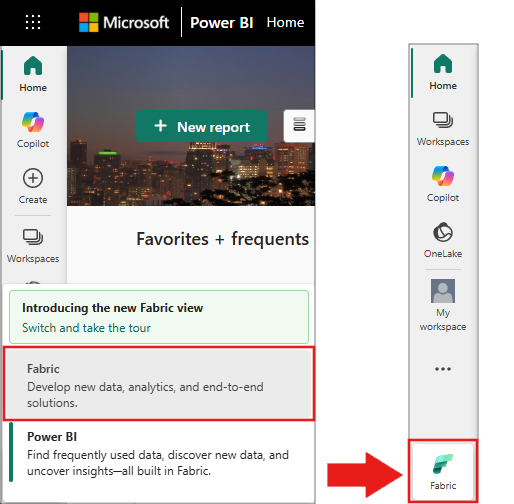
Switch to Fabric by using the experience switcher on the lower-left side of your home page.
- Attach your notebook to a lakehouse. On the left side of your notebook, select Add to add an existing lakehouse or create one.
- Fabric Runtime 1.2 or later.
Install required packages
Run the following cell in your notebook to install the required packages. The onnxmltools package isn't pre-installed in the Fabric runtime.
%pip install onnxmltools --quiet
After the install completes, verify the packages are available:
import onnxmltools
import lightgbm
print(f"onnxmltools version: {onnxmltools.__version__}")
print(f"lightgbm version: {lightgbm.__version__}")
Note
The lightgbm package is pre-installed in Fabric Runtime 1.2 and later. You only need to install onnxmltools.
Load the example data
Load the bankruptcy prediction dataset from public Azure Blob Storage:
df = (
    spark.read.format("csv")
    .option("header", True)
    .option("inferSchema", True)
    .load(
        "wasbs://publicwasb@mmlspark.blob.core.windows.net/company_bankruptcy_prediction_data.csv"
    )
)

print(f"Rows: {df.count()}, Columns: {len(df.columns)}")
display(df.limit(5))
The displayed table includes columns such as:
| Bankrupt? | Net Income Flag | Equity to Liability |
|---|---|---|
| 0 | 1.0 | 0.0165 |
| 0 | 1.0 | 0.0208 |
Train a LightGBM model
Use the VectorAssembler to combine feature columns, then train a LightGBMClassifier:
from pyspark.ml.feature import VectorAssembler
from synapse.ml.lightgbm import LightGBMClassifier

feature_cols = df.columns[1:]
featurizer = VectorAssembler(inputCols=feature_cols, outputCol="features")

train_data = featurizer.transform(df)["Bankrupt?", "features"]

model = (
    LightGBMClassifier(featuresCol="features", labelCol="Bankrupt?")
    .setDataTransferMode("bulk")
    .setEarlyStoppingRound(300)
    .setLambdaL1(0.5)
    .setNumIterations(1000)
    .setNumThreads(-1)
    .setMaxDeltaStep(0.5)
    .setNumLeaves(31)
    .setMaxDepth(-1)
    .setBaggingFraction(0.7)
    .setFeatureFraction(0.7)
    .setBaggingFreq(2)
    .setObjective("binary")
    .setIsUnbalance(True)
    .setMinSumHessianInLeaf(20)
    .setMinGainToSplit(0.01)
)

model = model.fit(train_data)
Verify the model trained successfully:
print(f"Model type: {type(model).__name__}")
print(f"Number of features: {len(feature_cols)}")
Convert the model to ONNX format
Export the trained model to a LightGBM booster, then convert it to ONNX:
import lightgbm as lgb
from typing import Union
from lightgbm import Booster, LGBMClassifier
from onnxmltools.convert import convert_lightgbm
from onnxmltools.convert.common.data_types import FloatTensorType


def convert_to_onnx(lgbm_model: Union[LGBMClassifier, Booster], input_size: int) -> bytes:
    initial_types = [("input", FloatTensorType([-1, input_size]))]
    onnx_model = convert_lightgbm(
        lgbm_model, initial_types=initial_types, target_opset=13
    )
    return onnx_model.SerializeToString()


booster_model_str = model.getLightGBMBooster().modelStr().get()
booster = lgb.Booster(model_str=booster_model_str)
model_payload_ml = convert_to_onnx(booster, len(feature_cols))
Verify the ONNX conversion succeeded:
print(f"ONNX model payload size: {len(model_payload_ml)} bytes")
assert len(model_payload_ml) > 0, "ONNX conversion failed: empty payload"
The output shows the ONNX model payload size in bytes (typically around 800,000 bytes).
Important
Use from onnxmltools.convert.common.data_types import FloatTensorType for the type definition. The older import path from onnxconverter_common.data_types import FloatTensorType is incompatible with current versions of onnxmltools.
Load and configure the ONNX model
Load the ONNX payload into a SynapseML ONNXModel and inspect the model inputs and outputs:
from synapse.ml.onnx import ONNXModel

onnx_ml = ONNXModel().setModelPayload(model_payload_ml)

print("Model inputs:" + str(onnx_ml.getModelInputs()))
print("Model outputs:" + str(onnx_ml.getModelOutputs()))
The output lists the model's input and output nodes.
Configure the model by mapping input and output columns. The FeedDict maps ONNX model input names to DataFrame column names. The FetchDict maps desired output column names to ONNX model output names:
onnx_ml = (
    onnx_ml.setDeviceType("CPU")
    .setFeedDict({"input": "features"})
    .setFetchDict({"probability": "probabilities", "prediction": "label"})
    .setMiniBatchSize(5000)
)
Run inference
Create test data and transform it through the ONNX model:
from pyspark.ml.feature import VectorAssembler
import pandas as pd
import numpy as np

n = 10000
m = 95
test = np.random.rand(n, m)
testPdf = pd.DataFrame(test)
cols = list(map(str, testPdf.columns))
testDf = spark.createDataFrame(testPdf)
testDf = testDf.repartition(4)
testDf = (
    VectorAssembler()
    .setInputCols(cols)
    .setOutputCol("features")
    .transform(testDf)
    .drop(*cols)
    .cache()
)

display(onnx_ml.transform(testDf))
Note
Because the test data is randomly generated, the prediction values don't represent real-world results. This section demonstrates that the ONNX model runs correctly on Spark.
The output should contain columns for features, prediction, and probability:
| Features | prediction | probability |
|---|---|---|
{"type":1,"values":[0.105... |
0 | {"0":0.835... |
{"type":1,"values":[0.814... |
0 | {"0":0.658... |
Verify the inference produced results:
results = onnx_ml.transform(testDf)
print(f"Result count: {results.count()}")
print(f"Output columns: {results.columns}")
assert "prediction" in results.columns, "Missing prediction column"
assert "probability" in results.columns, "Missing probability column"
The output confirms that all test rows were scored and the result DataFrame contains the features, prediction, and probability columns.
Troubleshooting
| Issue | Cause | Resolution |
|---|---|---|
ModuleNotFoundError: No module named 'onnxmltools' |
Package isn't pre-installed in Fabric runtime. | Run %pip install onnxmltools --quiet and restart the Python kernel. |
RuntimeError: Operator LgbmClassifier got an input with a wrong type |
Wrong import path for FloatTensorType. |
Use from onnxmltools.convert.common.data_types import FloatTensorType instead of importing from onnxconverter_common.data_types. |
ModuleNotFoundError: No module named 'onnx.mapping' |
Incompatible onnxmltools version 1.7.0 or earlier with the current onnx package. |
Run %pip install onnxmltools --upgrade --quiet to install a compatible version. |
ONNX conversion returns empty payload |
Booster model string extraction failed. | Verify that model.getLightGBMBooster().modelStr().get() returns a non-empty string before conversion. |
Feature (Column_) appears more than one time during model.fit() |
Dataset columns with special characters produce duplicate names after LightGBM sanitization. | Add .setDataTransferMode("bulk") to the LightGBMClassifier configuration. Bulk mode uses Apache Arrow and avoids the column name sanitization issue. |
AssertionError on SparkContext in ONNXModel() |
Spark session isn't initialized. | Run this code in a Fabric notebook with a lakehouse attached. The spark variable is pre-initialized by the runtime. |
Clean up resources
If you no longer need the cached test DataFrame, unpersist it to free cluster memory:
testDf.unpersist()