Platform logs are logs generated by Azure platform services and resources. Platform telemetry data collection rules (DCRs) let you send platform logs from supported Azure resources to a Log Analytics workspace, storage account, or Event Hubs. This article shows you how to create a DCR that exports platform logs.
Note
Platform logs in Azure Monitor are also referred to as resource logs.
Compare to diagnostic settings
Before this feature, you could only export platform logs by using diagnostic settings. Diagnostic settings are still required for resource types that don't yet support DCRs.
Platform telemetry DCRs provide several benefits over diagnostic settings:
- DCRs are more flexible and scalable than diagnostic settings. Use a single DCR with multiple resources, while a separate diagnostic setting is required for each resource.
- Use consistent ARM, Bicep, and Terraform deployment patterns across resource types.
- Use managed identity for keyless authentication to storage accounts and Event Hubs.
Prerequisites
Before you create a platform telemetry DCR, make sure that you have the following:
| Tool |
Requirement |
| Azure portal |
No extra tooling required. |
| Azure CLI |
Azure CLI 2.61 or later. |
| Azure PowerShell |
Az.Monitor 5.2 or later. |
| REST API |
Bearer token for ARM authentication. |
| Bicep or ARM templates |
Azure CLI or Azure PowerShell for deployment. |
Export destinations
A platform telemetry DCR supports one destination type. To send data to multiple destination types, create separate DCRs.
| Destination type |
Region requirement |
Managed identity |
Details |
| Log Analytics workspace |
DCR and workspace must be in the same region. |
Not required |
Data is stored in resource-specific log tables. |
| Storage account |
DCR, storage account, and monitored resources must be in the same region. |
Required (Storage Blob Data Contributor) |
Data is written as JSON blobs in a container. |
| Event Hubs |
DCR, Event Hubs namespace, and monitored resources must be in the same region. |
Required (Azure Event Hubs Data Sender) |
Data is streamed as JSON events. |
Note
It may take up to 30 minutes for logs to show up in the destination after the initial setup, and for the data to appear in the destination.
Create a data collection rule
Use one of the following methods to create a platform telemetry DCR to collect platform logs. After you create the DCR, grant permissions to the managed identity for storage account and Event Hubs destinations, and then create a data collection rule association.
Note
For storage account and Event Hubs destinations, the DCR, destination, and monitored resources must all be in the same region.
Create a data collection rule using the Azure portal
- On the Monitor menu in the Azure portal, select Data Collection Rules and then Create.
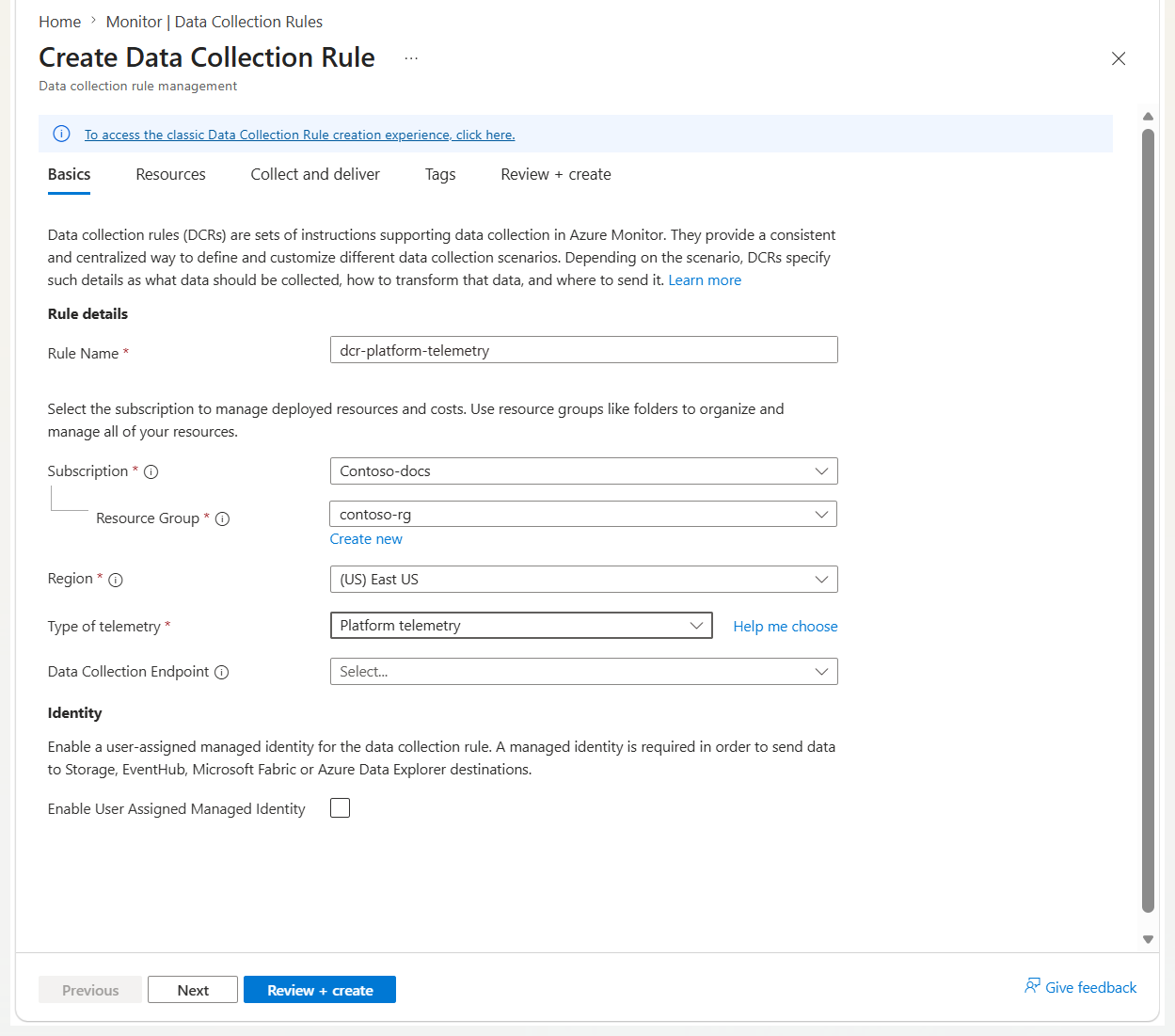
- On the Create Data Collection Rule page, enter a rule name, select a Subscription, Resource group, and Region for the DCR.
- Select PlatformTelemetry for the Type of telemetry and Enable Managed Identity if you want to send logs to a Storage Account or Event Hubs.
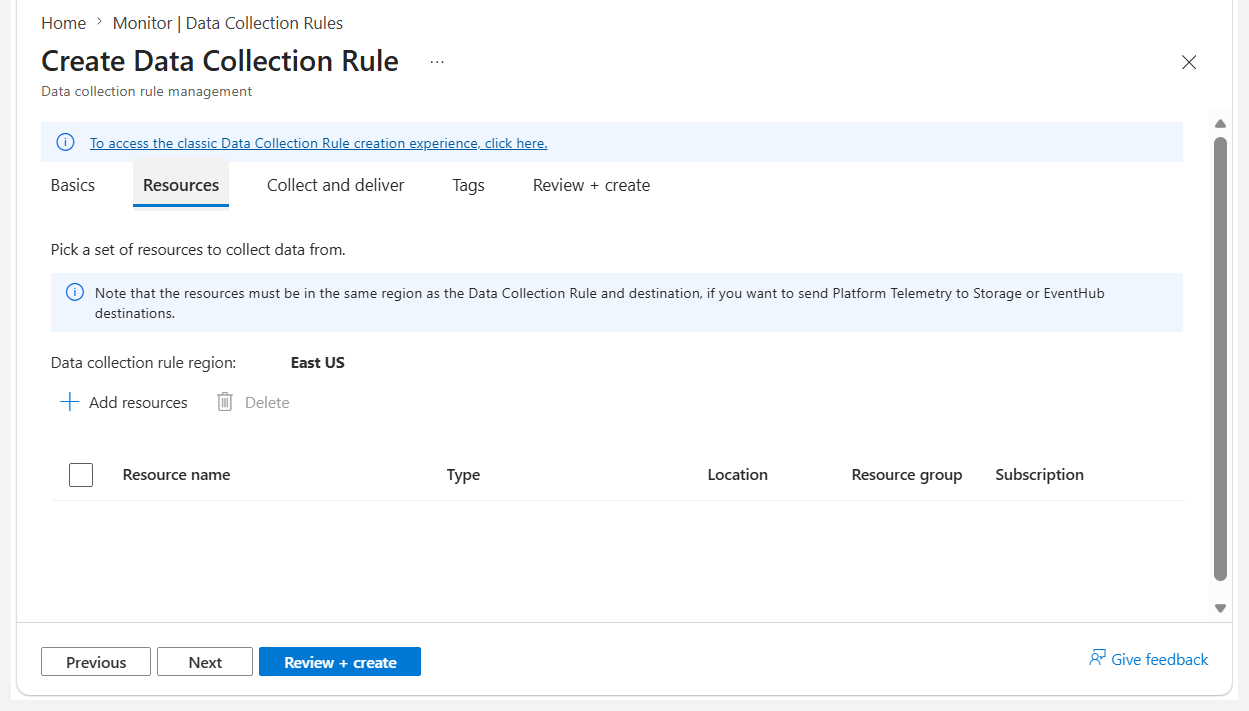
- On the Resources page, select Add resources to add the resources you want to collect logs from.
- Select Next to move to the Collect and deliver tab.
- Select Add new datasource.
- The resource type of the resource specified in the previous step is automatically selected. Add more resource types if you want to use this rule to collect logs from multiple resource types in the future. Select the Actions for a resource type if you want to remove some of the logs collected for it. By default, all available logs for the resource are collected.
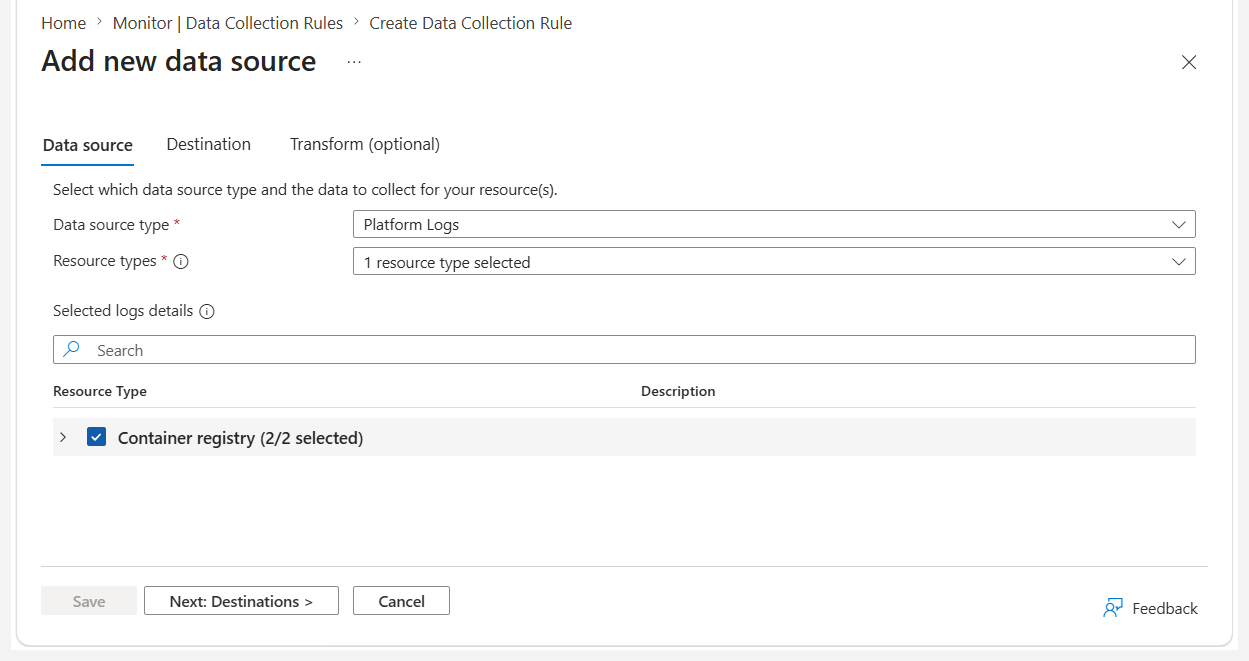
- Select Next Destinations to move to the Destinations tab.
- Select Add destination and then the Destination type that you want to add. The required fields change based on the destination type you select.
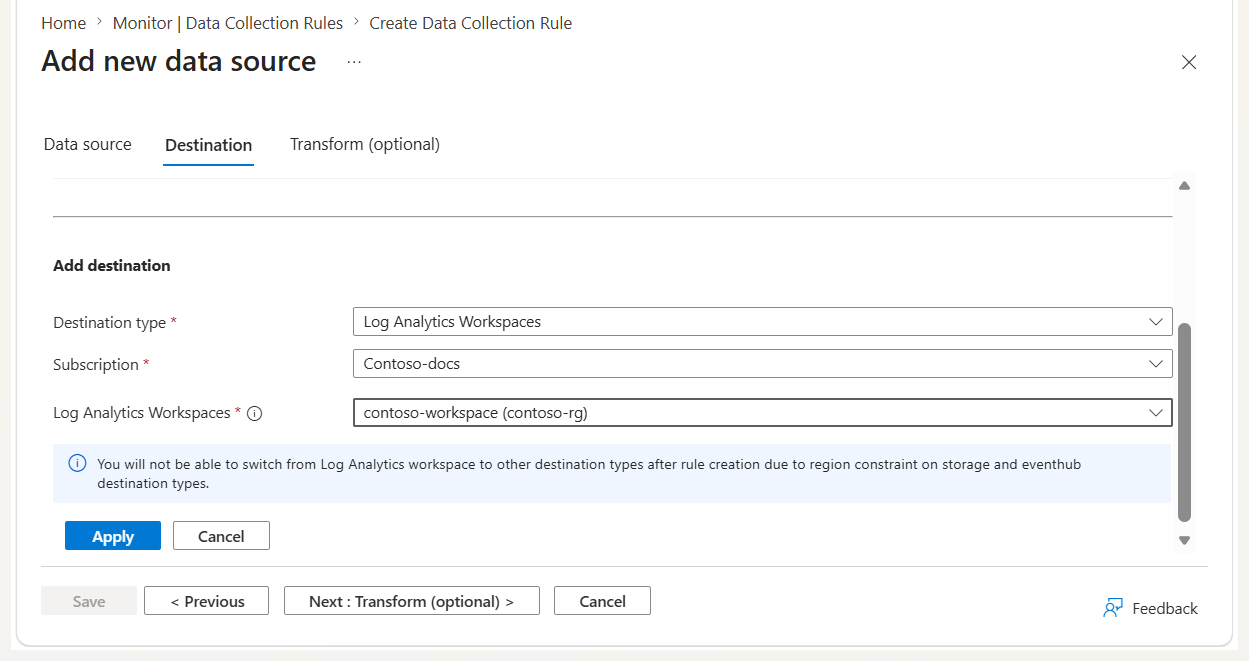
- Select Save , then select Review + create.
Log Analytics workspace destination
Create a JSON file named dcr-definition.json with the DCR specification. The following example exports all logs from Azure Database for MySQL flexible servers and NGINX deployments to a Log Analytics workspace:
Logs Analytics workspace DCR
{
  "properties": {
    "dataSources": {
      "platformTelemetry": [
        {
          "streams": [
            "microsoft.dbformysql/flexibleservers:Logs-Group-All",
            "nginx.nginxplus/nginxdeployments:Logs-Group-All"
          ],
          "name": "myPlatformTelemetryDataSource"
        }
      ]
    },
    "destinations": {
      "logAnalytics": [
        {
          "workspaceResourceId": "<log-analytics-workspace-resource-id>",
          "name": "myLogAnalyticsDestination"
        }
      ]
    },
    "dataFlows": [
      {
        "streams": [
          "microsoft.dbformysql/flexibleservers:Logs-Group-All",
          "nginx.nginxplus/nginxdeployments:Logs-Group-All"
        ],
        "destinations": ["myLogAnalyticsDestination"]
      }
    ]
  }
}
Storage account DCR
{
  "properties": {
    "dataSources": {
      "platformTelemetry": [
        {
          "streams": [
            "microsoft.dbformysql/flexibleservers:Logs-Group-All",
            "microsoft.storagecache/caches:Logs-Group-All"
          ],
          "name": "myPlatformTelemetryDataSource"
        }
      ]
    },
    "destinations": {
      "storageAccounts": [
        {
          "storageAccountResourceId": "<storage-account-resource-id>",
          "containerName": "<container-name>",
          "name": "myStorageDestination"
        }
      ]
    },
    "dataFlows": [
      {
        "streams": [
          "microsoft.dbformysql/flexibleservers:Logs-Group-All",
          "microsoft.storagecache/caches:Logs-Group-All"
        ],
        "destinations": ["myStorageDestination"]
      }
    ]
  }
}
Event Hubs DCR
{
  "properties": {
    "dataSources": {
      "platformTelemetry": [
        {
          "streams": [
            "microsoft.app/managedenvironments:Logs-Group-All",
            "microsoft.containerregistry/registries:Logs-Group-All"
          ],
          "name": "myPlatformTelemetryDataSource"
        }
      ]
    },
    "destinations": {
      "eventHubs": [
        {
          "eventHubResourceId": "<event-hub-resource-id>",
          "name": "myEventHubDestination"
        }
      ]
    },
    "dataFlows": [
      {
        "streams": [
          "microsoft.app/managedenvironments:Logs-Group-All",
          "microsoft.containerregistry/registries:Logs-Group-All"
        ],
        "destinations": ["myEventHubDestination"]
      }
    ]
  }
}
Create the DCR:
az monitor data-collection rule create \
  --name "dcr-platform-telemetry" \
  --resource-group "<resource-group-name>" \
  --location "<supported-region>" \
  --kind PlatformTelemetry \
  --rule-file "dcr-definition.json"
For storage account or Event Hubs destinations, add the identity parameter:
az monitor data-collection rule create \
  --name "dcr-platform-telemetry" \
  --resource-group "<resource-group-name>" \
  --location "<supported-region>" \
  --kind PlatformTelemetry \
  --identity "{type:'SystemAssigned'}" \
  --rule-file "dcr-definition.json"
Copy the id and principalId values from the output. You use these values when you assign roles and create rule associations.
Create a JSON file named dcr-definition.json with the full DCR specification, including kind, location, and optionally identity:
Logs Analytics workspace DCR
{
  "properties": {
    "dataSources": {
      "platformTelemetry": [
        {
          "streams": [
            "microsoft.dbformysql/flexibleservers:Logs-Group-All",
            "nginx.nginxplus/nginxdeployments:Logs-Group-All"
          ],
          "name": "myPlatformTelemetryDataSource"
        }
      ]
    },
    "destinations": {
      "logAnalytics": [
        {
          "workspaceResourceId": "<log-analytics-workspace-resource-id>",
          "name": "myLogAnalyticsDestination"
        }
      ]
    },
    "dataFlows": [
      {
        "streams": [
          "microsoft.dbformysql/flexibleservers:Logs-Group-All",
          "nginx.nginxplus/nginxdeployments:Logs-Group-All"
        ],
        "destinations": ["myLogAnalyticsDestination"]
      }
    ]
  },
  "kind": "PlatformTelemetry",
  "location": "<supported-region>"
}
Storage account DCR
{
  "properties": {
    "dataSources": {
      "platformTelemetry": [
        {
          "streams": [
            "microsoft.dbformysql/flexibleservers:Logs-Group-All",
            "microsoft.storagecache/caches:Logs-Group-All"
          ],
          "name": "myPlatformTelemetryDataSource"
        }
      ]
    },
    "destinations": {
      "storageAccounts": [
        {
          "storageAccountResourceId": "<storage-account-resource-id>",
          "containerName": "<container-name>",
          "name": "myStorageDestination"
        }
      ]
    },
    "dataFlows": [
      {
        "streams": [
          "microsoft.dbformysql/flexibleservers:Logs-Group-All",
          "microsoft.storagecache/caches:Logs-Group-All"
        ],
        "destinations": ["myStorageDestination"]
      }
    ]
  },
  "identity": {
    "type": "systemAssigned"
  },
  "kind": "PlatformTelemetry",
  "location": "<supported-region>"
}
Event Hubs DCR
{
  "properties": {
    "dataSources": {
      "platformTelemetry": [
        {
          "streams": [
            "microsoft.app/managedenvironments:Logs-Group-All",
            "microsoft.containerregistry/registries:Logs-Group-All"
          ],
          "name": "myPlatformTelemetryDataSource"
        }
      ]
    },
    "destinations": {
      "eventHubs": [
        {
          "eventHubResourceId": "<event-hub-resource-id>",
          "name": "myEventHubDestination"
        }
      ]
    },
    "dataFlows": [
      {
        "streams": [
          "microsoft.app/managedenvironments:Logs-Group-All",
          "microsoft.containerregistry/registries:Logs-Group-All"
        ],
        "destinations": ["myEventHubDestination"]
      }
    ]
  },
  "identity": {
    "type": "systemAssigned"
  },
  "kind": "PlatformTelemetry",
  "location": "<supported-region>"
}
Create the DCR:
$subscriptionId  = "<subscription-id>"
$resourceGroupName  = "<resource-group-name>"
$dataCollectionRuleName = "dcr-platform-telemetry"
$jsonFilePath  = ".\dcr-definition.json"

Set-AzContext -Subscription $subscriptionId

$dcrParams = @{
  Name              = $dataCollectionRuleName
  ResourceGroupName = $resourceGroupName
  JsonFilePath      = $jsonFilePath
}
New-AzDataCollectionRule @dcrParams
Copy the Id and IdentityPrincipalId values from the output for use in role assignments and rule associations.
Send a PUT request to create the DCR:
PUT https://management.azure.com/subscriptions/{subscriptionId}/
    resourceGroups/{resourceGroupName}/
    providers/Microsoft.Insights/dataCollectionRules/{dataCollectionRuleName}
    ?api-version=2024-03-11
Authorization: Bearer {accessToken}
Content-Type: application/json
Logs Analytics workspace DCR
{
  "properties": {
    "dataSources": {
      "platformTelemetry": [
        {
          "streams": [
            "microsoft.dbformysql/flexibleservers:Logs-Group-All",
            "nginx.nginxplus/nginxdeployments:Logs-Group-All"
          ],
          "name": "myPlatformTelemetryDataSource"
        }
      ]
    },
    "destinations": {
      "logAnalytics": [
        {
          "workspaceResourceId": "<log-analytics-workspace-resource-id>",
          "name": "myLogAnalyticsDestination"
        }
      ]
    },
    "dataFlows": [
      {
        "streams": [
          "microsoft.dbformysql/flexibleservers:Logs-Group-All",
          "nginx.nginxplus/nginxdeployments:Logs-Group-All"
        ],
        "destinations": ["myLogAnalyticsDestination"]
      }
    ]
  },
  "kind": "PlatformTelemetry",
  "location": "<supported-region>"
}
Storage account DCR
{
  "properties": {
    "dataSources": {
      "platformTelemetry": [
        {
          "streams": [
            "microsoft.dbformysql/flexibleservers:Logs-Group-All",
            "microsoft.storagecache/caches:Logs-Group-All"
          ],
          "name": "myPlatformTelemetryDataSource"
        }
      ]
    },
    "destinations": {
      "storageAccounts": [
        {
          "storageAccountResourceId": "<storage-account-resource-id>",
          "containerName": "<container-name>",
          "name": "myStorageDestination"
        }
      ]
    },
    "dataFlows": [
      {
        "streams": [
          "microsoft.dbformysql/flexibleservers:Logs-Group-All",
          "microsoft.storagecache/caches:Logs-Group-All"
        ],
        "destinations": ["myStorageDestination"]
      }
    ]
  },
  "identity": {
    "type": "systemAssigned"
  },
  "kind": "PlatformTelemetry",
  "location": "<supported-region>"
}
Storage account DCR
#### Event Hubs destination
{
  "properties": {
    "dataSources": {
      "platformTelemetry": [
        {
          "streams": [
            "microsoft.app/managedenvironments:Logs-Group-All",
            "microsoft.containerregistry/registries:Logs-Group-All"
          ],
          "name": "myPlatformTelemetryDataSource"
        }
      ]
    },
    "destinations": {
      "eventHubs": [
        {
          "eventHubResourceId": "<event-hub-resource-id>",
          "name": "myEventHubDestination"
        }
      ]
    },
    "dataFlows": [
      {
        "streams": [
          "microsoft.app/managedenvironments:Logs-Group-All",
          "microsoft.containerregistry/registries:Logs-Group-All"
        ],
        "destinations": ["myEventHubDestination"]
      }
    ]
  },
  "identity": {
    "type": "systemAssigned"
  },
  "kind": "PlatformTelemetry",
  "location": "<supported-region>"
}
Copy the id and identity.principalId values from the response for use in role assignments and rule associations.
Log Analytics workspace
@description('Name of the data collection rule.')
param dataCollectionRuleName string

@description('Resource ID of the Log Analytics workspace.')
param workspaceResourceId string

@description('Azure region for the DCR. Must be a supported region.')
param location string

resource dataCollectionRule 'Microsoft.Insights/dataCollectionRules@2024-03-11' = {
  name: dataCollectionRuleName
  location: location
  kind: 'PlatformTelemetry'
  identity: {
    type: 'SystemAssigned'
  }
  properties: {
    dataSources: {
      platformTelemetry: [
        {
          streams: [
            'microsoft.app/managedenvironments:Logs-Group-All'
            'microsoft.storagecache/caches:Logs-Group-All'
          ]
          name: 'myPlatformTelemetryDataSource'
        }
      ]
    }
    destinations: {
      logAnalytics: [
        {
          workspaceResourceId: workspaceResourceId
          name: 'myLogAnalyticsDestination'
        }
      ]
    }
    dataFlows: [
      {
        streams: [
          'microsoft.app/managedenvironments:Logs-Group-All'
          'microsoft.storagecache/caches:Logs-Group-All'
        ]
        destinations: [ 'myLogAnalyticsDestination' ]
      }
    ]
  }
}

output dcrId string = dataCollectionRule.id
output principalId string = dataCollectionRule.identity.principalId
Storage account
@description('Name of the data collection rule.')
param dataCollectionRuleName string

@description('Resource ID of the destination storage account.')
param storageAccountResourceId string

@description('Name of the blob container for exported logs.')
param containerName string

@description('Azure region for the DCR. Must match storage account and monitored resources.')
param location string

resource dataCollectionRule 'Microsoft.Insights/dataCollectionRules@2024-03-11' = {
  name: dataCollectionRuleName
  location: location
  kind: 'PlatformTelemetry'
  identity: {
    type: 'SystemAssigned'
  }
  properties: {
    dataSources: {
      platformTelemetry: [
        {
          streams: [
            'microsoft.dbformysql/flexibleservers:Logs-Group-All'
            'microsoft.containerregistry/registries:Logs-Group-All'
          ]
          name: 'myPlatformTelemetryDataSource'
        }
      ]
    }
    destinations: {
      storageAccounts: [
        {
          storageAccountResourceId: storageAccountResourceId
          containerName: containerName
          name: 'myStorageDestination'
        }
      ]
    }
    dataFlows: [
      {
        streams: [
          'microsoft.dbformysql/flexibleservers:Logs-Group-All'
          'microsoft.containerregistry/registries:Logs-Group-All'
        ]
        destinations: [ 'myStorageDestination' ]
      }
    ]
  }
}

output dcrId string = dataCollectionRule.id
output principalId string = dataCollectionRule.identity.principalId
Event Hubs
@description('Name of the data collection rule.')
param dataCollectionRuleName string

@description('Resource ID of the event hub.')
param eventHubResourceId string

@description('Azure region for the DCR. Must match the event hub and monitored resources.')
param location string

resource dataCollectionRule 'Microsoft.Insights/dataCollectionRules@2024-03-11' = {
  name: dataCollectionRuleName
  location: location
  kind: 'PlatformTelemetry'
  identity: {
    type: 'SystemAssigned'
  }
  properties: {
    dataSources: {
      platformTelemetry: [
        {
          streams: [
            'microsoft.avs/privateclouds:Logs-Group-All'
            'nginx.nginxplus/nginxdeployments:Logs-Group-All'
          ]
          name: 'myPlatformTelemetryDataSource'
        }
      ]
    }
    destinations: {
      eventHubs: [
        {
          eventHubResourceId: eventHubResourceId
          name: 'myEventHubDestination'
        }
      ]
    }
    dataFlows: [
      {
        streams: [
          'microsoft.avs/privateclouds:Logs-Group-All'
          'nginx.nginxplus/nginxdeployments:Logs-Group-All'
        ]
        destinations: [ 'myEventHubDestination' ]
      }
    ]
  }
}

output dcrId string = dataCollectionRule.id
output principalId string = dataCollectionRule.identity.principalId
Deploy the Bicep template:
az deployment group create \
  --resource-group "<resource-group-name>" \
  --template-file "dcr-platform-telemetry.bicep" \
  --parameters dataCollectionRuleName="dcr-platform-telemetry" \
               workspaceResourceId="<log-analytics-workspace-resource-id>" \
               location="<supported-region>"
Grant permissions to the managed identity
For storage account and Event Hubs destinations, the DCR system-assigned managed identity must have write permissions on the destination resource.
| Destination type |
Required role |
Role definition ID |
| Log Analytics workspace |
Not required |
N/A |
| Storage account |
Storage Blob Data Contributor |
ba92f5b4-2d11-453d-a403-e96b0029c9fe |
| Event Hubs |
Azure Event Hubs Data Sender |
2b629674-e913-4c01-ae53-ef4638d8f975 |
# Storage account
az role assignment create \
  --assignee "<dcr-principal-id>" \
  --role "Storage Blob Data Contributor" \
  --scope "/subscriptions/<subscription-id>/resourceGroups/<resource-group-name>/providers/Microsoft.Storage/storageAccounts/<storage-account-name>"

# Event Hubs
az role assignment create \
  --assignee "<dcr-principal-id>" \
  --role "Azure Event Hubs Data Sender" \
  --scope "/subscriptions/<subscription-id>/resourceGroups/<resource-group-name>/providers/Microsoft.EventHub/namespaces/<event-hub-namespace>"
Create a data collection rule association
After you create the DCR and assign permissions, associate the rule with each resource you want to monitor.
az monitor data-collection rule association create \
  --name "<association-name>" \
  --rule-id "/subscriptions/<subscription-id>/resourceGroups/<resource-group-name>/providers/Microsoft.Insights/dataCollectionRules/<dcr-name>" \
  --resource "/subscriptions/<subscription-id>/resourceGroups/<resource-group-name>/providers/<resource-provider>/<resource-type>/<resource-name>"
Verify data collection
After you create the DCR and association, allow up to 30 minutes for the first data to appear. Once data starts flowing, latency is approximately three minutes.
The following tabs show how to verify data collection for each destination type.
Query the resource-specific log table in your Log Analytics workspace. For example, to verify logs from Azure Database for MySQL flexible servers:
AzureDiagnostics
| where TimeGenerated > ago(1h)
| where ResourceProvider == "MICROSOFT.DBFORMYSQL"
| summarize count() by Category
| order by count_ desc
You can also run a broad search to locate any data for a resource in the last 60 minutes:
search "<resource-name-or-id-fragment>"
| where TimeGenerated > ago(60m)
| project TimeGenerated, Type, _ResourceId, Resource, ResourceGroup
| take 50
Check the blob container you specified in the DCR for JSON files containing exported logs. Each file contains records in the following format:
{
  "category": "MySqlAuditLogs",
  "resourceId": "<resource-id>",
  "time": "2026-05-20T14:13:00.0000000Z",
  "operationName": "LogEvent",
  "properties": {}
}
To list the newest blobs in a container using the Azure CLI:
az storage blob list \
  --account-name <storageAccount> \
  --container-name <container> \
  --query "sort_by([].{name:name, lastModified:properties.lastModified}, &lastModified)[-10:]" \
  -o table
Use the Event Hubs monitoring features in the Azure portal to verify incoming messages, or consume events from the event hub using a consumer application. Each event contains a JSON record:
{
  "category": "ContainerAppConsoleLogs",
  "resourceId": "<resource-id>",
  "time": "2026-05-20T13:43:00.0000000Z",
  "operationName": "LogEvent",
  "properties": {}
}
In the Azure portal, go to Event Hub > Monitoring > Metrics, add the Incoming Messages and Incoming Bytes metrics, and confirm nonzero values after onboarding.
Troubleshoot
If you don't see data flowing, use DCR monitoring features in Azure Monitor:
- Check Logs Ingestion Bytes per Min and Logs Rows Received per Min to confirm that data is reaching Azure Monitor.
- Check Logs Rows Dropped per Min and Logs Transformation Errors per Min for processing errors.
- Enable DCR error logs and query the
DCRLogErrors table for detailed error information.
Common issues to check:
- Incorrect API version: Use
api-version=2024-03-11 for DCR and DCRA operations.
- Streams mismatch with resource type. Confirm that the stream specification matches a supported resource type and log category.
- Region mismatch. Ensure the DCR, destination resource, and monitored resources are all in the same region (except for Log Analytics workspace destinations).
- Missing managed identity role assignment: For storage account and Event Hubs destinations, verify that
Storage Blob Data Contributor or Azure Event Hubs Data Sender is assigned.
Limitations
- Only one destination type can be specified per DCR. To send data to multiple destination types, create separate DCRs.
- A maximum of five platform telemetry DCRs can be associated with a single Azure resource.
- While you can use DCRs and diagnostic settings simultaneously, disable diagnostic settings for logs when you use DCRs to avoid duplicate data collection.
- The DCR and destination resource (workspace, storage account, or event hub namespace) must be in the same Azure region. Create a separate DCR per region and destination as needed.
- For storage account and Event Hubs destinations, monitored resources must also be in the same region as the DCR and destination.
Related content
