Note
Access to this page requires authorization. You can try signing in or changing directories.
Access to this page requires authorization. You can try changing directories.
This article helps you set up an example application that uses resources from the Gateway API. The article provides steps to:
- Create a
Gatewayresource with one HTTPS listener. - Create an
HTTPRouteresource that references a back-end service. - Create a
WebApplicationFirewallPolicyresource that references anHTTPRouteresource.
Background
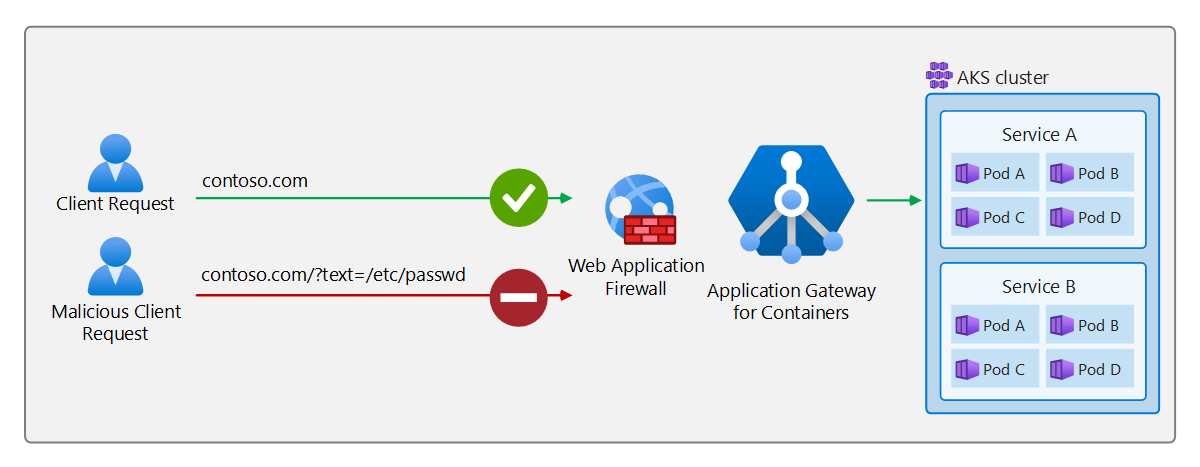
Application Gateway for Containers uses Azure Web Application Firewall to block a malicious request from being proxied to the back-end target. The following diagram shows an example scenario.
Prerequisites
If you're following the bring-your-own (BYO) deployment strategy, ensure that you set up your Application Gateway for Containers resources and ALB Controller (Add-on or Helm).
If you're following the Application Load Balancer (ALB) managed deployment strategy, ensure that you:
- Provisioned your ALB Controller (Add-on or Helm).
- Provisioned the Application Gateway for Containers resources via the
ApplicationLoadBalancercustom resource.
Apply the following
deployment.yamlfile on your cluster to create a sample web application that demonstrates the header rewrite:kubectl apply -f https://raw.githubusercontent.com/MicrosoftDocs/azure-docs/refs/heads/main/articles/application-gateway/for-containers/examples/traffic-split-scenario/deployment.yamlThis command creates the following items on your cluster:
- A namespace called
test-infra - Two services called
backend-v1andbackend-v2in thetest-infranamespace - Two deployments called
backend-v1andbackend-v2in thetest-infranamespace
- A namespace called
Deploy the required Gateway API resources
Create a Gateway resource:
kubectl apply -f - <<EOF
apiVersion: gateway.networking.k8s.io/v1
kind: Gateway
metadata:
  name: gateway-01
  namespace: test-infra
  annotations:
    alb.networking.azure.io/alb-namespace: alb-test-infra
    alb.networking.azure.io/alb-name: alb-test
spec:
  gatewayClassName: azure-alb-external
  listeners:
  - name: http-listener
    port: 80
    protocol: HTTP
    allowedRoutes:
      namespaces:
        from: Same
EOF
Note
When the ALB Controller creates the Application Gateway for Containers resources in Azure Resource Manager, it uses the following naming convention for a frontend resource: fe-<eight randomly generated characters>.
If you want to change the name of the frontend resource created in Azure, consider following the bring-your-own deployment strategy.
After you create the Gateway resource, ensure that the status is valid, the listener has a status of Programmed, and an address is assigned to it:
kubectl get gateway gateway-01 -n test-infra -o yaml
Here's example output for successful creation of a Gateway resource:
status:
  addresses:
  - type: IPAddress
    value: xxxx.yyyy.alb.azure.com
  conditions:
  - lastTransitionTime: "2023-06-19T21:04:55Z"
    message: Valid Gateway
    observedGeneration: 1
    reason: Accepted
    status: "True"
    type: Accepted
  - lastTransitionTime: "2023-06-19T21:04:55Z"
    message: Application Gateway For Containers resource has been successfully updated.
    observedGeneration: 1
    reason: Programmed
    status: "True"
    type: Programmed
  listeners:
  - attachedRoutes: 0
    conditions:
    - lastTransitionTime: "2023-06-19T21:04:55Z"
      message: ""
      observedGeneration: 1
      reason: ResolvedRefs
      status: "True"
      type: ResolvedRefs
    - lastTransitionTime: "2023-06-19T21:04:55Z"
      message: Listener is accepted
      observedGeneration: 1
      reason: Accepted
      status: "True"
      type: Accepted
    - lastTransitionTime: "2023-06-19T21:04:55Z"
      message: Application Gateway For Containers resource has been successfully updated.
      observedGeneration: 1
      reason: Programmed
      status: "True"
      type: Programmed
    name: https-listener
    supportedKinds:
    - group: gateway.networking.k8s.io
      kind: HTTPRoute
Create an HTTPRoute resource that listens for the host name contoso.com:
kubectl apply -f - <<EOF
apiVersion: gateway.networking.k8s.io/v1
kind: HTTPRoute
metadata:
  name: contoso-waf-route
  namespace: test-infra
spec:
  parentRefs:
    - name: gateway-01
      namespace: test-infra
  hostnames:
  - "contoso.com"
  rules:
  - backendRefs:
    - name: backend-v1
      port: 8080
EOF
After you create the HTTPRoute resource, ensure that the status of the route is Accepted and the status of the Application Gateway for Containers resource is Programmed:
kubectl get httproute header-rewrite-route -n test-infra -o yaml
Verify that the status of the Application Gateway for Containers resource was successfully updated:
status:
  parents:
  - conditions:
    - lastTransitionTime: "2023-06-19T22:18:23Z"
      message: ""
      observedGeneration: 1
      reason: ResolvedRefs
      status: "True"
      type: ResolvedRefs
    - lastTransitionTime: "2023-06-19T22:18:23Z"
      message: Route is Accepted
      observedGeneration: 1
      reason: Accepted
      status: "True"
      type: Accepted
    - lastTransitionTime: "2023-06-19T22:18:23Z"
      message: Application Gateway For Containers resource has been successfully updated.
      observedGeneration: 1
      reason: Programmed
      status: "True"
      type: Programmed
    controllerName: alb.networking.azure.io/alb-controller
    parentRef:
      group: gateway.networking.k8s.io
      kind: Gateway
      name: gateway-01
      namespace: test-infra
Configure WebApplicationFirewallPolicy
Application Gateway for Containers uses a custom resource called WebApplicationFirewallPolicy to define Azure Web Application Firewall protection. In this example, Azure Web Application Firewall helps protect a specific HTTPRoute resource:
kubectl apply -f - <<EOF
apiVersion: alb.networking.azure.io/v1
kind: WebApplicationFirewallPolicy
metadata:
  name: sample-waf-policy
  namespace: test-infra
spec:
  targetRef:
    group: gateway.networking.k8s.io
    kind: HTTPRoute
    name: contoso-waf-route
    namespace: test-infra
    #sectionNames: ["listenerA"] # defined if you're targeting a specific listener on a gateway resource or path
  webApplicationFirewall:
    id: /subscriptions/.../Microsoft.Network/applicationGatewayWebApplicationFirewallPolicies/waf-policy-0
EOF
kubectl apply -f - <<EOF
apiVersion: alb.networking.azure.io/v1
kind: WebApplicationFirewallPolicy
metadata:
  name: sample-waf-policy
  namespace: test-infra
spec:
  targetRef:
    group: gateway.networking.k8s.io
    kind: HTTPRoute
    name: contoso-waf-route
    namespace: test-infra
    #sectionNames: ["listenerA"] # defined if you're targeting a specific listener on a gateway resource or path
  webApplicationFirewall:
    id: /subscriptions/711d99a7-fd79-4ce7-9831-ea1afa18442e/resourceGroups/AGC-RG/providers/Microsoft.Network/applicationGatewayWebApplicationFirewallPolicies/agc-waf
EOF
Test access to the application
Now you're ready to send some traffic to the sample application, via the fully qualified domain name (FQDN) assigned to the frontend resource. Use the following command to get the FQDN:
fqdn=$(kubectl get gateway gateway-01 -n test-infra -o jsonpath='{.status.addresses[0].value}')
If you specify the server name indicator by using the curl command, with contoso.com for the frontend resource's FQDN, the output should return a response from the backend-v1 service:
fqdnIp=$(dig +short $fqdn)
curl -k --resolve contoso.com:80:$fqdnIp http://contoso.com
Via the response, you should see:
{
 "path": "/",
 "host": "contoso.com",
 "method": "GET",
 "proto": "HTTP/1.1",
 "headers": {
  "Accept": [
   "*/*"
  ],
  "User-Agent": [
   "curl/7.81.0"
  ],
  "X-Forwarded-For": [
   "xxx.xxx.xxx.xxx"
  ],
  "X-Forwarded-Proto": [
   "http"
  ],
  "X-Request-Id": [
   "dcd4bcad-ea43-4fb6-948e-a906380dcd6d"
  ]
 },
 "namespace": "test-infra",
 "ingress": "",
 "service": "",
 "pod": "backend-v1-5b8fd96959-f59mm"
}
Now, send a request with a malicious query string to trigger a 403 forbidden response from Application Gateway for Containers.
Here's one example request:
curl -k --resolve contoso.com:80:$fqdnIp http://contoso.com/?text=/etc/passwd
Here's another example request:
curl -k --resolve contoso.com:80:$fqdnIp http://contoso.com/?1=1=1
Congratulations! You installed an ALB Controller, deployed a back-end application, and used Azure Web Application Firewall functionality to block a malicious request.