Note
Access to this page requires authorization. You can try signing in or changing directories.
Access to this page requires authorization. You can try changing directories.
Model router is a purpose-built, trained machine-learning model that analyzes each prompt in real time and routes it to the most suitable large language model (LLM). It's a lightweight ML model designed to predict which model performs best for a given prompt at minimal latency.
This article explains the capabilities, routing modes, and best practices that power model router. For supported models and version information, see the model router overview. For deployment and usage steps, see Use model router.
Prerequisites
- Familiarity with LLMs and the Chat Completions API
- Understanding of the model router overview
Why Model router
Choosing the right model for every prompt is hard to do manually. Model router is a purpose-built ML model trained on hundreds of thousands of examples across diverse scenarios — from simple prompts to complex agentic workflows. It automatically matches each prompt to the best-suited model, optimizing for quality, cost, and latency.
Rather than relying on static rules or manual selection, model router learns from data and adapts as models evolve.
How requests are routed
When a prompt arrives, model router processes it through three steps:
Understand the prompt. The router analyzes the full request — including system message, user message, tool definitions, and conversation history — to determine what the prompt is asking for and how challenging it is.
Select the best model. Based on the analysis, the router estimates which model in the pool delivers the best result for this specific prompt. It also factors in any routing mode configured. These can be Balanced, Cost, or Quality modes.
Route and respond. The prompt is forwarded to the selected model. The entire routing decision adds minimal overhead — a negligible fraction of the LLM inference time.
Key design deliverables
- Efficiency. The router is optimized for fast inference, keeping overhead minimal regardless of prompt complexity.
- Adaptability. The router adjusts automatically as the set of supported models evolves, without requiring changes to your application.
- Transparency. The selected model is always disclosed in the API response via the model field, so you can see exactly which model handled each request.
Model router analyzes prompts to make routing decisions but does not store them. It honors data-zone boundaries, routing only to models approved within your deployment’s geographic and compliance constraints.
Model overview
Model router is a purpose-built ML model optimized for fast inference. It is not an LLM itself — it is designed to make routing decisions with minimal latency overhead.
We train the router on a large, diverse dataset spanning hundreds of thousands of examples across many domains. These include question answering, code generation, mathematical reasoning. Summarization, conversations, and agentic workflows are also covered. We continuously expand the training data to keep pace with new models and capabilities.
We train model router to handle production-level complexity, including agentic and tool-calling workloads that require structured invocations and multi-step workflows.
Intelligent prompt routing
One of model router’s key capabilities is understanding prompt difficulty. Not all coding questions are equally hard; not all summaries require the same reasoning depth.
The router distinguishes between prompts that any capable model can handle well — ideal for fast, cost-efficient models — and prompts that demand deeper reasoning, nuanced judgment, or sophisticated tool orchestration, where frontier models justify their higher cost.
This difficulty-aware routing is what allows model router to save costs without sacrificing quality. It only pays for frontier-level capability when the prompt genuinely needs it.
Handling real-world complexity
Production prompts are rarely tidy single-sentence questions. The router handles:
- Long contexts spanning thousands of tokens, where the routing signal might be distributed across the entire input.
- Multi-turn conversations, where earlier turns provide context but the latest user message carries the most routing-relevant signal.
- Agentic and tool-calling scenarios, where the model must produce structured tool invocations, a capability the router is optimized for.
Adapting to model subsets
When you customize the model pool using model subsets, the router automatically recalibrates its routing decisions to optimize across the available models.
Routing modes in depth
Model router exposes three routing modes that control the cost-quality tradeoff. For the mode descriptions and configuration steps, see the model router overview and the how-to guide.
- Balanced (default): Optimizes for the best combination of quality and cost. Most workloads should start here.
- Cost: Aggressively favors cheaper models, accepting slightly lower quality on complex prompts.
- Quality: Always selects the highest-quality model for each prompt, regardless of cost.
Observe routing behavior
Each routing mode produces a different distribution of traffic across underlying models. You can observe your routing distribution using Azure Monitor:
- In Balanced mode, traffic is distributed more broadly across the model pool based on prompt complexity.
- In Cost mode, most traffic routes to smaller, cheaper models, escalating to larger models only when the prompt requires it.
- In Quality mode, frontier and high-capability models handle most traffic.
Example
The ModelRouter-Distribution repository lets you run routing experiments against your own prompt corpus to preview how each mode distributes your workload before choosing.
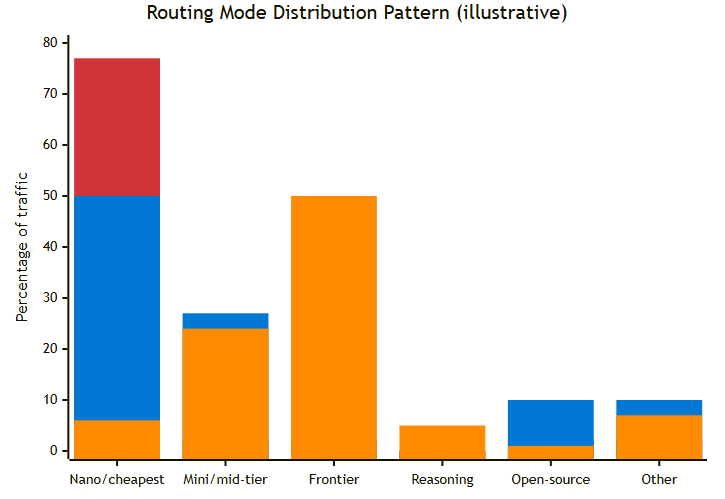
| Color | Mode | Description |
|---|---|---|
| 🟥 | Cost mode | First bar — routes to cheapest models by default |
| 🟦 | Balanced mode | Second bar — spreads across cheap and mid-tier |
| 🟠 | Quality mode | Third bar — favors frontier and reasoning models |
Based on a point-in-time experiment; actual models and distribution will vary. Source: ModelRouter-Distribution.
When to use model router vs. direct deployment
Choosing between model router and a direct model deployment depends on your workload characteristics, compliance requirements, and operational preferences.
When to use model router
- Your workload is diverse. A mix of simple and complex prompts benefits most from intelligent routing. The router matches each prompt to the best-suited model, delivering quality comparable to — or exceeding — a single general-purpose model.
- Cost optimization matters. Smaller, cheaper models handle simple prompts while frontier models are reserved for complex tasks. The savings are validated on both in-domain and out-of-domain benchmarks.
- Latency and responsiveness are critical. For high-traffic, user-facing scenarios like chatbots and customer support, model router routes simpler prompts to faster models. The result is lower average latency across your traffic mix compared to always calling a frontier model.
- You want a single endpoint. One deployment, one API call, one rate limit — simpler operations.
- You're building agents. Model router supports tools and can select fast models for classification subtasks and reasoning models for analysis — dynamically, per step.
- You want automatic failover. Built-in resilience with no extra configuration.
- You want to simplify model lifecycle management. Each router version maintains a curated set of underlying models. Deprecated models are replaced transparently. With auto-update enabled, your endpoint and application code don't change as models evolve.
When to use direct deployment
- You need the same model on every request. Model router always reveals which model handled a request (via the model response field), but it might select different models for different prompts. If your workflow requires same model across all— pin to a specific model.
The hybrid pattern
The most effective architecture uses both:
- Model router as the default path for general API traffic, capturing cost savings across the majority of requests.
- Direct deployments for specialized, compliance-mandated, or parameter-sensitive workloads.
This approach gives you broad optimization and precise control where you need it.
Best practices
Follow these recommendations to get the most from model router.
- Start with Balanced mode, then tune. Let traffic flow through Balanced mode, observe the routing distribution in Azure Monitor for a few weeks, and then adjust. Switch latency-insensitive batch pipelines to Cost mode and promote critical-path reasoning tasks to Quality mode.
- Use model subset as your compliance gate. Get model approval from your security team, encode it in the subset, and know that new models won't appear without explicit opt-in.
- Monitor routing distribution. In the Azure portal, go to Monitoring > Metrics for your resource, filter by your model router deployment, and split by underlying model. This view shows exactly where your tokens go.
- Design for the smallest context window — or raise the floor. If your prompts consistently exceed the context window of the smallest model in the pool, use model subset to include only models that support your required context length.
- Select at least two models for failover. A single-model subset defeats the purpose of routing and disables automatic failover.
Practices to avoid
- Don't use single-model subsets. You lose routing optimization, cost savings, and failover — effectively using model router as an expensive passthrough.
- Don't ignore the model field in responses. This field is your primary observability signal. Log it, build dashboards, and track which models are handling your traffic.