Note
Access to this page requires authorization. You can try signing in or changing directories.
Access to this page requires authorization. You can try changing directories.
Agentic Retrieval can ingest documents from an on-premises Network File System (NFS) file share by using Kerberos authentication (krb5p). Instead of passing a UID/GID to access files, Agentic Retrieval uses your Active Directory infrastructure to authenticate securely, with full encryption of data in transit.
This article applies to Agentic Retrieval on Azure Local (Arc-enabled Kubernetes).
This article explains the Kerberos architecture, ingestion flow, prerequisite scope, and portal configuration fields so that you can plan a production-ready deployment.
Important
Agentic Retrieval in Foundry Local is currently in PREVIEW. See the Supplemental Terms of Use for Microsoft Azure Previews for legal terms that apply to Azure features that are in beta, preview, or otherwise not yet released into general availability.
How it works
Kerberos configuration lives on the Kubernetes worker node, not inside the pod. The pod reads files from a mounted directory and isn't aware of Kerberos. The node kernel service (rpc.gssd) handles ticket acquisition and encrypted NFS communication.
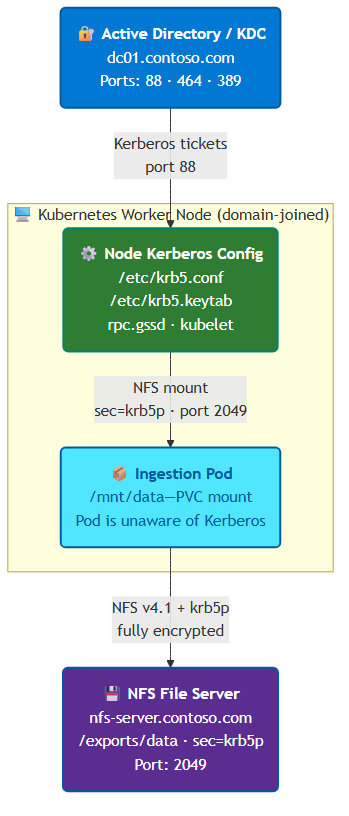
Key design points
The Kerberos NFS architecture is designed around these principles:
- No passwords stored: Authentication uses a keytab file on the node.
- Data encrypted in transit:
krb5pprovides full NFS payload encryption. - Pod is Kerberos-unaware: The kernel handles everything via
rpc.gssd. - Continuous health monitoring: A DaemonSet validates each node every 60 seconds and labels it ready or not ready.
- Node affinity: Ingestion pods only schedule on nodes that pass validation.
What happens during ingestion
When you create an NFS data source with Kerberos authentication:
- Ingestion API receives the request with
uid=0, gid=0(sentinel values for Kerberos mode). - Preflight check queries for nodes with
edge-rag/kerberos-ready=trueand raises an error if no nodes are found. - PV/PVC creation creates a static PersistentVolume with
mount_options: ["sec=krb5p", "vers=4.1"]. - Pod scheduling uses node affinity to land the pod on a
kerberos-ready=truenode. - Mount: Kubelet on the node triggers the NFS mount, and
rpc.gssdintercepts and obtains a Kerberos ticket from the keytab. - File access: The pod reads
/mnt/dataas a normal directory with no Kerberos code in the pod.
Prerequisites summary
Before you install Agentic Retrieval with Kerberos enabled, make sure you have:
- A healthy Azure Local Arc-enabled Kubernetes cluster with worker nodes ready for ingestion.
- Active Directory, DNS, and NTP configured for Kerberos workloads.
- Kerberos client and NFS packages installed and validated on each worker node.
- Keytab and SPN configuration completed for both worker nodes and the NFS server.
- Network connectivity from worker nodes to domain controllers, DNS, NTP, and NFS server endpoints.
For full setup steps and command-level validation, see Set up NFS with Kerberos authentication for Agentic Retrieval.
Portal field reference
When you install Agentic Retrieval via the Azure portal, the Data Source Connection / Authentication section includes the following Kerberos fields:
| Portal field | Helm key | Type | Default | Description |
|---|---|---|---|---|
| Enable Kerberos | kerberos.enabled |
Toggle | false |
Enables Kerberos authentication for NFS data sources. When enabled, the installer validates that at least one node is labeled kerberos-provisioned=true. |
| Service principal name (SPN) | kerberos.spn |
Text (required when enabled) | (empty) | The Kerberos SPN for NFS authentication. Format: nfs/<service_account>@<REALM>. Example: nfs/edgerag-svc@CONTOSO.COM. Must match the principal in the keytab deployed on your nodes. |
The SPN field is required when Kerberos is enabled. The installation fails with a template error if left empty.
When you set kerberos.enabled to true, Agentic Retrieval:
- Deploys a Kerberos Validator DaemonSet on every node (health checks every 60 seconds).
- Runs a preinstall validation hook (checks for labeled nodes).
- Creates a dedicated
kerberos-ingestion-saServiceAccount with PV/PVC permissions. - Uses PVC-based NFS mounts with
sec=krb5p,vers=4.1(instead of inline NFS volumes). - Schedules ingestion pods only on
kerberos-ready=truenodes.
The system injects the kerberos.spn value into the ingestion API pod as the KERBEROS_SPN environment variable. It uses this value for logging and validation. The keytab on the node handles Kerberos authentication.
Frequently asked questions
Does the pod need any Kerberos libraries or configuration?
No. The pod is unaware of Kerberos. The rpc.gssd service on the node handles all authentication. The pod reads files from a mounted directory.
Can I use an IP address for the NFS server?
No. Kerberos requires a hostname for SPN construction. Use the NFS server's FQDN (for example, nfs-server.contoso.com).
What if my NFS server only supports NFSv3? NFSv3 doesn't support Kerberos authentication. You must upgrade to NFSv4.1 or later, or use UID/GID authentication instead.
Can I mix Kerberos and UID/GID data sources?
Yes. When kerberos.enabled=true, you can still create UID/GID-based NFS data sources by providing nonzero UID and GID values. Kerberos is used only when the authentication method is set to Kerberos in the UI (which sends UID=0, GID=0 as sentinel values).
What happens if a node loses its keytab or rpc.gssd stops?
The DaemonSet validator detects the issue within 60 seconds and sets the node to kerberos-ready=false. Ingestion pods aren't scheduled on that node. Existing pods on the node might fail their next NFS mount. Files are redelivered from Redis and processed by a healthy node.
How do I remove a node from Kerberos workloads?
Remove the provisioned label: kubectl label node <node_name> edge-rag/kerberos-provisioned-. The DaemonSet continues to run, but the node isn't considered for new ingestion workloads once kerberos-ready is set to false.