Note
Access to this page requires authorization. You can try signing in or changing directories.
Access to this page requires authorization. You can try changing directories.
Applies to:  Azure SQL Managed Instance
SQL Managed Instance provides the ability to cancel some management operations, such as when you deploy a new managed instance or update instance properties.
Overview
All management operations fall into the following categories:
- Instance deployment (new instance creation).
- Instance update (changing instance properties, such as vCores or reserved storage).
- Instance deletion.
You can monitor progress and status of management operations and cancel some of them if necessary.
The following table summarizes management operations, whether you can cancel them, and their typical overall duration:
| Category | Operation | Cancelable | Estimated cancel duration |
|---|---|---|---|
| Deployment | Instance creation | Yes | 90% of operations finish in 5 minutes. |
| Update | Instance storage scaling up/down (General Purpose) | No | |
| Update | Instance storage scaling up/down (Business Critical) | Yes | 90% of operations finish in 5 minutes. |
| Update | Instance compute (vCores) scaling up and down (General Purpose) | Yes | 90% of operations finish in 5 minutes. |
| Update | Instance compute (vCores) scaling up and down (Business Critical) | Yes | 90% of operations finish in 5 minutes. |
| Update | Instance service tier change (General Purpose to Business Critical and vice versa) | Yes | 90% of operations finish in 5 minutes. |
| Delete | Instance deletion | No |
Cancel management operation
To cancel management operations by using the Azure portal, follow these steps:
Go to the Azure portal.
Go to the Overview pane of your SQL Managed Instance.
Select the Notification box next to the ongoing operation to open the Ongoing Operation page.
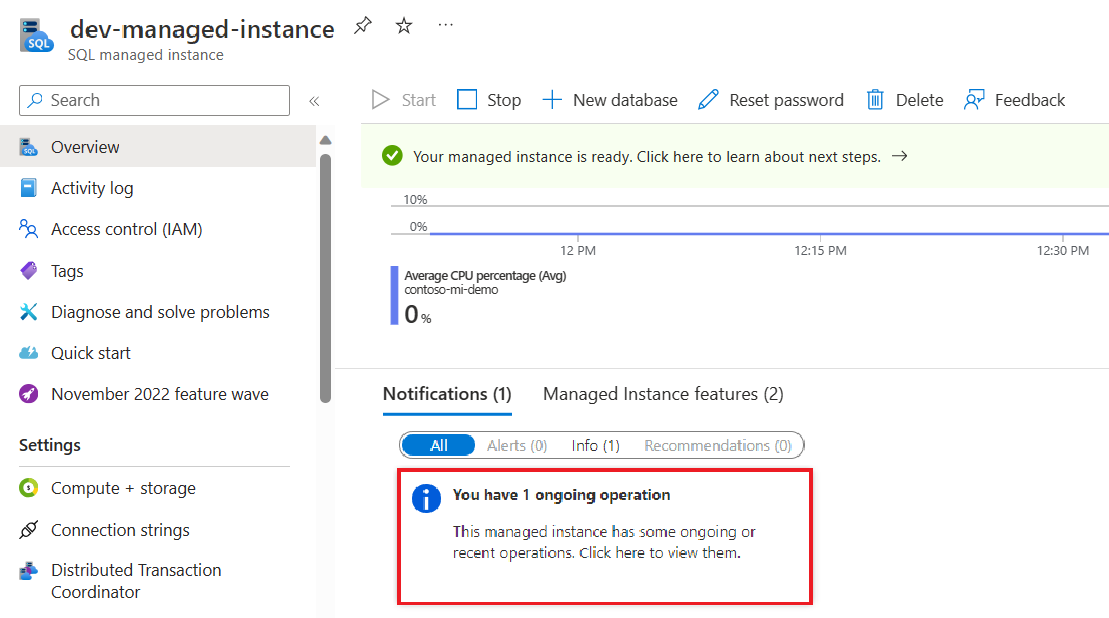
Select Cancel the operation at the bottom of the page.

Confirm that you want to cancel the operation.
If the cancel request succeeds, the management operation is canceled and results in a failure. You get a notification that the cancellation succeeds or fails.
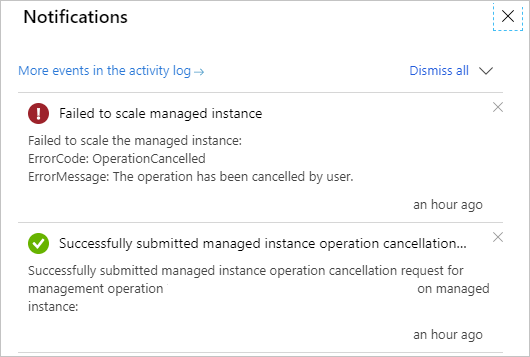
If the cancel request fails or the cancel button isn't active, the management operation enters a non-cancelable state and finishes shortly. The management operation continues until it's completed.
Canceled deployment request
By using API version 2020-02-02, as soon as the service accepts the instance creation request, the instance exists as a resource, regardless of the progress of the deployment process (managed instance status is Provisioning). If you cancel the instance deployment request (new instance creation), the managed instance goes from the Provisioning state to FailedToCreate.
Instances that fail to create still exist as a resource and:
- Aren't charged
- Don't count towards resource limits (subnet or vCore quota)
Note
To minimize noise in the list of resources or managed instances, delete instances that fail to deploy or instances with canceled deployments.
Next steps
- To learn how to create your first managed instance, see Quickstart guide.
- For a features and comparison list, see Common SQL features.
- For more information about VNet configuration, see SQL Managed Instance VNet configuration.
- For a quickstart that creates a managed instance and restores a database from a backup file, see Create a managed instance.
- For a tutorial about using Azure Database Migration Service for migration, see SQL Managed Instance migration using Database Migration Service.