Note
Access to this page requires authorization. You can try signing in or changing directories.
Access to this page requires authorization. You can try changing directories.
Applies to: ✔️ AKS Automatic ✔️ AKS Standard
Domain Name System (DNS) resolution is a critical component in Azure Kubernetes Service (AKS), enabling pods and services to communicate using human-readable names instead of IP addresses. AKS provides built-in DNS services to ensure seamless name resolution for both internal cluster resources and external endpoints. Understanding how DNS works in AKS helps cluster operators and developers ensure reliable connectivity, optimize performance, and troubleshoot networking issues effectively.
AKS Automatic is the recommended production-ready default for most AKS workloads. AKS Automatic clusters come preconfigured with LocalDNS to improve DNS performance, reduce conntrack pressure, and increase resiliency without requiring extra setup.
Note
Starting with Kubernetes 1.37, AKS Standard applies the Preferred LocalDNS mode by default to eligible node pools that don't have an explicitly configured LocalDNS profile. In Preferred mode, AKS enables LocalDNS only if the node pool and cluster pass the required compatibility checks. If the checks fail, LocalDNS remains disabled. Explicitly configured profiles take precedence over this default, so a node pool explicitly set to Disabled remains disabled.
To prevent LocalDNS from being enabled, explicitly set the LocalDNS mode to Disabled. For instructions, see Disable LocalDNS on a Node Pool.
For more information about AKS Automatic, see What is AKS Automatic?
CoreDNS in Azure Kubernetes Service
CoreDNS is the default DNS service in AKS. It provides internal name resolution and service discovery for workloads running in the cluster. It operates as a set of pods in the kube-system namespace and is tightly integrated with Kubernetes networking.
When a pod in AKS issues a DNS query, such as resolving the name of another service, the request goes to the CoreDNS pods. These pods process the query and return the appropriate IP address or forward the request to an upstream DNS server for external domains.
This architecture ensures a balance between flexibility and operational safety in a managed environment. For details on how to customize CoreDNS in AKS, refer to the CoreDNS customization guide.
When LocalDNS is active, the resolution path depends on the pod's dnsPolicy (Default or ClusterFirst) and on the LocalDNS server block configuration. For example, when a pod uses dnsPolicy: Default, external DNS queries take the following path:
Workload -> LocalDNS -> upstream DNS server
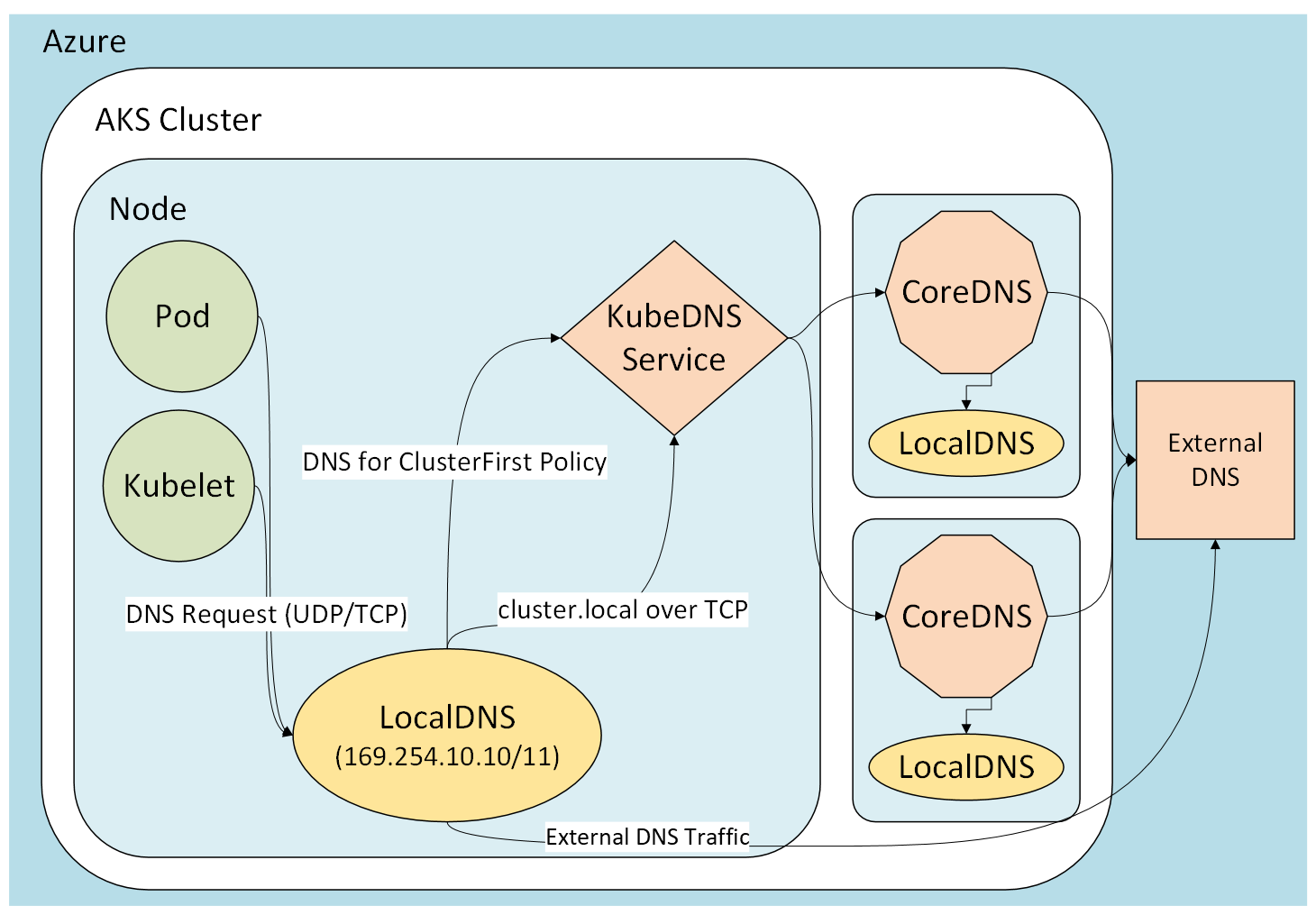
LocalDNS runs as a systemd unit on the node, so it receives the query before CoreDNS does. cluster.local queries are forwarded to CoreDNS, and external queries are forwarded either to CoreDNS or directly to the virtual network (VNet) DNS server. For the exact forwarding behavior for each DNS policy and the default configuration, see Server blocks for LocalDNS.
Custom VNet DNS servers must accept both UDP and TCP DNS queries from AKS nodes. With PreferUDP, LocalDNS retries over TCP when a UDP response is truncated.
For information on the CoreDNS project, see the CoreDNS upstream project page.
LocalDNS in Azure Kubernetes Service
Note
This article provides an overview of what LocalDNS is and its benefits in AKS.
For AKS Automatic, LocalDNS is preconfigured.
For AKS Standard, see the LocalDNS how-to guide for guidance on enabling and configuring LocalDNS.
Overview
LocalDNS is an advanced feature in Azure Kubernetes Service (AKS) that deploys a Domain Name System (DNS) proxy on each node to provide highly resilient, low-latency DNS resolution. By handling DNS queries locally, this proxy reduces traffic to the CoreDNS add-on pods, improving overall DNS reliability and performance in the cluster. LocalDNS is especially beneficial in large clusters or environments with high DNS query volumes, where centralized DNS resolution can become a bottleneck.
When LocalDNS is enabled, AKS deploys a local DNS cache as a systemd service on each node. Pods on the node send their DNS queries to this local cache, enabling faster resolution by reducing network hops. This approach also minimizes conntrack table usage, lowering the risk of table exhaustion. Additionally, if upstream DNS becomes unavailable, LocalDNS can continue serving cached responses for a configurable duration, helping maintain pod connectivity and service reliability.
LocalDNS and AKS Automatic
AKS Automatic preconfigures LocalDNS as part of its production-ready defaults. You don't need to run a separate enable command on AKS Automatic clusters.
Use this article to understand how LocalDNS works and why it improves DNS behavior for AKS workloads. If you need enablement and configuration steps for AKS Standard, use the LocalDNS how-to guide.
Key capabilities
- Reduced DNS resolution latency: Each AKS node runs a LocalDNS
systemdservice. Workloads running on the node send DNS queries to this service, which resolves them locally, reducing network hops and speeding up DNS lookups. - Customizable DNS behavior: Use
kubeDNSOverridesandvnetDNSOverridesto control DNS behavior in the cluster. - Avoid conntrack races and conntrack table exhaustion: Pods send DNS queries to the LocalDNS service on the same node without creating new
conntracktable entries. Skipping the connection tracking helps reduce conntrack races and avoids User Datagram Protocol (UDP) DNS entries from filling upconntracktables. This optimization prevents dropped and rejected connections caused byconntracktable exhaustion and race conditions. - Connection upgraded to TCP: The connection from the
localdnscache to the cluster’s CoreDNS service uses Transmission Control Protocol (TCP). TCP allows for connection rebalancing and removesconntracktable entries when the server closes the connection (in contrast to UDP connections, which have a default 30-second timeout). Applications don't need changes, because thelocaldnsservice still listens for UDP traffic. - Caching: You can configure the LocalDNS cache plugin with
serveStaleand Time to Live (TTL) settings. Set theserveStale,serveStaleDurationInSeconds, andcacheDurationInSecondsparameters to achieve DNS resiliency, even during an upstream DNS outage. - Protocol control: Set the preferred DNS query protocol, such as
PreferUDPorForceTCP, for each domain.PreferUDPisn't an instruction to use UDP exclusively. The resolver can retry or fall back over TCP, so upstream custom DNS servers and network controls must support both UDP and TCP port 53.
Other benefits and considerations
| Benefits | Considerations |
|---|---|
| Better scalability: Reduces load on centralized CoreDNS pods | Minimal resource overhead: Uses a small amount of CPU and memory on each node |
| Seamless integration: Doesn't require changes to existing application connections | Configuration changes: Updates require node image upgrades, which can cause temporary disruptions |
| Block invalid search domains: Prevents invalid DNS queries at the node level | Availability planning: Teams using AKS Standard should evaluate whether DNS performance and resiliency justify enabling LocalDNS |
AKS Automatic and AKS Standard behavior
| Cluster mode | LocalDNS behavior |
|---|---|
| AKS Automatic | Preconfigured |
| AKS Standard, Kubernetes 1.31 through 1.36 | Explicitly configured per node pool |
| AKS Standard, Kubernetes 1.37 and later | Defaults eligible node pools to Preferred when no explicit LocalDNS profile exists. LocalDNS is enabled only when compatibility checks pass. Explicit profiles, including Disabled, are preserved. |
By using LocalDNS, you get faster and more reliable DNS resolution for your workloads, reduce the risk of DNS-related outages, and gain more control over DNS traffic in your AKS environment.
Related content
- To learn more about AKS Automatic, see What is Azure Kubernetes Service (AKS) Automatic?
- To learn how to create an AKS Automatic cluster, see Quickstart: Create an AKS Automatic cluster.
- To learn how to enable LocalDNS and configure its settings in your AKS cluster, see the LocalDNS how-to guide.
- To learn more about core network concepts, see Network concepts for applications in AKS.