Note
Access to this page requires authorization. You can try signing in or changing directories.
Access to this page requires authorization. You can try changing directories.
Genie Spaces is an Azure Databricks feature that allows business teams to interact with their data using natural language. Domain experts configure Genie Spaces with datasets, sample queries, and text guidelines to help Genie translate business questions into analytical queries. After setup, business users can ask questions and generate visualizations to understand operational data. For additional information about Azure Databricks AI-powered features, see Databricks AI assistive features.
Genie selects relevant names and descriptions from annotated tables and columns to convert natural language questions to an equivalent SQL query. It responds with the generated query and results table, if possible. If Genie can't generate an answer, it can ask follow-up questions to clarify before providing a response.
Example use case
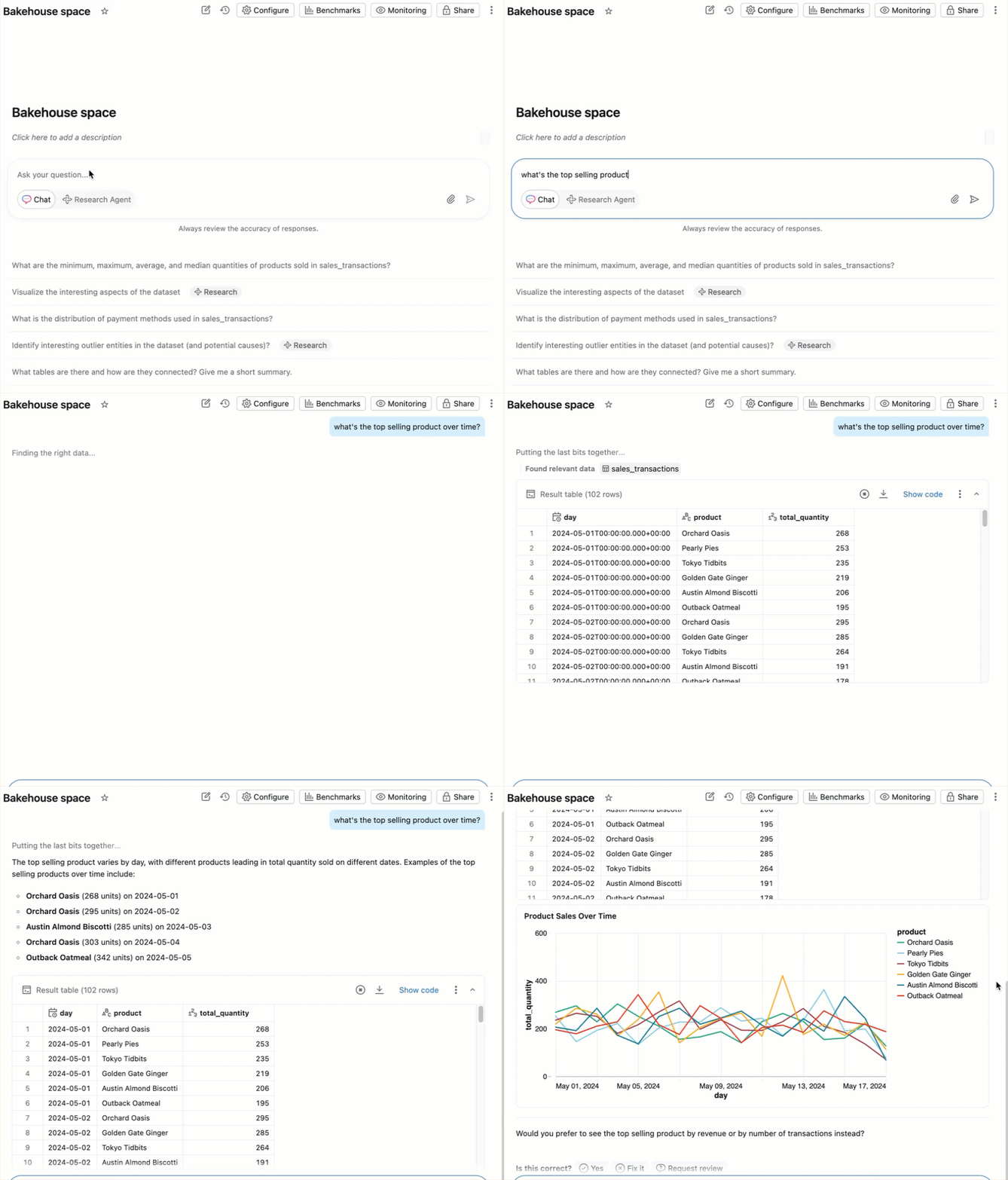
A sales manager wants to understand the top selling product over time in their bakery. They can interact with the Genie Space using natural language and automatically generate a visualization.
The following GIF shows this interaction:
How Genie Spaces works
Genie Spaces use a compound AI system to interpret business questions and generate answers. Instead of using a single large language model, compound AI systems process tasks in AI applications by combining multiple interacting components. Compound AI systems are an increasingly common design pattern for AI applications because of their performance and flexibility. For more information, see The Shift from Models to Compound AI Systems.
Key concepts
| Concept | Description |
|---|---|
| Knowledge store | A collection of curated semantic definitions that enhances Genie's understanding of your data. The knowledge store includes space-level table and column descriptions, synonyms, join relationships, SQL expressions, and prompt matching settings. Knowledge store configurations are scoped to the space and do not affect Unity Catalog metadata. See Build a knowledge store. |
| Instructions | Plain-text notes that tell Genie how to interpret your data and respond to questions. Instructions can describe business rules, preferred terminology, date formats, and other domain-specific context. See Provide instructions. |
| Example SQL queries | SQL queries that serve as reference answers for common questions. Genie intelligently selects relevant examples from the space's query library to generate more accurate responses. See Add example SQL queries and functions. |
| Trusted assets | Parameterized example queries and SQL functions whose exact logic has been verified by a space author. When Genie uses a trusted asset to generate a response, the answer comes from this verified logic. See Review a response. |
| Benchmarks | A set of test questions used to evaluate and measure Genie Space response accuracy. Unlike instructions, benchmarks are for evaluation only — Genie does not use benchmark questions or SQL to improve its context. See Benchmarks. |
| Agent mode | A multi-step reasoning mode that performs deeper analysis across your data. Agent mode breaks complex questions into sub-tasks, runs multiple SQL queries, and returns a structured report with findings and visualizations. See Agent mode in Genie Spaces. |
What data can I use?
A Genie Space is based on data registered to Unity Catalog, including managed tables, external tables, foreign tables, views, metric views, and materialized views. Genie uses the metadata attached to Unity Catalog objects, as well as an author-curated space-level knowledge store, to generate responses. Well-annotated datasets, paired with specific instructions that you provide, are key to creating a positive experience for end users.
Note
Genie works with structured data only. It cannot answer questions about unstructured data such as PDFs, Word documents, or other file-based content. To give Genie access to unstructured documents, use Chat in Genie, which can connect to external document sources such as Google Drive or SharePoint.
How Genie Spaces generates a response
When a user submits a question, Genie parses the request, identifies relevant data sources, and determines how to generate an appropriate response. Details provided by authors, combined with relevant Unity Catalog comments, metadata, and sample values from selected columns, allow Genie to infer both business and technical logic. Genie intelligently filters example SQL queries, table and column metadata, and chat history to select the most relevant context for answering the request.
Genie generates responses using the following components:
| Component | Description |
|---|---|
| Unity Catalog table metadata | Table names, descriptions, and defined primary key (PK) and foreign key (FK) relationships. Genie uses this data to convert natural language prompts to SQL. |
| Column names and descriptions | Genie intelligently filters for relevant column names and descriptions. |
| Knowledge store context | Space-specific metadata that authors add locally, including column values relevant to query generation. Does not alter existing Unity Catalog metadata. See Build a knowledge store. |
| Example SQL queries | Genie intelligently selects relevant SQL examples from SQL Queries. |
| SQL functions | All SQL functions that have been added to the space. |
| Instructions | Plain-text notes provided as General instructions. |
| Prompt and response history | Prompts and responses from the current chat. If necessary, because of set token limits, the oldest parts of the chat record are excluded. |
Note
Some table details, such as the owner and table size, are not included by default. To access this information, use views from the information schema available for all Unity Catalog catalogs. For more information about what's available in the information schema, see Information schema.
In most cases, Genie generates a SQL query that runs on the space's SQL warehouse. Generated queries are always read-only. Retries are handled automatically, and the SQL warehouse handles concurrency and scale. For details about how Genie maintains security and privacy, see Databricks AI assistive features trust and safety.
Improve response accuracy using Inspect
Important
This feature is in Public Preview.
Inspect uses advanced reasoning to review and improve the accuracy of Genie's generated SQL queries. When you enable Inspect for a response, Genie:
- Reviews the initially generated SQL query.
- Authors smaller SQL statements to verify specific aspects of the query, such as:
- Confirming the correct filter values are included.
- Validating date range logic, such as trailing 7-day windows.
- Checking join conditions and aggregations.
- Identifies gaps or potential issues in the original query.
- If issues are identified, generates an improved SQL query that resolves them.
- Performs a final comparison between the original and improved queries.
- Returns the query that most accurately answers your question.
Use Inspect when you want additional confidence in query accuracy, especially for complex queries involving filters, date ranges, or multiple tables.
Language support
You can use Genie Spaces in languages other than English, such as Portuguese and French. However, the underlying agent framework wraps prompts in English.
Azure Databricks recommends that space creators add as much metadata as possible in their language of choice. Genie responses might sometimes appear in English due to the underlying system prompts.
How data access works
Data access in a Genie Space is governed by Unity Catalog. When a user asks a question, the generated SQL query runs against the data using the compute credentials embedded by the space author (the configured SQL warehouse). Each user's own Unity Catalog data permissions are applied to the query results. Users only see data they are authorized to access. Any question about data they cannot access returns an empty response.
This means:
- You do not need to grant users direct warehouse permissions.
- Row filters and column masks defined in Unity Catalog are automatically enforced per user.
- To implement per-user data filtering, apply row-level security to the underlying tables in Unity Catalog. See Row filters and column masks.
For information about setting up user permissions for a Genie Space, see Share a Genie Space. For privacy and security FAQs, see Privacy and security FAQs.
Next steps
- To create a Genie Space and configure data and settings, see Create and manage a Genie Space.
- To add instructions, example queries, and a knowledge store to improve response quality, see Tune Genie Space quality.
- To ask questions and explore data as a business user, see Use a Genie Space to explore business data.
- To integrate Genie into applications and agent frameworks, see Use the Genie Spaces API.