Note
Access to this page requires authorization. You can try signing in or changing directories.
Access to this page requires authorization. You can try changing directories.
Currently viewing:  Foundry (classic) portal version - Switch to version for the new Foundry portal
A structured deployment plan helps you avoid security gaps, cost overruns, and access sprawl when you adopt Microsoft Foundry at scale. Use this guide to define workload boundaries, choose a resource topology, and establish governance for self-serve teams.
Prerequisites
Before you begin planning, confirm that you have:
- An understanding of your organization's baseline Azure subscription and resource group organization.
- Inputs on your organization's security requirements for networking, encryption, and data isolation.
- An initial region plan based on model and feature availability. For details, see feature availability across cloud regions.
- Agreement on security requirements for networking, encryption, and data isolation in your organization.
- An inventory of the Foundry features and APIs your teams plan to use.
Define isolation boundaries
Start with Cloud Adoption Framework decision guidance for AI platform sharing, then apply those decisions to Foundry:
While every situation is unique, for the common organization we recommend the following sequence:
- Define nonnegotiable sharing boundaries across business units, data domains, product ownership, and environment tiers.
- Set a prod policy that defaults to isolation, unless a documented exception allows colocation.
- Set an exploration policy that defaults to colocation for faster experimentation, unless compliance or validation requires isolation.
- Assign ownership for each boundary, including security, cost, and incident response ownership.
Identify capability and access requirements
Determine which Foundry features and APIs each workload requires before you finalize your topology.
Note
Not all Foundry APIs support the full variety of authentication modes, storage encryption levels, and project-level isolation. Some of the Foundry Tools APIs can require role assignments at the parent Foundry resource scope.
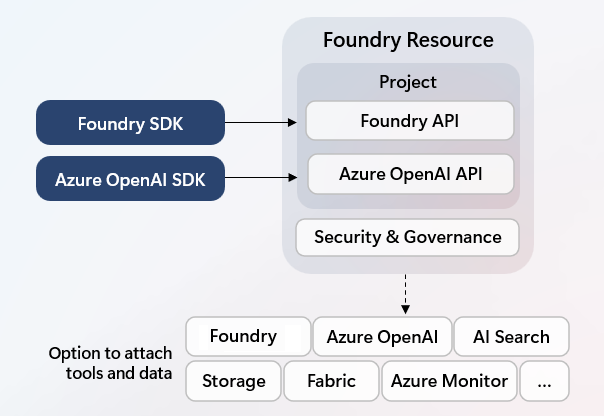
For co-located use cases that share one Foundry resource, use Foundry projects as isolated workspaces for each use case. For example, teams experimenting with an idea can create a project to organize coherent assets without repeating infrastructure setup for security, model deployments and tool access.
Most newer, agent-centric Foundry APIs support project-scope permissioning. Some traditional Foundry Tools APIs (former Azure AI Services), such as speech-to-text, still require parent resource-scope access. Plan boundaries and RBAC so all required capabilities are accessible at your intended access-management scope.
| Capability area | Organize by project | Project-level RBAC isolation | Bring your own storage | Networking / encryption support | Planning implication |
|---|---|---|---|---|---|
| Agent capabilities (agents, responses, evaluations, datasets, indexes, files, and playground assets) | Yes | Yes | Yes | Limited in basic setup (managed storage). For full coverage, use 'standard'. | Good fit for project-per-use-case segmentation in shared environments. |
| Fine-tune training | No (default project only) | No | Partial (inputs only) | Yes | If each team needs independent fine-tuning, use separate Foundry resources. Fine-tuned deployments are shared and consumable across projects within a resource. |
| OpenAI image, video, batch | No | No | Partial (only Batch) | Yes | Use an isolated workload setup, and if managed storage is required, validate RBAC constraints early. |
| Content Understanding | Yes | No | Yes | Yes | If strict per-use-case access isolation is required, prefer separate Foundry resources. |
| Speech | Yes (fine-tune) | No | Yes | Limited in basic setup (managed storage). | For full CMK encryption coverage, use BYO Storage. |
| Language | Yes (fine-tune) | No | Yes | Limited in basic setup (managed storage). | For full CMK encryption coverage, use BYO Storage. |
| Translator | No | No | No | Yes | Use separate Foundry resource if isolation is a must. |
Important
Confirm your exact capability mix before rollout. If a required API only works at Foundry resource scope, assign roles at that scope or isolate workloads into separate Foundry resources.
Choose Foundry resource topology
After you define boundaries and capability needs, choose topology per environment.
| Decision path | Recommended Foundry setup | Best fit | Main tradeoff |
|---|---|---|---|
| Co-located workloads | One Foundry resource with multiple projects (typically one project per use case) | Experimentation-heavy environments, early prototypes, and teams that benefit from shared deployments and shared connected data or tools | Shared blast radius for production incidents, quota exhaustion, and misconfiguration |
| Fully isolated workloads | One Foundry resource per production workload boundary (often with one primary project per workload) | Production workloads that require strict operational containment, independent access control, and independent quota or cost boundaries | Self-serve enablement harder with more resources to manage and higher setup overhead |
Tip
For production, treat isolation as the default. Use colocation as a deliberate exception only when workload boundaries, data requirements, and risk acceptance are aligned.
Plan your security baseline
Use this reference table as a checklist for security design decisions.
| Area | What to decide | Start with |
|---|---|---|
| Identity and access | Define admin, project manager, and project user personas. Map each persona to least-privilege roles and Microsoft Entra ID groups. | Role-based access control in Foundry |
| Networking | Choose the network model per environment. Use managed virtual network for a more secure, straightforward setup. Use bring-your-own (BYO) virtual network for advanced network control and custom routing requirements. Validate private DNS and endpoint approval flow before production. | Configure managed virtual network, Configure private link for Foundry, and Network-secured setup (BYO virtual network) |
| Data protection and keys | Decide whether Microsoft-managed keys meet policy requirements or whether customer-managed keys are required. | Customer-managed keys in Foundry |
| Authentication model | Prefer Microsoft Entra ID and RBAC for people and services. Use API keys only where role granularity isn't required. | Role-based access control in Foundry |
Plan model, region, and capacity strategy
For each workload, define:
- Model families and deployment types required by the use case.
- Data processing requirements (for example, global or regional constraints).
- Throughput and latency targets for interactive and batch scenarios.
- Quota and provisioned capacity requirements for steady-state and peak loads.
Use these references:
- Models sold directly by Azure
- Models from partners
- Quota in Foundry
- Quotas and limits for Foundry models
Plan connectivity and data integration
For each workload, identify external dependencies and connection patterns:
- Data sources and data stores.
- Internal APIs and line-of-business systems.
- Non-Azure SaaS tools required by agents or orchestration flows.
- Networking requirements, including private endpoints, DNS resolution, egress controls, and whether managed network or BYO virtual network is required.
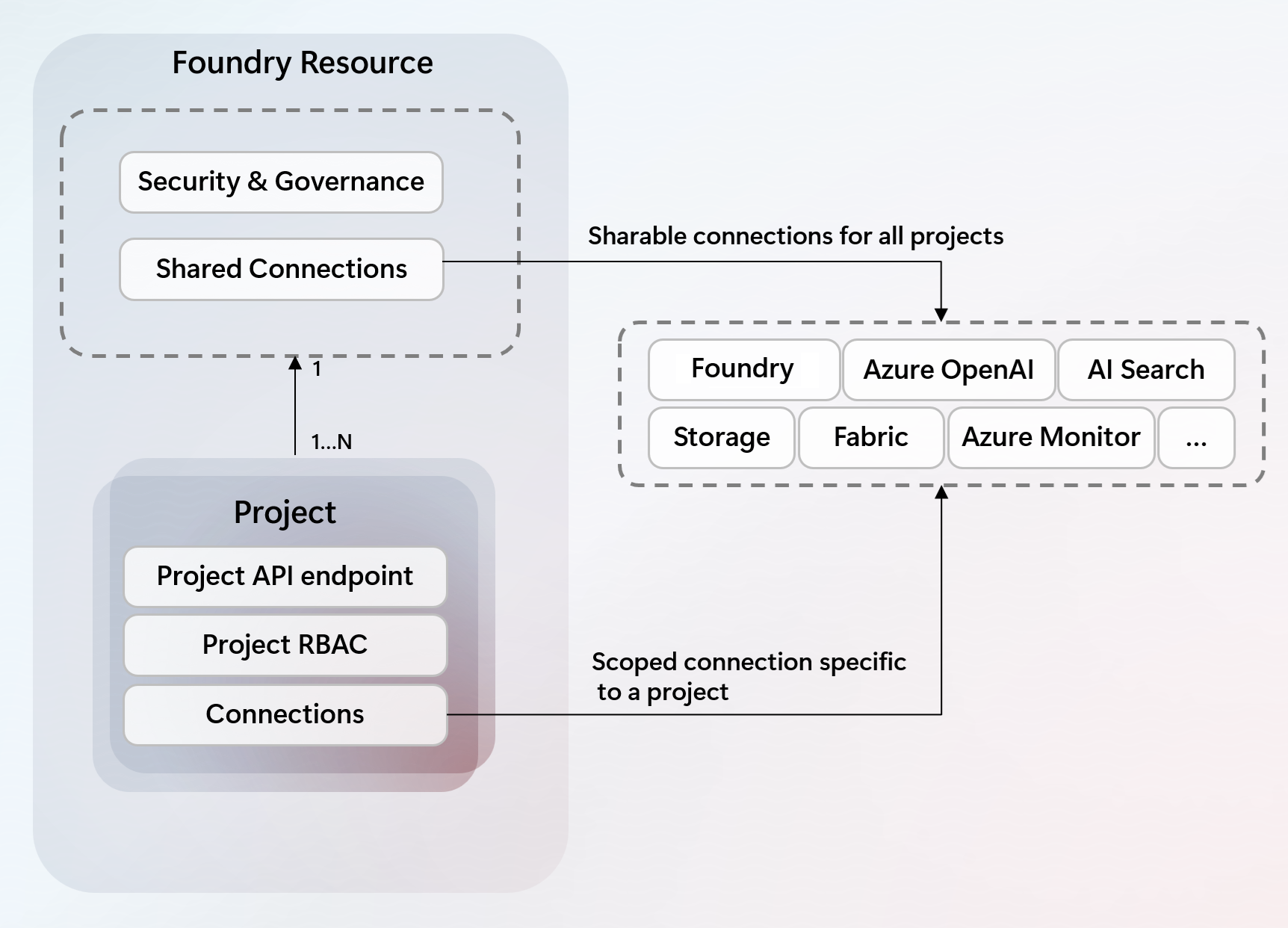
Use Add connections in Foundry to standardize connection setup.
Connections can be created at both the parent Foundry resource-level and child project-level dependent on desired isolation scope. Connections configured at the parent level are available to all projects.
Plan automation and operations
Define how teams create and manage resources consistently across environments.
- Use infrastructure as code to provision core resources and policy defaults.
- Standardize deployment pipelines for projects, connections, model deployments, and configuration changes.
- Define rollback and incident response procedures for model and policy changes.
For automation patterns and starter implementations, use:
- Quickstart: Deploy a Microsoft Foundry resource by using a Bicep file
- Terraform on Azure
- Security configurations samples
The sample templates include end-to-end patterns for common security scenarios, such as private networking, customer-managed keys, and role-based access control.
Define self-serve guardrails
Enable self-serve only within clear constraints:
- Define which roles can create projects, deploy models, and connect external tools.
- Apply policy controls for model deployment and runtime behavior including which model providers, and which tool connections are allowed.
- Set cost controls and budget alerts for shared and isolated environments.
- Enforce trace logging into central observability across Microsoft Foundry, Microsoft Copilot Studio and Microsoft 365.
Use these references:
Assign ownership and governance
Treat this step as the transition from provisioned infrastructure to operational developer usage.
Most organizations already manage access through precreated Microsoft Entra ID groups. Map those groups to Foundry roles at the required scope, then validate both management and development access paths.
Foundry separates access across:
- Control plane RBAC actions for resource management.
- Data plane RBAC actions for development workloads.
Important
Management roles such as Owner or Contributor are not sufficient for all development scenarios. For example, a user can manage resources but still need data plane roles to chat with an agent in Foundry.
For role mapping guidance and required role combinations, see Role-based access control in Foundry.
After onboarding your user groups, consider establishing or expanding governance dashboards to track Foundry usage, reliability, lineage, and compliance:
Sample platform deployment
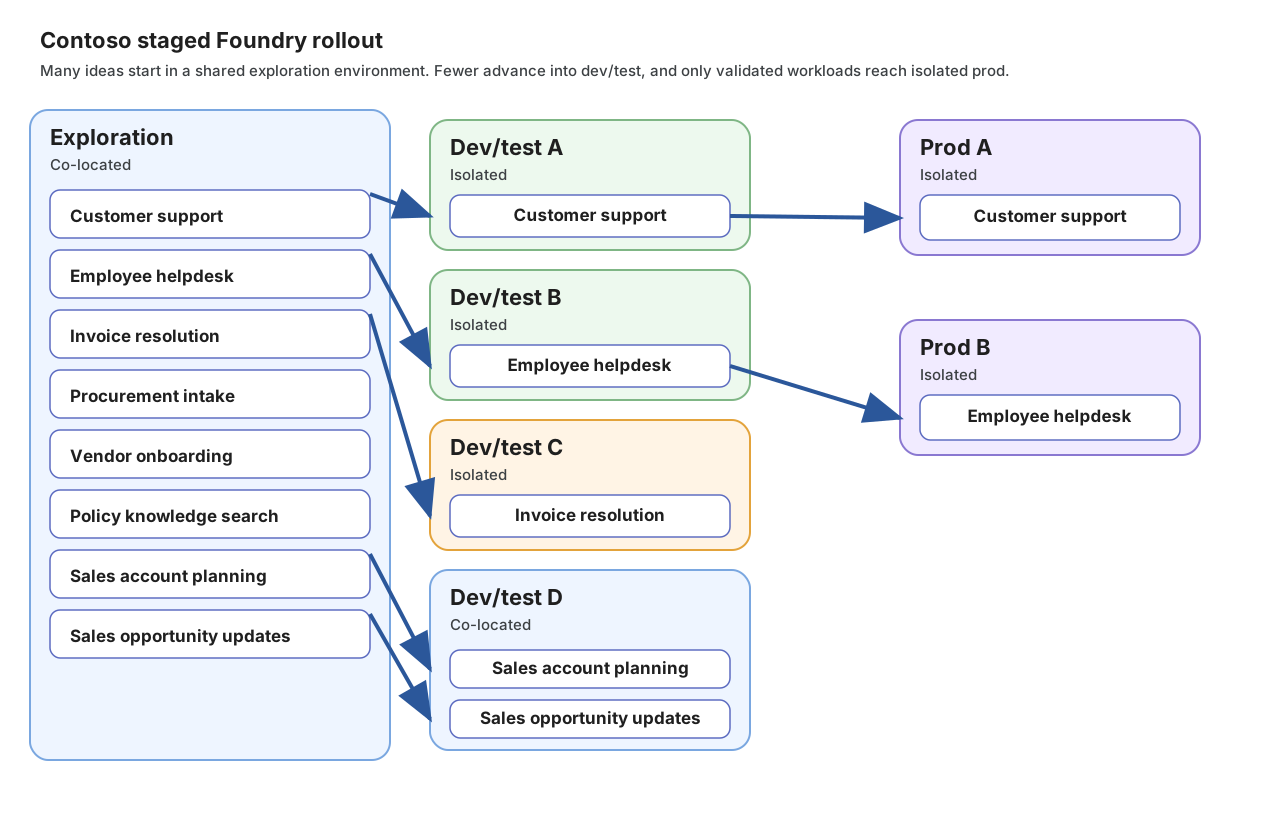
The IT organization at Contoso needs to support multiple teams while balancing two priorities:
- Rapid innovation, where developers can rigorously test the latest AI technologies using non-production data.
- Fully isolated dev/test and prod environments for proven use cases that receive funding for operationalization.
The diagram shows how Contoso co-locates a shared exploration Foundry instance for innovation, available to all teams, with limited capacity and pre-connected data and tools. The sample backlog reflects common enterprise functions such as customer support, employee helpdesk, finance operations, procurement, and sales. Historically, only a handful of use cases progress to proven feasibility or secure funding for a dev/test rollout. From those, an even smaller subset advances to prod. The sample also shows two related sales use cases that stay co-located through exploration and dev/test because they share the same CRM data, user personas, and connected systems. As use cases mature, teams are assigned environments with progressively stronger isolation, culminating in full prod-grade separation where needed.
Access extended functionality with Azure AI Hub
While a Foundry resource alone gives you access to most Foundry functionality, select capabilities are currently only available in combination with an Azure AI hub resource powered by Azure Machine Learning. These capabilities are lower in the AI development stack and focus on model customization.
Hub resources require their own project types that you can also access by using the Azure Machine Learning Studio, SDK, or CLI. To help plan your deployment, see this table and choose a resource type for an overview of supported capabilities.
You deploy a hub resource side-by-side with your Foundry resource. The hub resource takes a dependency on your Foundry resource to provide access to select tools and models.
Learn more
Secure the Foundry environment
- Authentication and RBAC: Role-based access control in Foundry
- Networking: Use a virtual network with Foundry
- Customer-managed keys (CMK): Customer-managed keys in Foundry
- Example infrastructure: templates repository with sample infrastructure templates
- Recover or purge deleted Foundry resources
Establish connectivity with other Azure services
- Overview of connections: Add a new connection in Foundry