Note
Access to this page requires authorization. You can try signing in or changing directories.
Access to this page requires authorization. You can try changing directories.
SecureDesignStudio (SDS) brings security and privacy design reviews into one open-source, browser-based workspace for Windows, macOS, and Linux. Find the project at aka.ms/securedesignstudio, or start with the getting-started guide to create your first model.
Core modeling and local analysis don't require an Azure account or AI service. PowerShell launchers support Windows, and shell launchers support macOS and Linux. The screenshots in this article are SDS 1.0.18 reference captures, so current controls might differ.
SDS isn't restricted to Azure or Microsoft technologies. Microsoft services across Azure, Microsoft 365, and Dynamics 365 have first-class built-in catalog coverage. Generic Process, Data Store, and External Interactor components and customizable node types let you describe non-Microsoft, on-premises, and mixed-cloud systems. Contributions can extend provider-specific catalogs, including AWS and Google Cloud; built-in service coverage isn't equivalent across all providers.
SDS uses an open-source maintenance model, not a Microsoft product-support contract. The quickstart pins a source snapshot for reproducibility.
Model the design
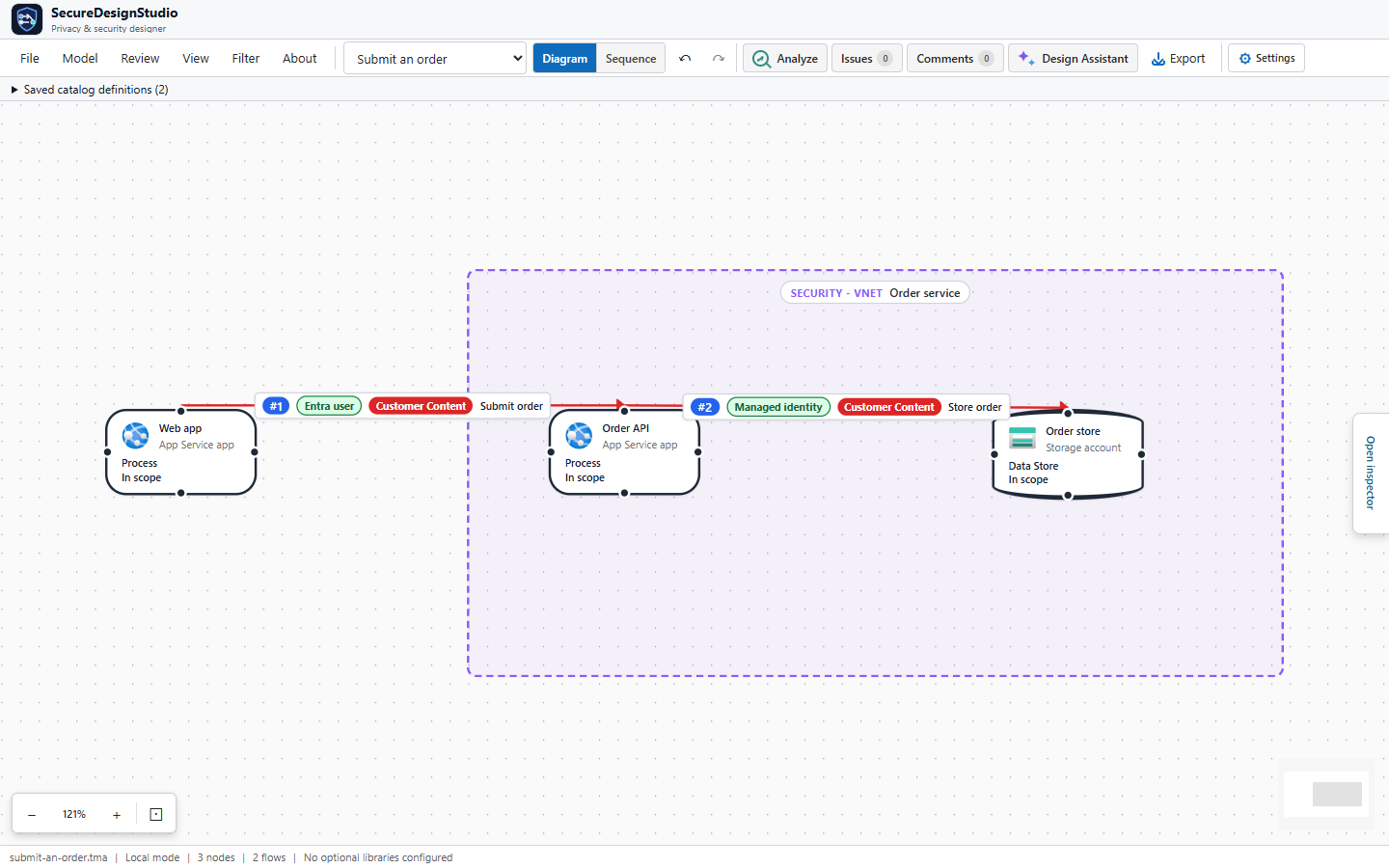
A fictional order workflow in Diagram view. The examples use synthetic data.
| Feature | What you can do |
|---|---|
| Data-flow diagrams | Add components, connect directional flows, and describe security and privacy boundaries. Use Process, Data Store, and External Interactor roles to explain each component's purpose. |
| Scenarios | Break a larger system into focused workflows. Reuse components while keeping scenario-specific call order, data attachments, and retention. |
| Sequence view | Walk through calls in order using another view of the same model. It describes the modeled workflow, not observed runtime traffic. |
| Node Type Catalog | Choose service types and define reusable component information. |
| Authentication and data | Describe flow authentication, classify reusable data elements, attach request and response data, and record retention on receiving components. |
| Reusable libraries and guidance | Customize authentication and classification vocabularies, and retain referenced definitions with native models. Component and authentication guidance supports review; it doesn't establish that controls are deployed. |
Choose View > Sequence to discuss the same workflow in call order:
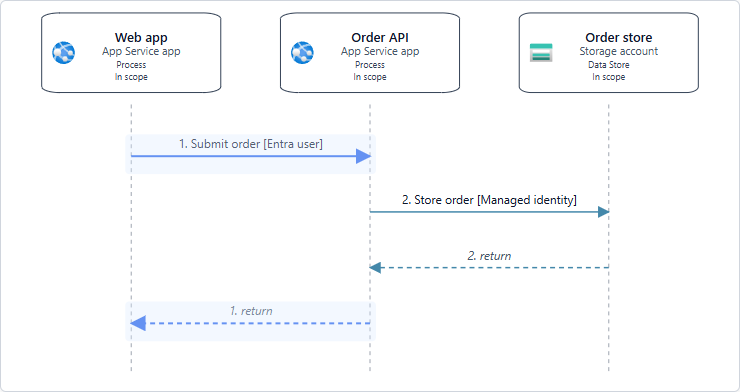
Return arrows are inferred from the modeled call order, not captured network traffic.
Review the design
Review > Analyze runs local checks across the whole document. It highlights missing information and inconsistencies in areas such as authentication, data handling, and retention. These checks don't require an AI service.
Use Issues for findings, Comments for scenario discussions, and Work Items for follow-up actions and tracker links. Review each work item's name, description, type, and severity, then accept or reject it.
You can export accepted work for Azure Boards CSV import. Direct Azure DevOps submission requires a separately configured deployment, sign-in, and an explicit submit action. Accepting an item alone doesn't contact Azure DevOps, and SDS doesn't automatically synchronize with your tracker. For more information, see Work items and Azure DevOps submission.
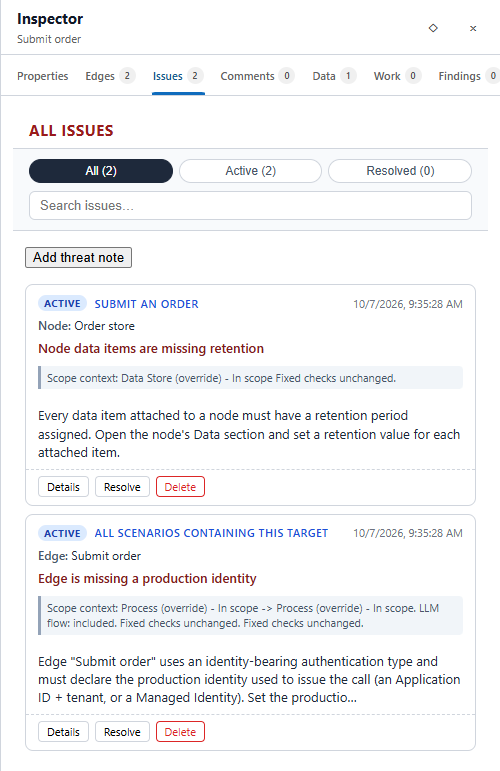
Local analysis identifies deliberately incomplete information in the example model.
Use Compare to previous to load an earlier model without replacing your current work, then inspect Review > Changes.
The inspector can stay docked, expand over the workspace, or open in a separate window. Its Excel (.xlsx) action exports retained review data across all scenarios and inspector tabs, not just the current selection or filter. Review the workbook for sensitive content before sharing; it isn't an editable-model backup or an import format.
Important
Analysis supports a review; it doesn't replace one. It doesn't scan deployed resources or certify security or compliance. Investigate incomplete or unavailable checks, and validate mitigations against the implementation.
Not re-evaluated means a retained finding couldn't be refreshed with the available rules; it doesn't mean the design passed.
Find your way around
| Menu or control | Purpose |
|---|---|
| File | Create, open, save, import, export model formats, and compare models. |
| Model | Manage catalogs, authentication and classification libraries, data elements, work items, and scenarios. |
| Review | Analyze the model and review issues, comments, and changes. |
| View | Switch between Diagram and Sequence, open inspector panels, and fit the diagram to the canvas. |
| Filter | Narrow the visible diagram. Choose Apply to apply staged filters; Clear all removes them immediately. Filtering doesn't remove model content. |
| Export | Save a diagram image or an HTML review report for the selected scenario. |
Select a component or flow to edit it in the inspector. Use the scenario selector to switch workflows and the bottom-left canvas controls to zoom.
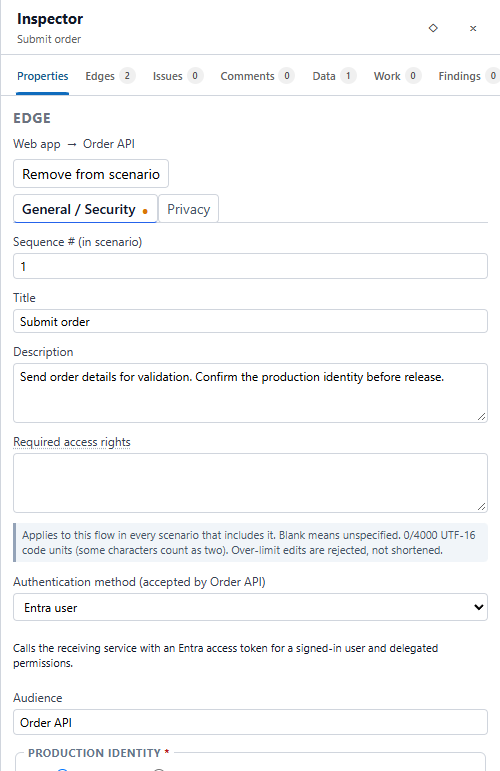
Use the inspector to describe a flow's security and privacy details. The selected method is an example, not a recommendation.
Save, import, and share
Save .tma for the full editable SDS model. Browser autosave helps with recovery but isn't a substitute for saved backups.
SDS can import and export TMT .tm7 diagrams, export Visio .vsdx diagrams, and produce PNG images and HTML review reports. Review conversion notices: external formats don't preserve every SDS property, and .tm7 interchange isn't a lossless transfer of templates or threat records.
Visio is export-only, so SDS doesn't import .vsdx files. SDS also supports two other local imports:
- Scenario/DFD JSON in the documented structure (not arbitrary JSON). This import replaces the current model.
- Privacy Manager export (PMEXP) data-inventory files. This import merges inventory data into mapped or created nodes, and it requires an existing scenario.
These imports don't sign in to a portal or acquire source files.
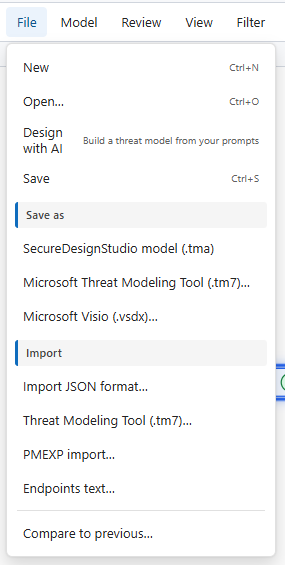
File contains editable-model formats and imports; Export contains image and review-report options.
Optional AI and collaboration
These capabilities require separate configuration and aren't enabled by the basic local launcher:
- Design with AI helps you build or refine a scenario from prompts. Design Assistant supports Chat and AI Analysis. Choose an authorized deployment of Azure OpenAI in Microsoft Foundry Models, or the Claude Code or Codex CLI signed in with an eligible subscription. Azure requires Azure-specific configuration. Claude and Codex use a local bridge without Azure credentials or Azure Functions. SDS doesn't include a model service or subscription.
- Simulate breach animates a modeled path assembled from connected flows near an AI finding. It isn't an observed attack or exploit test, and its displayed severity score isn't a calculated risk score. New AI Analysis sends scenario context to the selected provider; replaying existing findings doesn't send another request.
- Live collaboration, in a collaboration-enabled deployment, lets authorized participants work on a shared model. Share room links only with intended reviewers.
Important
AI requests send prompts and the included model context, which can contain sensitive design details, to the selected provider. A local CLI bridge doesn't keep inference or the submitted context on your machine. Consumer subscriptions can handle data differently from an organization-managed deployment. Use only a provider and account your organization approves for that data. Don't send secrets, personal data, or confidential threat-model details unless explicitly authorized under the applicable data-handling policy. Review the provider's retention, training, and sharing controls, follow your organization's AI policies, and validate generated suggestions before accepting them.
Provider selection, account access, costs, and authorization to share model context belong to the customer or their organization. Supporting a provider doesn't endorse it for confidential workloads or establish compliance with your organization's requirements. You can leave AI disabled and use local modeling and Analyze instead. For more information, see Bring your own AI.
On macOS and Linux, run the optional AI launcher with sh ./start-securedesignstudio-with-ai.sh --provider <name>, replacing <name> with azure, claude, or codex. Windows uses .\Start-SecureDesignStudio-WithAI.ps1 -Provider <name> with Azure, Claude, or Codex. The cross-platform equivalent is npm run start:ai -- --provider <name>. Claude/Codex readiness requires a Node.js build with TypeScript type stripping; some Linux distribution builds omit it. The launcher reports this prerequisite; use an official Node.js build through a version manager if necessary.
Neither AI nor collaboration is required to draw, run local Analyze, save, or export a model locally.