Note
Access to this page requires authorization. You can try signing in or changing directories.
Access to this page requires authorization. You can try changing directories.
Microsoft invests in Azure-native security capabilities that organizations can use to protect against ransomware attack techniques found in high-volume everyday attacks and sophisticated targeted attacks.
Tip
For comprehensive ransomware protection guidance across all Microsoft platforms and services, see Protect your organization against ransomware and extortion. This article focuses specifically on Azure-native features and resources.
Key capabilities include:
- Native threat detection: Microsoft Defender for Cloud provides high-quality threat detection and response capabilities, also called Extended Detection and Response (XDR). These capabilities help you:
- Avoid wasting time and talent of scarce security resources to build custom alerts by using raw activity logs.
- Ensure effective security monitoring, which often enables security teams to rapidly approve use of Azure services.
- Passwordless and multifactor authentication: Microsoft Entra multifactor authentication, Microsoft Authenticator, and Windows Hello provide these capabilities. These capabilities help protect accounts against commonly seen password attacks, which account for 99.9% of identity attacks in Microsoft Entra ID. While no security is perfect, eliminating password-only attack vectors dramatically lowers the ransomware attack risk to Azure resources.
- Native firewall and network security: Microsoft built native DDoS attack mitigations, Azure Firewall, Web Application Firewall, and many other controls into Azure. These security-as-a-service capabilities help simplify the configuration and implementation of security controls. These capabilities give organizations the choice of native services or virtual appliance versions of familiar vendor capabilities to simplify their Azure security.
Microsoft Defender for Cloud
Microsoft Defender for Cloud is a built-in tool that provides threat protection for workloads running in Azure, on-premises, and in other clouds. It protects your hybrid data, cloud-native services, and servers from ransomware and other threats. Defender for Cloud also integrates with your existing security workflows, such as your SIEM solution, and Microsoft threat intelligence to streamline threat mitigation.
Microsoft Defender for Cloud delivers protection for all resources from directly within the Azure experience and extends protection to on-premises and multicloud virtual machines and SQL databases by using Azure Arc:
- Protect Azure services.
- Protect hybrid workloads.
- Streamline security with AI and automation.
- Detect and block advanced malware and threats for Linux and Windows servers on any cloud.
- Protect cloud-native services from threats.
- Protect data services against ransomware attacks.
- Protect your managed and unmanaged IoT and OT devices, with continuous asset discovery, vulnerability management, and threat monitoring.
Microsoft Defender for Cloud provides the tools to detect and block ransomware, advanced malware, and threats for your resources.
Keeping your resources safe is a joint effort between Azure and you. Secure your workloads as you move to the cloud. When you move to infrastructure as a service (IaaS), you're responsible for more security tasks than with platform as a service (PaaS) and software as a service (SaaS). Microsoft Defender for Cloud provides tools to harden your network, secure your services, and maintain your security posture.
Microsoft Defender for Cloud is a unified infrastructure security management system that strengthens the security posture of your datacenters and provides advanced threat protection across your hybrid workloads in the cloud, whether they're in Azure or not, and on-premises.
Defender for Cloud threat protection helps you detect and prevent threats at the infrastructure as a service (IaaS) layer, on non-Azure servers, and for platform as a service (PaaS) in Azure.
Defender for Cloud's threat protection includes fusion kill-chain analysis, which automatically correlates alerts in your environment based on cyber kill-chain analysis, to help you better understand the full story of an attack campaign, where it started and what kind of impact it had on your resources.
Key features:
- Continuous security assessment: Identify Windows and Linux machines with missing security updates or insecure OS settings and vulnerable Azure configurations. Add optional watchlists or events you want to monitor.
- Actionable recommendations: Remediate security vulnerabilities quickly with prioritized, actionable security recommendations.
- Centralized policy management: Ensure compliance with company or regulatory security requirements by centrally managing security policies across all your hybrid cloud workloads.
- Industry's most extensive threat intelligence: Tap into the Microsoft Intelligent Security Graph, which uses trillions of signals from Microsoft services and systems around the globe to identify new and evolving threats.
- Advanced analytics and machine learning: Use built-in behavioral analytics and machine learning to identify known attack patterns and post-breach activity.
- Adaptive application control: Block malware and other unwanted applications by applying allowlist recommendations adapted to your specific workloads and powered by machine learning.
- Prioritized alerts and attack timelines: Focus on the most critical threats first with prioritized alerts and incidents that are mapped into a single attack campaign.
- Streamlined investigation: Quickly investigate the scope and impact of an attack with a visual, interactive experience. Use ad hoc queries for deeper exploration of security data.
- Automation and orchestration: Automate common security workflows to address threats quickly by using built-in integration with Azure Logic Apps. Create security playbooks that can route alerts to existing ticketing system or trigger incident response actions.
Microsoft Sentinel
Microsoft Sentinel helps you create a complete view of a cyberattack chain.
By using Sentinel, you can connect to any of your security sources through built-in connectors and industry standards. Then, take advantage of artificial intelligence to correlate multiple low-fidelity signals spanning multiple sources. This approach creates a complete view of a ransomware cyberattack chain and prioritized alerts so that defenders can accelerate their time to remove adversaries.
Microsoft Sentinel provides a view across the enterprise. This view helps reduce the stress of increasingly sophisticated cyberattacks, increasing volumes of alerts, and long resolution time frames.
Collect data at cloud scale across all users, devices, applications, and infrastructure, both on-premises and in multiple clouds.
Detect previously undetected threats, and minimize false positives by using Microsoft's analytics and unparalleled threat intelligence.
Investigate threats with artificial intelligence. Hunt for suspicious activities at scale based on years of cybersecurity work at Microsoft.
Respond to incidents rapidly with built-in orchestration and automation of common tasks.
Native threat prevention with Microsoft Defender for Cloud
Microsoft Defender for Cloud scans virtual machines across an Azure subscription and makes a recommendation to deploy endpoint protection when it doesn't detect an existing solution. You can access this recommendation through the Recommendations section:
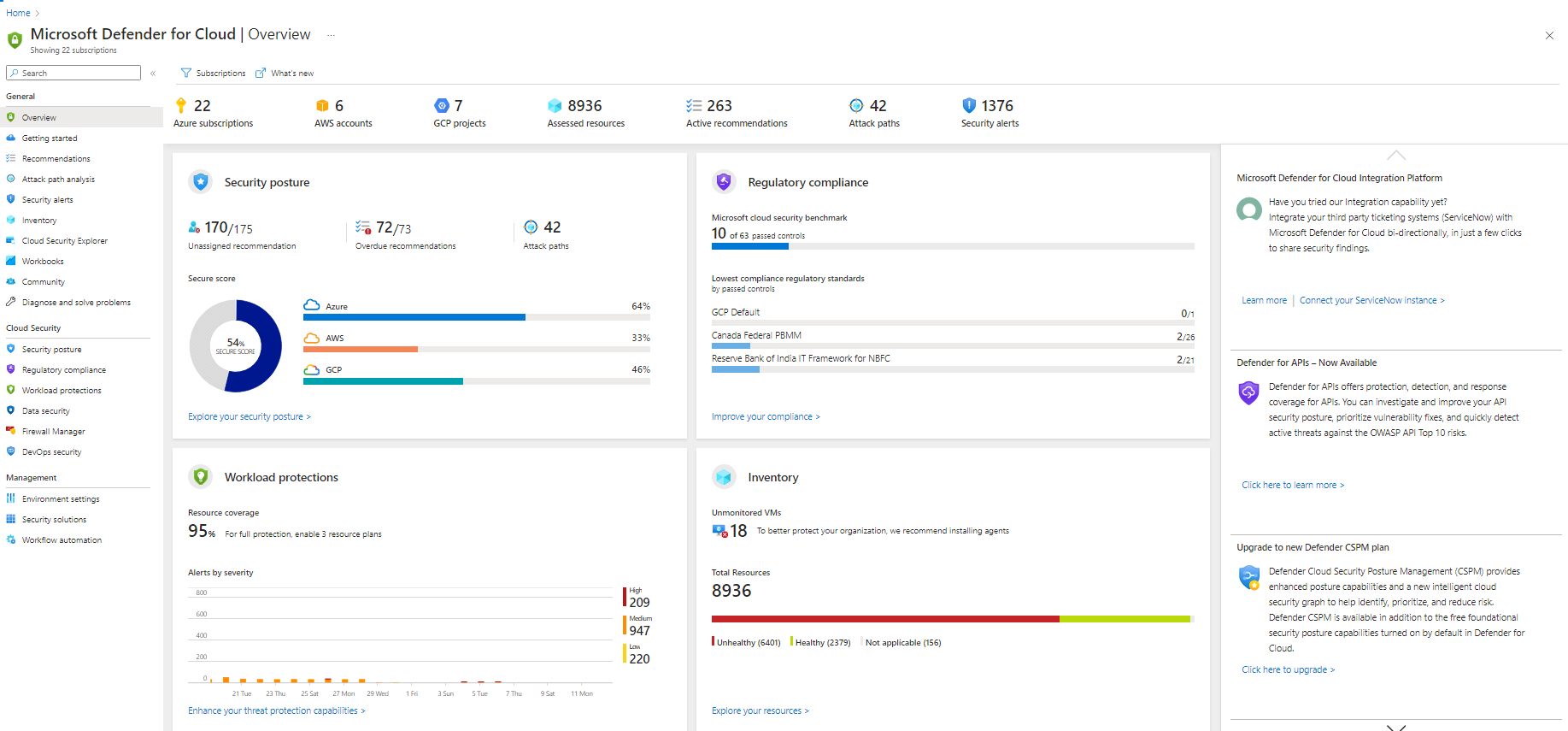
Microsoft Defender for Cloud provides security alerts and advanced threat protection for virtual machines, SQL databases, containers, web applications, your network, and more. When Microsoft Defender for Cloud detects a threat in any area of your environment, it generates a security alert. These alerts describe details of the affected resources, suggested remediation steps, and in some cases an option to trigger a logic app in response.
This alert is an example of a detected Petya ransomware alert:

Azure-native backup solution protects your data
One important way that organizations can help protect against losses in a ransomware attack is to back up business-critical information in case other defenses fail. Because ransomware attackers invest heavily in neutralizing backup applications and operating system features like volume shadow copy, it's critical to have backups that are inaccessible to a malicious attacker. Azure offers secure services for data protection, business continuity, and disaster recovery:
- Azure Backup: Azure Backup provides a simple, secure, and cost-effective solution to back up your Azure VM. Azure Backup supports backup of all disks (OS and data disks) in a VM by using the backup solution for Azure virtual machines.
- Azure Site Recovery: By using disaster recovery from on-premises to the cloud, or from one cloud to another, you can avoid downtime and keep your applications running.
- Built-in security and management in Azure: To be successful in the cloud era, enterprises must have visibility, metrics, and controls on every component to pinpoint problems efficiently, optimize and scale effectively, and help ensure security, compliance, and policies are in place.
Resilient and protected access to your data
Azure has extensive experience managing global datacenters. Microsoft invested over $15 billion to build its global infrastructure, which undergoes continuous evaluation and improvement.
Key features:
- Azure Storage stores multiple copies of your data. Locally redundant storage (LRS) copies data within a single physical location in the primary region. Geo-redundant storage (GRS) copies data to a secondary region.
- An advanced encryption process protects all data stored on Azure. All Microsoft datacenters have two-tier authentication, proxy card access readers, and biometric scanners.
- Azure supports many compliance offerings, including ISO 27001, HIPAA, FedRAMP, SOC 1, SOC 2, and many international specifications.
More resources
- Microsoft Cloud Adoption Framework for Azure
- Build great solutions with the Microsoft Azure Well-Architected Framework
- Azure Top Security Best Practices
- Microsoft cloud security benchmark
- Azure documentation
- Azure Migration Guide
- Security Compliance Management
- Azure Security Control – Incident Response
- Zero Trust Guidance Center
- Azure Web Application Firewall
- Azure VPN gateway
- Microsoft Entra multifactor authentication (MFA)
- Microsoft Entra ID Protection
- Microsoft Entra Conditional Access
- Microsoft Defender for Cloud documentation
Conclusion
Microsoft focuses heavily on the security of its cloud and provides the security controls required to protect your cloud workloads. As a leader in cybersecurity, Microsoft embraces its responsibility to help make the world safer. This responsibility is reflected in Microsoft's comprehensive approach to ransomware prevention and detection across security frameworks, designs, products, legal efforts, industry partnerships, and services.
Microsoft can partner with you to address ransomware protection, detection, and prevention in a holistic manner.
Connect with Microsoft:
For detailed information about how Microsoft secures the cloud, see the Service Trust Portal.
What's next
For comprehensive ransomware protection guidance across all Microsoft platforms and services, see Protect your organization against ransomware and extortion.
Other Azure ransomware articles: