Note
Access to this page requires authorization. You can try signing in or changing directories.
Access to this page requires authorization. You can try changing directories.
Each connector offers a set of operations classified as actions and triggers. Once you connect to the underlying service, you can easily use these operations within your apps and workflows.
Actions
Actions are changes directed by a user. For example, use an action to look up, write, update, or delete data in a SQL database. All actions directly map to operations defined in an OpenAPI specification.
Triggers
Many connectors provide triggers that can notify your app when specific events occur. For example, the FTP connector has the OnUpdatedFile trigger. You can build either a Logic App or a flow that listens to this trigger and performs an action whenever the trigger fires.
There are two types of triggers:
Polling triggers: These triggers call your service at a specified frequency to check for new data. When new data is available, they cause a new run of your workflow instance with the data as input.
Push triggers: These triggers listen for data on an endpoint, that is, they wait for an event to occur. The occurrence of this event causes a new run of your workflow instance.
Note
Power Apps doesn't support triggers. Learn how to start a flow in an app.
Architecture components
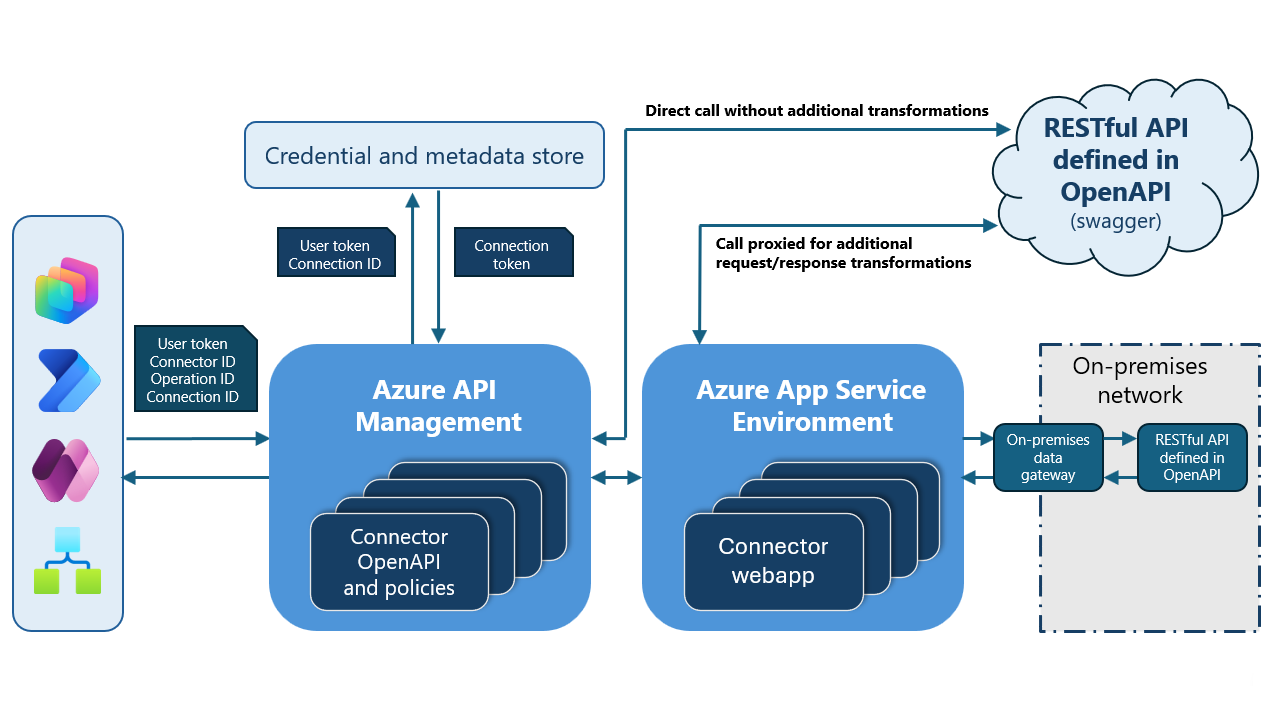
Here are the architecture components and what they do:
Credential and metadata store: A service that stores connector metadata, such as Swagger files, connection information, and access control lists (ACLs). It also stores credentials associated with a connection.
Connector:
- Azure API Management (APIM) to host all the Swagger files and policies. Besides being the entry point for all calls that interact with the connector, Azure APIM verifies keys, tokens, certificates, and other credentials.
- App Service Environment to host connector web apps.
Runtime flow:
Provide feedback
We greatly appreciate feedback on issues with our connector platform, or new feature ideas. To provide feedback, go to Submit issues or get help with connectors and select your feedback type.