Note
Access to this page requires authorization. You can try signing in or changing directories.
Access to this page requires authorization. You can try changing directories.
What is Enterprise Preview?
Enterprise preview provides a simpler way for admins to flight prerelease Edge builds to their users. To reduce friction and bolster usage, users receive prerelease builds directly inside of their Stable Edge application. Admins can allow users to easily opt-out of the preview experience, using built-in rollback to switch between their prerelease and stable channels with ease. Microsoft 365 admin center users can configure the feature, view their flighting population, and receive personalized recommendations all in one place.
How do I configure it?
Set the Target Channel policy to Beta or Dev to flight the desired prerelease channel inside of the Edge Stable application by default.
Set the Edge Preview Enrollment Type policy to Allow opt-out to allow end users to seamlessly switch between prerelease builds and Stable builds inside the Edge Stable application
What is the recommended flighting population?
To get a strong compatibility signal, we recommend the following prerelease flighting population sizes based on a percentage of the total device population. The minimum suggested prerelease audience size is 20 devices.
| Total device count | Recommended prerelease audience size |
|---|---|
| Less than 10,000 | 10% |
| 10,000 to 100,000 | 5% |
| 100,000 to 1,000,000 | 1% |
| 1,000,000 to 10,000,000 | 0.5% |
| 10,000,000 or more | 0.1% |
Example: Contoso has 500,000 devices in their total population. To get a strong compatibility signal, they should have at least 5,000 devices flighting prerelease versions of Edge.
What do end users see?
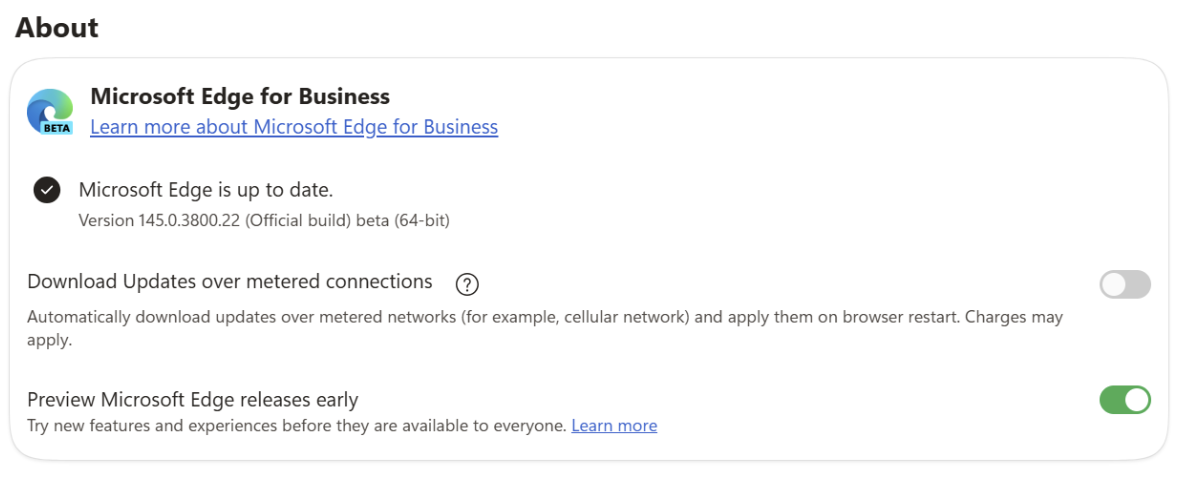
While using enrolled in Enterprise Preview. There is change to the taskbar icon. The only indicators that this is a prerelease build reside on edge://about, where end users see the prerelease channel's icon, version, and UI that shows they're enrolled in Enterprise Preview.
What are the different enrollment types?
If the Edge Preview Enrollment Type policy is set to Required, users must remain on the targeted prerelease channel and can’t switch back to the Stable channel. The toggle on edge://about appears grayed out.
If the Edge Preview Enrollment Type policy is set to Allow opt-out, users can seamlessly switch between the targeted prerelease channel and the Stable channel. A toggle appears on edge://about that allows users to switch channels.
What happens if I delete this policy?
If you delete this policy, affected devices take patch updates to their prerelease version until an equal or higher Stable version is released. When this condition is met, the devices return to the Stable channel.
How is this different from TargetChannel?
The new EdgePreviewEnrollmentType policy gives end users the option to seamlessly return to the Stable channel, rather than being stuck in the channel set by TargetChannel. This allows end users to move back to a functional version of Edge if a prerelease build negatively affects productivity.
If you want your device group to receive the previous functionality of TargetChannel, set EdgePreviewEnrollmentType to Required.
Can I configure this feature in Edge Management Service?
Yes, you can set up flighting groups in Edge Management Service by deploying the policies mentioned previously.
When you enable the Monitoring dashboard, you can intuitively set up and view your flighting population. You'll also be able to see how the size of your flighting population compares to the recommended flighting population size for your organization.
Note
Intune is required to use this feature in Edge Management Service.