Note
Access to this page requires authorization. You can try signing in or changing directories.
Access to this page requires authorization. You can try changing directories.
This article is for Microsoft Purview administrators who manage unlicensed OneDrive for Business sites. Use the Fix-PurviewConfig cmdlet in Security & Compliance PowerShell to force-exclude a specified retention hold from an unlicensed, archived site. Removing the blocking hold allows the site to be deleted when no other non-force-excluded holds apply.
Before you begin, review the account, site, and policy requirements in Prerequisites.
Prerequisites
Before you begin, make sure you have:
- An account that can connect to Security & Compliance PowerShell.
- The URL of the unlicensed OneDrive for Business site.
- The GUID of the retention or hold policy to remove. The policy must exist in EOP and apply to the specified site.
- Confirmation that the site owner is unlicensed and the OneDrive site is archived. For more information, see Manage unlicensed OneDrive user accounts.
Remove the retention hold
The RemoveHoldFromUnlicencedODBSite scenario removes the specified hold from the site. Review your organization's retention and legal requirements before you run the cmdlet because removing the blocking hold can allow site deletion.
Confirm the values that you will use for
SiteUrlandPolicyId.Run the
Fix-PurviewConfigcmdlet with the following syntax:Fix-PurviewConfig -Scenario RemoveHoldFromUnlicencedODBSite -SiteUrl <String> -PolicyId <String>For example:
Fix-PurviewConfig -Scenario RemoveHoldFromUnlicencedODBSite `
  -SiteUrl "https://<tenant>-my.sharepoint.com/personal/<user>" `
  -PolicyId "430b7b03-88b7-4ec5-9ae1-736f27bac9c3"
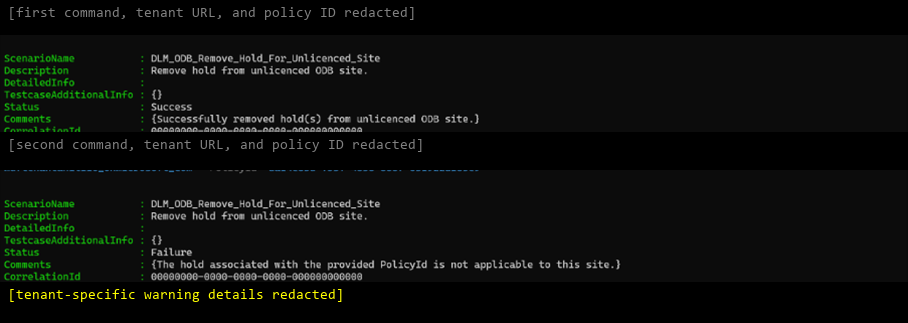
Review the result. A successful operation returns the following fields:
ScenarioName  : DLM_ODB_Remove_Hold_For_Unlicenced_Site
Description   : Remove hold from unlicenced ODB site.
Status        : Success
Comments      : {Successfully removed hold(s) from unlicenced ODB site.}
CorrelationId : 00000000-0000-0000-0000-000000000000
After successful execution, the specified hold is force-excluded. If no other non-force-excluded holds apply, site deletion is allowed.
You can run the command again without changing the result. If the hold is already excluded, the cmdlet reports that the hold has already been removed.
Resolve validation errors
Use the following table to resolve validation errors returned by the cmdlet.
| Validation error | Action |
|---|---|
SiteUrl isn't provided. |
Provide the URL of the unlicensed OneDrive for Business site. |
SiteUrl isn't a valid OneDrive for Business URL. |
Correct the URL format and run the command again. |
| The specified site isn't present in OneDrive for Business. | Confirm that the site exists and that you entered the correct URL. |
PolicyId isn't provided. |
Provide the retention or hold policy GUID. |
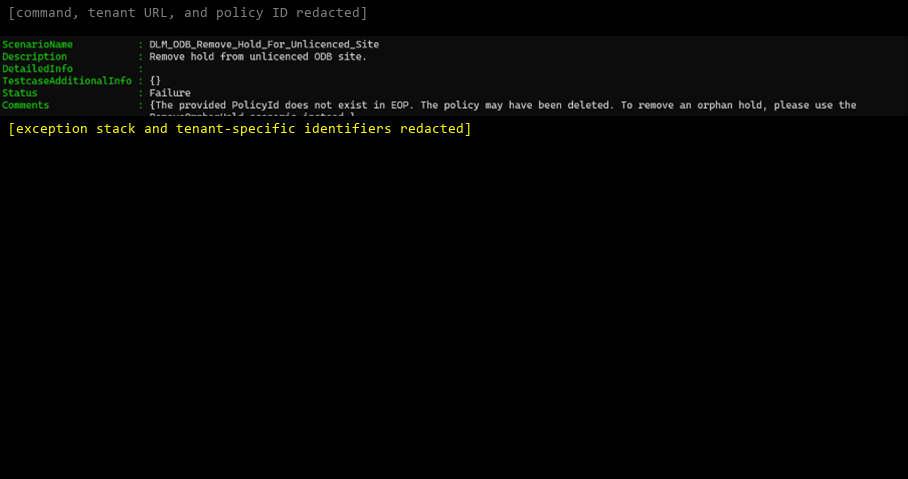
PolicyId doesn't exist in EOP. |
Confirm the policy ID and run the command again. |
PolicyId isn't a valid GUID. |
Provide a valid policy GUID. |
| The hold doesn't apply to the site. | Confirm that the policy applies to the specified site. |
| The site owner is licensed. | Remove the hold only after the site owner is unlicensed. |
Review validation screenshots
The following screenshots show the validation outcomes from the approved test run. Tenant URLs, user aliases, local file paths, policy identifiers, browser property values, and exception internals are redacted. The cmdlet results and status messages are unchanged.
Validate the site URL
Site URL isn't provided

Site URL isn't in a valid OneDrive for Business format

Site URL isn't present in OneDrive for Business

Validate the policy ID
Policy ID isn't provided

Policy ID doesn't exist in EOP
Policy ID isn't a valid GUID

Validate hold applicability and licensing
Hold isn't applicable to the site

Site owner is licensed

Verify site-level hold removal
Before cmdlet execution

Successful cmdlet execution

After cmdlet execution

Verify tenant-level hold removal
Before cmdlet execution

Successful cmdlet execution

After cmdlet execution

Verify repeated execution
Hold is already excluded