Note
Access to this page requires authorization. You can try signing in or changing directories.
Access to this page requires authorization. You can try changing directories.
Note
Learn more about where specific automated extensions are available.
Microsoft Advertising can enhance your ads with ad extensions and automated extensions (formerly known as annotations). Both enhancement options help to improve the visibility and performance of your ads by displaying extra information about your business. More clicks means more customer traffic. You can add ad extensions to your ads yourself, but automated extensions require no action on your end. Automated extensions are automatically applied to your ads if Microsoft Advertising determines that the automated extension can improve your ad performance.
Eligibility
All advertisers are eligible for automated extensions; however, they are not always guaranteed to show in the ads. If two competing ads have the same bid and quality, the ad with greater expected impact from ad extensions and automated extensions will generally appear in a higher ad position than the other.
Here's how they work
Automated extensions show data from any of the sources—your ad landing pages, ad copies, and domains your ad copy points to. Certain data, like reviews and ratings, may be offered from third-party providers.
Here are the different types of automated extensions available from Microsoft Advertising. Keep in mind that these are examples only and your ad might look a little different than those shown below.
FAQ
Business logo
Business logo
Note
This feature is available on computer, tablet, and mobile devices in all Microsoft Advertising markets.
Promote your brand and stand out from the competition by displaying eye-catching logos in your ads. Automated business logo extensions help you build brand recognition to drive more clicks and conversions on your website. We'll automatically pull your business logo from your landing page to serve in your text ads and Product ads.
Note
You're automatically opted into business logos. To opt out, follow the instructions here: Opting out of Automated Extensions
Conversational Bing layout

Bing search engine results page layout
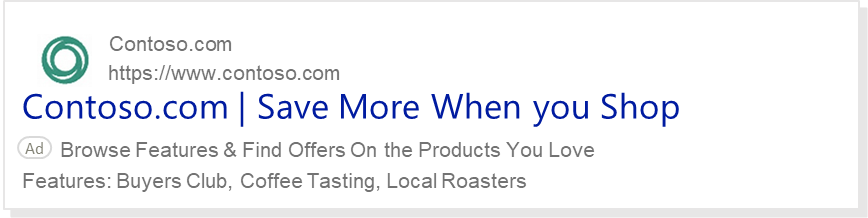
Consumer ratings
Note
This feature is available in Search advertising on computer, tablet, and mobile devices in the markets designated here.
Display high Consumer ratings for your business to increase customers' confidence in your ad. Consumer ratings are reviews that are added to eligible ads. When customers select the link for these ratings, they're taken to a third-party review page. These ratings attract more clicks, increasing confidence in your ads, and create a more engaging customer experience.
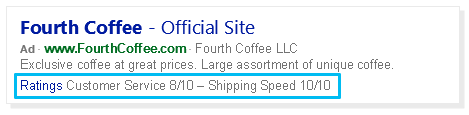
We base ratings from the following sources:
- ReviewCentre
- ViewPoints
- ShopperApproved
- Bizrate
- MrRebates
Consumer sentiment
Note
This feature is available for Search advertising on computer and mobile devices in the markets designated here.
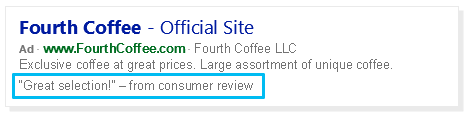
Show relevant reviews with positive comments about your business. Adding Consumer sentiments can increase customers' trust in your website, as well as your click-through rates.
Dynamic ad enhancements
Dynamic descriptions
Note
This feature is available for Search advertising on computer and tablet devices in the markets designated here.
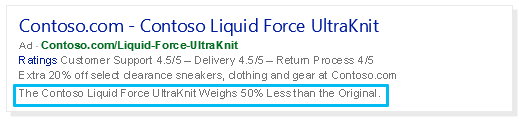
Dynamic descriptions enrich your ads with Bing-generated descriptions that are relevant to customers' search queries, based on content from your ad's landing page. This can build consumer confidence in the relevance of your ad, which can help to increase clicks.
Events
Note
This feature is available for Search advertising on computers in the markets designated here.
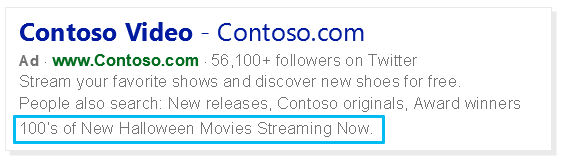
Events are automatically included as a single line of text from current or timely event-related content highlighted on your website. For example, if you're having a Mother's Day special, you may see the Event extension highlighting that.
This line of text encourages clicks by providing a quick glimpse of an event-related offer found on your website. Events may appear on the mainline or sidebar. Also, specific event date parameters are applied. For example, Bing will crawl for Valentine's Day-related content from January 31 to February 14.
Smart landing page title
Note
This feature is available for Search advertising on computer, mobile, and tablet devices in the markets designated here.
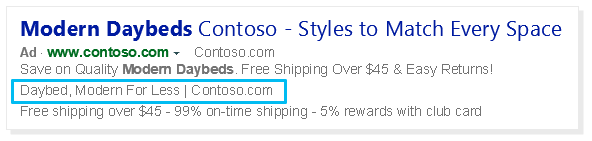
Smart landing page title highlights specific products and brands that are featured on your website. This informs users of the variety of products and services your website has to offer. Bing scans the landing page of your website to see if it contains product categories, features, or brand names that match the content of the search terms. It can also leverage the landing page title.
Dynamic callouts
Dynamic callouts
Note
This feature is available for Search advertising on computers in the markets designated here.
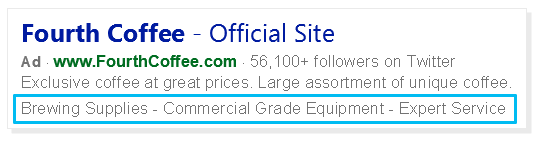
Dynamic callouts provide an extra snippet of text that highlights your website's products or offers. Learn more about callout extensions.
The callout text is generated from copy highlighted on your website's landing page, including key business details, highlighted services, and products offered.
Automated promotions (text ads only)
Note
This feature is available for Search advertising on computer and tablet devices in the markets designated here.
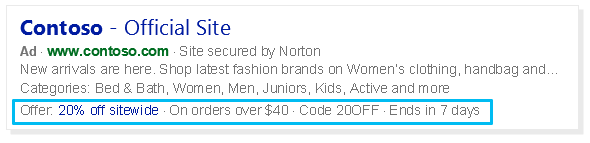
The Automated proaotion extension is available for text ads only. Automated promotion extensions use your Product ads Merchant Promotions data to automatically generate a promotional message for relevant ads. Promotions may include a promotion title, offer code, or expiration details.
This extension is only available if you are enrolled in Merchant Promotions. It's also important to know that only site-wide online promotions will be displayed and that product-level or local promotions will be included.
Dynamic partner data enhancements (includes Marketing with Purpose Attributes)
Marketing with Purpose Attributes
Note
This feature is available on computers in all Microsoft Advertising markets.
Showcase additional information about your business and stand out from the competition with Marketing with Purpose Attributes. Marketing with Purpose Attributes leverages data from your ad copy, information on your landing page, and your Business attributes data to highlight key business values. Marketing with Purpose Attributes will appear as an ad decoration to potential customers, which can improve your ad's visibility. For instance, in the following example we chose “Carbon-neutral” as the Marketing with Purpose Attributes ad decoration for this ad.

Get started with Business attributes
From the navigation menu on the left, hover over Campaigns and select Settings > Account level options.
Under the Business attributes dropdown menu, select one or more attributes that apply to your business. Examples of Business attributes include:
- Alcohol-free
- Family-owned
- Vegan
For a complete list of Business attributes, please see this spreadsheet.
Select Save.
Note
You can update your Business attributes settings at any time by selecting or canceling the selections as needed and then selecting Save.
Your account must have Dynamic Partner Data Enhancements enabled in order for your Marketing with Purpose Attributes to show during ad delivery. To enable Dynamic Partner Data Enhancements:
- From the navigation menu on the left, hover over Campaigns and select Ads & extensions > Automated Extensions. .
- Select Manage Automated Extensions.
- Select the radio button next to Use all Automated Extensions available for this account (recommended). Otherwise, if you select the radio button next to Opt out of specific Automated Extensions, make sure that Dynamic Partner Data Enhancements is unchecked.
- Select Save.
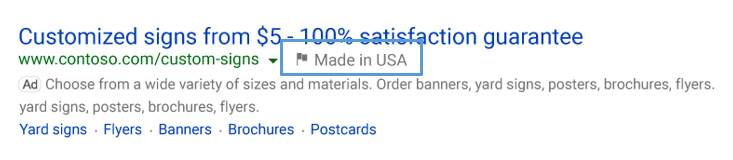
Country of origin badge
Note
This feature is available for Search advertising on computer and tablet devices in the markets designated here.
Highlight your products' country of origin to potential customers to help differentiate your products from your competitors'.
Deal badge
Note
This feature is available for Search advertising on computer and tablet devices in the markets designated here.
Highlight promotional aspects of your ad to increase customer engagement and drive more clicks. The Deal badge will only be eligible to serve during specified date ranges for various holidays or events.

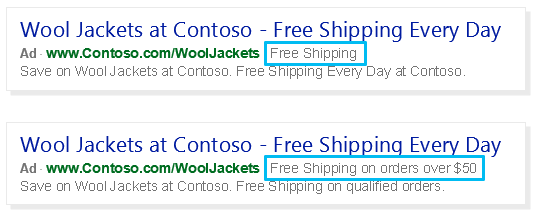
Free shipping for text ads
Note
This feature is available for Search advertising on computer and tablet devices in the markets designated here.
The Free shipping for text ads badge is enabled when you offer free shipping for products or orders. This can help to increase traffic to your ads, as it encourages shoppers to select your ad.
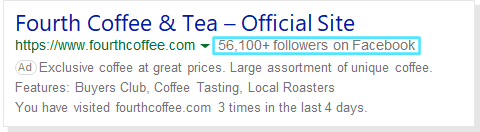
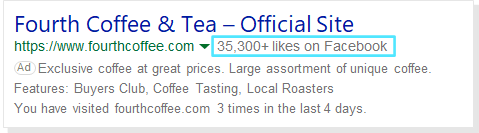
Facebook badge
Note
This feature is available for Search advertising on computer, mobile, and tablet devices in the markets designated here.
Uses your brand's Facebook presence to build trust and encourage ad engagement.
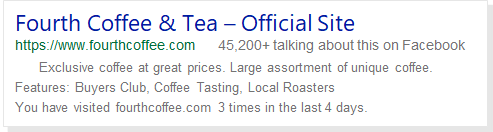
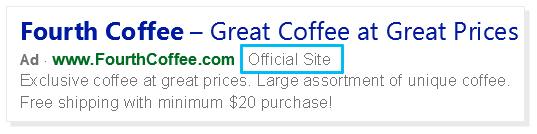
Official site badge
Note
This feature is available for Search advertising on computer and tablet devices in the markets designated here.
Build user confidence by affirming that your ad is for a brand's official website.
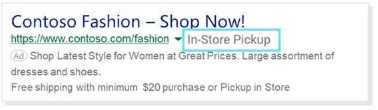
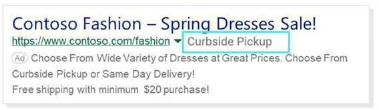
Store pickup badge
Note
This feature is available for Search advertising on computer and tablet devices in the markets designated here.
Highlight store pickup options to your shoppers.
Dynamic location
Dynamic location map link
Note
This feature is available for Search advertising on computer, mobile, and tablet devices in the markets designated here.
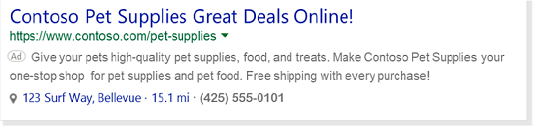
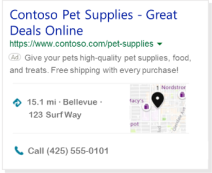
When you enable a location extension, you can choose to show the address of your business location that is closest to the customer and also include a local phone number. Better yet, if the customer is viewing your ad on a smartphone, they can click that number to give you a call.
Dynamic multimedia extensions
These automated extensions enhance ads with multimedia assets like images and videos.
- Eligible to serve on ads in the following markets: More information coming soon.
- Devices: More information coming soon.
Dynamic sitelinks
Dynamic ESL descriptions
Note
This feature is available for Search advertising on computer and tablet devices in the markets designated here.
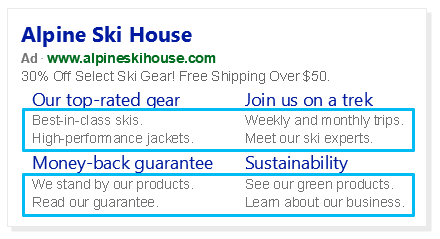
Dynamic ESL description extensions automatically turn your sitelink extensions (links that take people to specific pages on your website) to enhanced sitelink extensions (descriptive text under each sitelink). Descriptions are generated from relevant text pulled from your sitelink's landing page. Learn more about sitelink extensions.
Dynamic sitelinks
Note
This feature is available for Search advertising on computer, mobile, and tablet devices in the markets designated here.
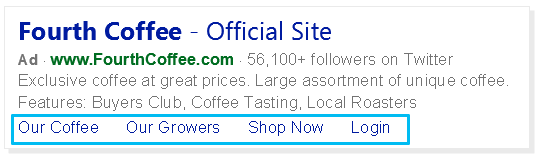
Display Dynamic sitelink extensions, which are links to other pages of your website, at the bottom of your ad. This gives customers another way to evaluate what your site has to offer. Learn more about sitelink extensions.
Automated dynamic product
Note
This feature is available for Search advertising on computer and tablet devices in the markets designated here.
Automated dynamic product extensions match the keyword of your text ad with your Product ads catalog data, automatically showing relevant product offers with text ads. You must have an active Microsoft Shopping campaign product feed for Automated dynamic product extensions to display and must not have Dynamic product extensions enabled.
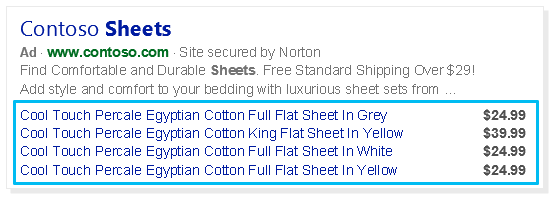
Dynamic structured snippets
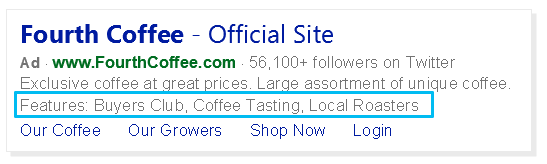
Dynamic structured snippets
Note
This feature is available for Search advertising on computers in the markets designated here.
Enrich your ads by automatically adding relevant text based on your website's landing pages with Dynamic structured snippets. This gives customers a look into what they'll find on your website, while increasing confidence in the relevancy of your ad. Learn more about structured snippet extensions.
Longer ad headlines
Note
This feature is available on computer, tablet, and mobile devices in the markets designated here.
Longer ad headlines add additional information like your ad description, display URL, or search keywords to the ad title. The additional information can be added before or after your existing ad title with a separator like a hyphen. This longer title provides extra information about your ad and increases visibility and click-through rates. Please note that in some cases, Longer ad headlines could replace the ad's title content.
Long ad title callout
Long ad title callout automatically scans for snippets in your extension copy that may be relevant to customers' queries and appends it to your title to make it longer.
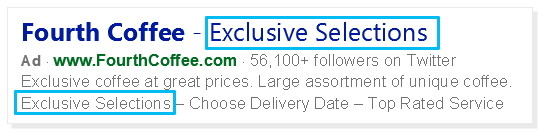
Long ad title description
Long ad title description adds additional information, like your ad description, to the ad title.
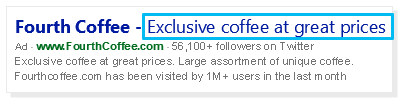
Long ad title landing page phrases
Add dominant phrases or visual headings found on your website's landing page to the title of your ad with Long ad title landing page phrases.
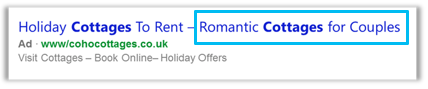
Long ad title query
Long ad title query matches the customer's exact search query to the ad title.
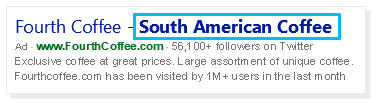
Long ad title URL
Long ad title URL adds your display URL before or after the ad title.
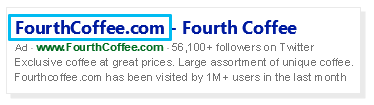
Previous visits
Previous visits
Note
This feature is available for Search advertising on computer, tablet, and mobile devices in the markets designated here.
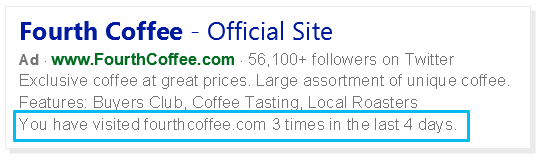
Previous visits adds a line of text to your ad that shows customers how many times they have clicked through to your website over the last few months. This makes it easy for customers to recall their experience and encourage them to return to sites they know and trust.
Visited links
Note
This feature is available for Search advertising on computer and tablet devices in the markets designated here.
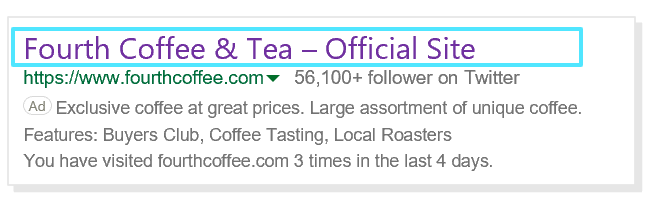
Visited links can change the color of your ad title to show that customers recently visited your site.
Top ads
Note
This feature is available for Search advertising on computer, tablet, and mobile devices in the markets designated here.
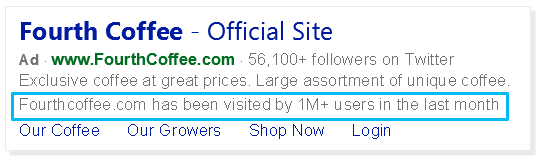
Top ads calls out if your website has consistently received high engagement to increase your website’s credibility and trust with customers.
To be eligible for Top ads, your ad must receive a high click-through rate with a low occurrence of back-button clicks from customers. Because of constant changes in customer engagement, the thresholds for when your ad will show a Top Ad annotation is will vary.
Seller ratings
Merchant ratings
Note
This feature is available for Search advertising on computer, mobile, and tablet devices in the markets designated here.
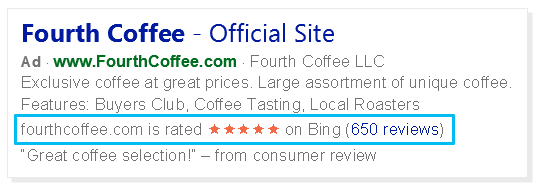
Merchant rating displays your business rating and links to highly-rated reviews to show what people are saying about your business. Learn more
We base ratings on a number of sources including:
- Yahoo Shopping
- Epinions
- bizrate
- Trustpilot
- PriceGrabber
- ViewPoints
- Review Centre
- Shopper Approved
- eKomi
- Feefo
- Verified Reviews
- Mr. Rebates
- Ciao.co.uk
- Shopzilla UK
- Reviews.co.uk
- Avis Verifies
- Reevoo
- Trusted Shop
Syndication-only decorations
Automated buttons
Note
This feature is available on computer, tablet, and mobile devices in all Microsoft Advertising markets.
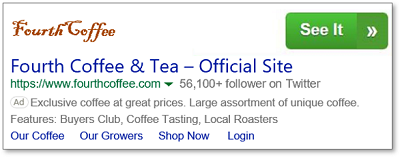
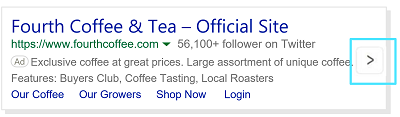
Verizon Media and Bing syndication publishers may automatically add a button on top of the ad or on the right side of the ad. Clicks on this button will be charged like a click on the ad title. Here's how different syndication publishers could handle this extension:
Note
- All clickable automated extensions will be charged for clicks, similar to ad headline clicks.
- Opt-out is only available at the account level.
- Choosing to opt out of an automated extension will opt out the account from all features under this extension.
- Historical opt-outs will be honored at the automated extension level.
- Reporting is available at the automated extension level, and not at each individual feature level.
- Automated extensions may or may not appear in ads, depending on placement and predicted impact.
- If you want to be included in the default opt-out list to be excluded from future automated extensions, notify your account manager or contact support.
How to opt out of automated extensions
If you don't want automated extensions to show up with your ads, learn about Opting out of Automated Extensions.