Note
Access to this page requires authorization. You can try signing in or changing directories.
Access to this page requires authorization. You can try changing directories.
If you have multiple products, services or offerings that have dedicated pages on your website, the filter link extension offers a way to surface those links directly in your Search ad. Potential customers can quickly preview your key offerings and head directly to what they’re looking for.
Use filter link extensions to list multiple categories of products or features with unique links to each of these offerings. Easily combined with other extensions, filter link extensions can enlarge your ad format even further and present multiple avenues to different parts of your site, in addition to your final URL.
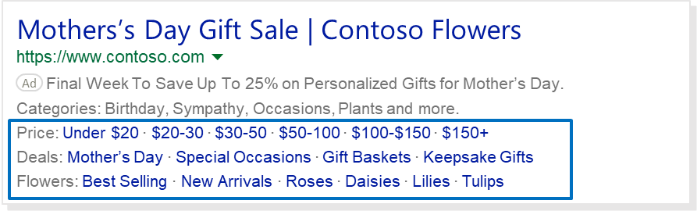
Choose from 36 header categories for example, Price, Deals, or Flowers. Then you can list up to 10 key products and offerings for each category—each with their own URLs—so users can quickly navigate to these additional destinations.
Filter link extensions operate nearly the same as structured snippet extensions. They are both free to add and allow you to list offerings based on predefined categories, but filter link extensions allow you to include individual links to locations other than your final URL.
Clicks on each link within the filter link extension will be charged the same cost per click (CPC) as on the ad headline.
Ability to set up in:
All Bing markets
Serves in
: All Bing markets, except China.
Get to know filter link extensions
Here are some things to consider before you build your filter link extension:
- Header: The category that describes the filters for your products and services that you would like to highlight. You can choose from 36 predefined header options. Here you can download a list of the headers.
- Value: Between three and 10 specific products or services that relate to the chosen header. Each value has a maximum character limit of 25. A minimum of three values must be entered, with a maximum of 10 supported. For each value you need to set the Final URL or landing page where customers will be taken after clicking your header.
Note
- The number of values appearing after a header is dependent on ad space limits (PC vs mobile). Therefore, we recommend you use succinct header and value text to accommodate as many values as possible.
- Values are shown after the header in the order they are listed in this lightbox. You can change their order of appearance when you add or edit the extension.
Filter link extensions can serve with other ad extensions and they can be created or edited at the account, campaign, or ad group level.
Standard ad extension reports are available. Filter link extensions are reported at the header level, not at the individual value level.
Comparing callout, filter link, and structured snippet extensions
| Callout | Filter link | Structured snippet | |
|---|---|---|---|
| When to use | Showcase what makes your products or services unique. | Create multiple links in your ad to specific products or services. | Provide more context on specific aspects of your products or services. |
| Example | "Free shipping • 24/7 Support" | "Price: Under $20 • $20-$30 • $30-$50 • $50-$100 • $100-$150 • $150+" | "Brands: Windows, Xbox, Skype" |
| Character limit | 25 characters per callout | 25 characters per value | 25 characters per value |
| Minimum number | 2 callouts | 3 values | 3 values |
| Maximum number | 4 callouts | 10 values | Based on value length and screen size |
Get started with filter link extensions
Head over to the About ad extensions page for instructions to:
- Add, edit, and delete ad extensions
- Associate ad extensions to campaigns and ad groups