Note
Access to this page requires authorization. You can try signing in or changing directories.
Access to this page requires authorization. You can try changing directories.
Note
The supported currency codes are ARS, AUD, BRL, CAD, CHF, CLP, CNY, COP, DKK, EUR, GBP, HKD, INR, MXN, NZD, PEN, PHP, PLN, SEK, SGD, USD, TWD, and VEF.
Use promotion extensions to highlight deals for holidays and other special occasions. Let's say you want to highlight a Summer Sale — using promotion extensions, you can include a promotion code, along with the offer and expiration date.
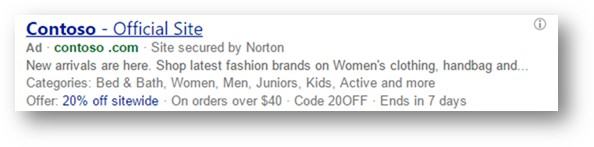
Benefits of promotion extensions
- Increase traffic volume with special offers highlighted in your ads, which can help grow ad engagement and boost your potential click-through rate.
- Better informed shoppers, thanks to highlighted promotions providing more information.
- Increased market share with special offers that encourage customers to click on your ad instead of your competitors’ ads.
Occasions available for promotion extensions
You can select from a preset list of occasions, which are holidays or events for which you can offer special offers or promotions.
| Occasion | Start date | End date |
|---|---|---|
| New Year's | December 1 | February 28 |
| Boxing Day | December 15 | January 15 |
| Epiphany | December 15 | January 31 |
| Chinese New Year | January 15 | March 1 |
| Valentine's Day | January 15 | February 28 |
| Carnival | February 1 | March 31 |
| Holi | February 1 | March 31 |
| Women's Day | February 15 | March 31 |
| Passover | February 15 | May 1 |
| Easter | March 1 | April 30 |
| Parent's Day | April 15 | August 1 |
| Labor Day | April 15 | September 15 |
| Rosh Hashanah | August 15 | November 1 |
| Diwali | September 1 | December 1 |
| Navratri | September 15 | October 31 |
| Halloween | October 1 | November 15 |
| Singles Day | October 15 | November 30 |
| Black Friday | October 15 | December 15 |
| Cyber Monday | October 15 | December 15 |
| Christmas | November 1 | January 15 |
| St. Nicholas Day | November 1 | December 31 |
| Hanukkah | November 15 | January 31 |
| Back to school | Any | Any |
| Mother's Day | Any | Any |
| Father's Day | Any | Any |
| Independence Day | Any | Any |
| National Day | Any | Any |
| End of Season | Any | Any |
| Winter Sale | Any | Any |
| Summer Sale | Any | Any |
| Fall Sale | Any | Any |
| Spring Sale | Any | Any |
| Ramadan | Any | Any |
| Eid al-Fitr | Any | Any |
| Eid Al Adha | Any | Any |
Dates for promotion extensions
There are three different date ranges to keep in mind for promotion extension to deliver. For an example, you want to run a promotion for the new year. You select New Year's from the Occasions dropdown list, which means the promotion will be available during the predefined date range from December 1 through February 28. But you don't want your actual promotion to run the entire length of the predefined date range, just until the beginning of February. You can enter the optional Displayed start date and Displayed end date to set the exact days of the promotion or you can use the ad extension scheduling from Advanced settings. Keep in mind, that if you set your ad extension schedule past the predefined date range of the occasion, it will stop showing at the end of the predefined date range.
- Predefined date range. Each occasion has a predefined date range that determines when the promotion can be shown.
- Display start and end dates (optional). Once you select an occasion, you can set the display start and end dates for when the actual promotion runs.
- Extension schedule. The start and end dates of when you want the extension to show.
Important
All extension details must adhere to our promotion extension policies.
Ability to set up in: All Bing markets
Serves in: All Bing Markets
Get to know promotion extensions
Your promotion extension's Displayed start date - Displayed end date should ideally match your scheduled Start date and End date.
Note
If the displayed date range falls outside the scheduled Start date and End date, your promotion extension will still serve during the Start date and End date.
If your Displayed end date is set before the current date, then the displayed date range will not appear in your promotion extension.
Promotions can still serve before the Displayed start date. For example, you can provide customers with a promotion code for an upcoming sale.
You can add one minimum purchase amount and/or one promotion code.
The promotion landing page must include details of the promotion.
The table below indicates when your promotion extension will serve based on whether you select from the preset list of occasions and schedule a Start date and End date:
| Did you select an occasion from the preset list? | Did you schedule a Start date and End date for your extension? | Does the occasion's date range overlap with your scheduled Start date and End date? | When will the extension serve? |
|---|---|---|---|
| Yes | Yes | Yes | During your scheduled Start date and End date |
| Yes | Yes | No | During your scheduled Start date and End date |
| Yes | No | No | Every year during the occasion's date range |
| No | Yes | No | During your scheduled Start date and End date |
| No | No | No | The extension will always serve |
Get started with promotion extensions
Head over to the About ad extensions page for instructions to:
- Add, edit, and delete ad extensions
- Associate ad extensions to campaigns and ad groups
View your promotion extension in the account level shared library
- From the navigation menu on the left, hover over Campaigns and select Ads & extensions > Extensions.
- Choose the extension type you want to view from the dropdown menu.
- Select the Account tab to locate the specific extension you want to review.