Note
Access to this page requires authorization. You can try signing in or changing directories.
Access to this page requires authorization. You can try changing directories.
The previous page showed how wrapping an LLM in an agent gives you a persistent identity, instructions, and session management. But even with all of that, the agent can only generate contents (text, images, etc.) — it can't look up today's stock price, send an email, or query your database. It answers from whatever knowledge was baked in during training and whatever context you provide in the prompt.
Tools bridge this gap. They give the agent the ability to act — to reach beyond its training data and interact with the real world. Adding tools is the single most impactful step you can take to make an agent genuinely useful.
When to use this
Add tools to your agent when:
- The agent needs access to real-time or external data — live prices, weather, database records, search results — that isn't in the model's training data.
- The agent needs to take actions — sending emails, creating tickets, calling APIs, writing files — rather than just producing content.
Considerations
| Consideration | Details |
|---|---|
| Latency | Each tool call adds a round trip — the model generates a tool request, your code executes it, and the result is sent back before the model can continue. Multi-tool turns compound this. |
| Token overhead | Tool definitions (names, descriptions, parameter schemas) are included in every prompt. More tools means fewer tokens available for conversation history and the model's response. |
| Debugging complexity | When something goes wrong, the cause may be in the model's tool selection, the arguments it chose, or the tool's execution. You're debugging reasoning and code together. |
| Reliability | The model may call tools incorrectly, pass bad arguments, or invoke a tool when it shouldn't. Good descriptions and tool approval mitigate this, but don't eliminate it. |
Why agents need tools
As covered in LLM Fundamentals, an LLM is trained to generate tokens — including a special structured format that represents a tool call. But the model itself never executes anything. It's your application (or Agent Framework) that parses the model's output, runs the actual function, and feeds the result back.
This means tools don't change what the model is — they change what your agent can do. Without tools, an agent is a conversationalist. With tools, it becomes an operator.
Consider a travel-booking agent. Without tools, it can discuss flights and suggest itineraries based on general knowledge. With tools, it can:
- Search a flight API for real-time availability and pricing
- Book a flight on the user's behalf
Each of those actions requires a tool — a piece of code the agent can invoke to interact with the outside world.
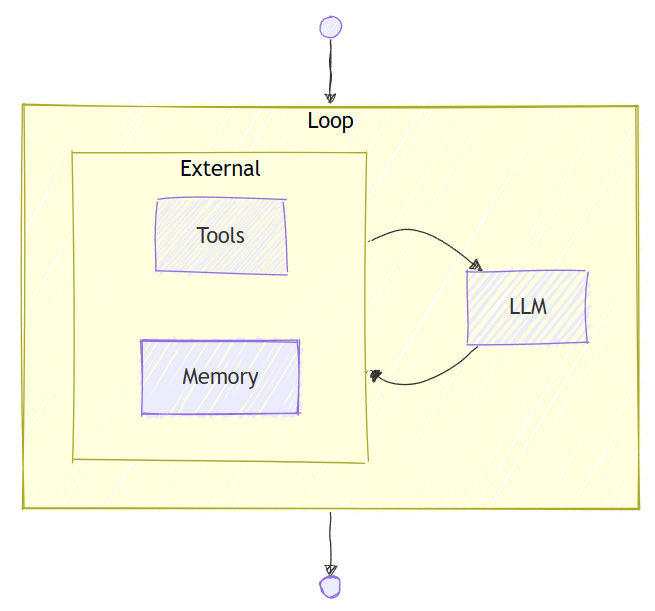
How the tool-calling loop works
When you give an agent tools, Agent Framework automatically manages a tool-calling loop:
┌──────────────────────────────────────────────────────┐
│  User: "What's the weather in Seattle?"              │
└──────────────┬───────────────────────────────────────┘
               ▼
┌──────────────────────────────────────────────────────┐
│  Agent sends messages + tool definitions to LLM      │
└──────────────┬───────────────────────────────────────┘
               ▼
       ┌───────────────┐
       │ LLM responds  │
       └───┬───────┬───┘
           │       │
     Tool call?    No ──────────────────────────┐
           │                                    │
           ▼                                    ▼
┌─────────────────────────────┐   ┌─────────────────────────────┐
│  Agent Framework executes   │   │  Final response:            │
│  the tool (e.g.,            │   │  "It's cloudy in Seattle    │
│  get_weather("Seattle"))    │   │   with a high of 15°C."     │
└──────────────┬──────────────┘   └─────────────────────────────┘
               │
               ▼
┌─────────────────────────────┐
│  Agent sends tool result    │
│  back to the LLM            │
└──────────────┬──────────────┘
               │
               └──────► (back to "LLM responds")
Key points:
- You don't need to write the loop. Agent Framework handles detecting tool calls in the model's response, executing the tools, and feeding results back. You define the tools; the framework orchestrates the rest.
- Multiple tool calls per turn. The model may call several tools (potentially in parallel) before producing a final answer — or chain tool calls where the output of one informs the next.
- The model decides when to call tools. Based on the user's request and the tool descriptions you provide, the model judges whether a tool is needed. Good tool descriptions lead to better tool selection.
Tip
For a hands-on walkthrough of adding your first tool and seeing this loop in action, see Step 2: Add Tools in the Get Started tutorial.
Types of tools
Agent Framework supports several categories of tools. Choosing the right one depends on what you need the agent to do and where the capability lives.
Function tools
Function tools are custom functions you write and register with the agent. They run in your process, giving you full control over the logic, security boundaries, and error handling.
Use function tools when:
- You have custom business logic the agent needs to invoke (query a database, call an internal API, perform a calculation)
- You need the tool to run in your environment with access to your resources
- You want compile-time type safety and testability
Function tools are the most common and flexible tool type. Most agents start here.
MCP tools (Model Context Protocol)
MCP is an open standard that defines how applications provide tools to LLMs. Instead of writing tool logic yourself, you connect to an MCP server that exposes a set of tools over a standard protocol — similar to how a REST API exposes endpoints.
Agent Framework supports two flavors:
| Flavor | What it is | When to use it |
|---|---|---|
| Hosted MCP tools | MCP servers hosted and managed by Microsoft Foundry or other providers | You want turnkey access to common capabilities (for example, file search, code execution) without managing infrastructure |
| Local MCP tools | MCP servers you run yourself or connect to from any provider | You have a custom or third-party MCP server, or you need tools that run in your own environment |
Use MCP tools when:
- A prebuilt MCP server already provides the capability you need
- You want to reuse tools across multiple agents or applications through a shared server
- You're integrating with a third-party service that exposes an MCP endpoint
Provider-hosted tools
Some providers offer built-in tools that run on the provider's infrastructure — no local code required. These include:
| Tool | What it does |
|---|---|
| Code Interpreter | Executes code in a sandboxed environment on the provider's infrastructure |
| File Search | Searches through files you upload to the provider |
| Web Search | Searches the web for real-time information |
Use provider-hosted tools when:
- You need capabilities like code execution or web search without building or hosting the tool yourself
- The provider already offers a managed version that meets your requirements
Note
Provider-hosted tool availability varies by provider. See the Tools Overview for the full provider support matrix.
Note
Some LLM providers may execute hosted tools on their infrastructure during inference, such as the Responses API by OpenAI. Think of these inference services as a semi-agentic services that combine inference with tool execution. It doesn't change how the underlying model works, but it does mean that tool execution can happen as part of the service's response generation. These services cannot execute local tools, which must be run on your own infrastructure.
Choosing the right tool type
| Question | Recommendation |
|---|---|
| Do I have custom business logic? | Function tools — write and register your own functions |
| Is there an MCP server that already does what I need? | MCP tools — connect to it instead of building from scratch, such as the GitHub MCP server |
| Do I need code execution, file search, or web search? | Provider-hosted tools — check if your provider supports them |
| Do I need tools from multiple categories? | Mix them — agents can use function tools, MCP tools, and provider-hosted tools simultaneously |
Tool descriptions matter
The model selects tools based on their names and descriptions. A vague description leads to poor tool selection — the model may call the wrong tool, skip a tool it should use, or pass incorrect arguments.
Write tool descriptions the same way you'd write an API doc: say what the tool does, what each parameter means, and what it returns. The clearer the description, the better the model's judgment.
Tip
Tool definitions (names, descriptions, parameter schemas) are included in the prompt and consume tokens in the context window. If you register many tools, the overhead can be significant. Only register the tools the agent actually needs.
Tool approval: human-in-the-loop
Some actions are sensitive — transferring money, deleting records, sending emails. You may not want the agent to execute these tools autonomously. Tool approval lets you require human confirmation before a tool is executed.
When a tool is marked as requiring approval, the agent pauses before execution and returns a response indicating that approval is needed. Your application is responsible for presenting this to the user and passing their decision back.
This pattern is often called human-in-the-loop and is essential for building trustworthy agents that handle consequential actions.
Common pitfalls
| Pitfall | Guidance |
|---|---|
| Too many tools | Every tool definition consumes tokens. Register only the tools relevant to the agent's purpose. |
| Vague descriptions | "Does stuff with data" won't help the model. Be specific: "Queries the inventory database for product availability by SKU." |
| No error handling | Tools can fail (network errors, invalid input). Return clear error messages so the model can reason about what went wrong and try again or inform the user. |
| Overly permissive tools | A tool that can "run any SQL query" is a security risk. Scope tools to specific, well-defined operations. |
| Missing approval on sensitive actions | If a tool can make irreversible changes, add tool approval to keep a human in the loop. |
Special mention: Code Interpreter Tool
As discussed in LLM Fundamentals, LLMs can make errors in precise calculations and formal logic. This is because LLMs generate answers token by token based on pattern matching — they don't actually compute. An LLM asked to multiply two large numbers isn't performing arithmetic; it's predicting what the answer "looks like" based on training data. This works surprisingly often, but fails unpredictably on edge cases.
Code Interpreter solves this by letting the agent write and execute code in a sandboxed environment. Instead of guessing the answer, the model writes a Python script that computes it exactly, runs it, and uses the verified result in its response.
Note
The model may write a slightly different script each time it is asked to solve the same problem, but the results should be mostly consistent.
Warning
Code Interpreter is not a replacement for careful reasoning on the human's part. Always check the work of the agent and verify the results independently when necessary.
Give your agent Code Interpreter when it needs to:
- Perform precise calculations — financial modeling, statistical analysis, unit conversions — where an approximate "best guess" isn't acceptable.
- Transform or analyze data — parse CSVs, aggregate rows, generate charts, or reshape structured data.
- Process files — read uploaded documents, extract content, convert formats, or generate new files.
- Validate its own reasoning — write test code to verify a logical claim before presenting it to the user.
Tip
Code Interpreter can be a provider-hosted tool — the code runs on the provider's infrastructure in a sandbox, not in your environment. This makes it safe to use without worrying about arbitrary code executing on your servers. See the Code Interpreter reference for setup details.
Next steps
Once your agent has tools, the next step is to learn about skills — portable packages of instructions, reference material, and scripts that give agents domain expertise they can load on demand.
Go deeper:
- Tools Overview — all tool types and provider support matrix
- Function Tools — detailed function tool reference
- Hosted MCP Tools — Microsoft Foundry MCP servers or other providers
- Local MCP Tools — custom MCP servers
- Tool Approval — human-in-the-loop for tools
- Step 2: Add Tools — hands-on tutorial