Note
Access to this page requires authorization. You can try signing in or changing directories.
Access to this page requires authorization. You can try changing directories.
The agent archetype framework organizes agent design into three layers: categories, capabilities, and components. These three layers (the "3Cs") provide a structured, repeatable way to design and communicate about agents at any level.
Tip
For an example scenario that applies the 3Cs model and demonstrates how teams can move from abstract concepts to concrete implementation decisions, go to Example enterprise pattern: Document extractor and summarizer.
Categories: The "why" of agent behavior
Categories represent the broad domains of agent behavior. They answer the question: "Why is the agent doing this?" Categories provide a shared vocabulary for reasoning about agent design at a strategic level, independent of specific tools or implementation choices.
The framework defines seven categories:
| Category | Description |
|---|---|
| Connect | Gathering and integrating information from across the enterprise. The foundational layer enabling everything that follows. |
| Analyze | Making sense of gathered data, going beyond retrieval to insight. |
| Create | Producing and transforming content, transitioning from information to deliverables. |
| Act | Taking action on behalf of users, transforming from conversational partners to proactive assistants. |
| Automate | Managing multistep processes and orchestrating complex workflows, operating as process coordinators. |
| Govern | Maintaining trust and regulatory compliance, embedding governance directly into agent behavior. |
| Monitor | Continuously improving through telemetry and feedback loops for iteration at scale. |
Capabilities: The "what" within each category
Capabilities are the specific, user-observable functions an agent can perform within a given category. They're the building blocks of agent behavior—the functional pieces assembled to create complete agent experiences. Capabilities answer the question: "What does this agent need to achieve?"
Capabilities are intentionally platform-agnostic. They describe what an agent does, not how it does it. This description ensures they're durable. Regardless of how the underlying platform evolves, the capabilities remain a stable reference point for designing and communicating about agent behavior.
Tip
Already familiar with skills? Capabilities are the same concept. Both describe reusable functions that define what an agent can do. This framework gives you a consistent vocabulary for designing around them.
Each category contains a set of capabilities:
| Category | Capabilities |
|---|---|
| Connect | Extract data, query knowledge, ingest documents, validate data, integrate data sources |
| Analyze | Compute and analyze metrics, generate visualizations, make data-driven recommendations, benchmark data, compare results, classify data |
| Act | Update records, send communications, create tickets or transactions, call external API or service |
| Automate | Trigger workflows, make conditional decisions, schedule automation, coordinate across multiple tools |
| Create | Draft or create content, summarize information, reformat or translate content, generate visual content |
| Govern | Perform audit logging and policy validation, ensure regulatory adherence |
| Monitor | Track usage analytics, capture feedback, measure performance |
Components: The "how" of implementation
Components are the implementation primitives that bring capabilities to life. They answer the question: "How do we make this happen?"
Components can take the form of prompts, topics, tools, connectors, flows, or code interpreters. They're modular, reusable, and interchangeable. For example, the same extract data capability could be implemented by using:
- Microsoft 365 knowledge sources for document-centric discovery.
- A Power Platform connector for structured line-of-business queries.
- An agent tool or API action for real-time, mission-critical data.
- A file upload and extraction flow for session-based document analysis.
Each option has distinct tradeoffs, and the framework provides a basis for reasoning through the right choice for a given context.
This modularity enables repeatability at scale. When a team builds a solution by using well-defined components mapped to clear capabilities, that solution can be documented, referenced, and reused. The solution becomes organizational knowledge instead of knowledge that stays with a single team.
The Copilot Studio Kit Component library is a concrete expression of this layer. It packages production-ready components for document extraction, research, content synthesis, executive briefs, and ServiceNow tickets that map directly to the framework's categories and capabilities. These building blocks are validated and derived from real customer scenarios. They're designed to be installed, configured, and deployed without custom development.
The framework as a foundation
The framework is a foundation, not a destination. As agent platforms evolve toward more autonomous routing, they still require a clear, shared map of what capabilities exist and how teams can implement them. The 3Cs provide that map, giving teams a consistent language for agent design, roadmaps, and decision-making.
Example enterprise pattern: Document extractor and summarizer
This example shows how to apply the 3Cs model to a common enterprise pattern: a document extractor and summarizer agent. Use this example to learn how teams can reuse the same structure across implementations and adapt components to specific business and technical requirements.
Scenario
Organizations across financial services, healthcare, legal, and professional services need agents that can:
- Ingest a document
- Extract structured information
- Summarize key content
- Generate visualizations
- Produce output in a usable format
Applying the 3Cs to the scenario
This scenario spans three categories in the framework: Connect, Analyze, and Create.
The capabilities involved are:
- Ingest document (Connect)
- Extract data (Connect / Analyze)
- Compute and analyze metrics (Analyze)
- Generate visualizations (Analyze / Create)
- Summarize information (Analyze)
- Create content (Create)
The components that provide these capabilities can vary depending on requirements and constraints:
| Capability | Example component |
|---|---|
| Ingest document | Power Automate file upload flow |
| Extract data | Data Extraction prompt from the Copilot Studio Kit Component library |
| Compute and analyze metrics | Code interpreter |
| Generate visualizations | Data visualization prompt, Code interpreter |
| Summarize information | Summarization prompt |
| Create content | Document creation tool or connector |
This diagram shows how the underlying processes map to categories and capabilities, which remain consistent across implementations, while components adapt to different contexts and constraints.
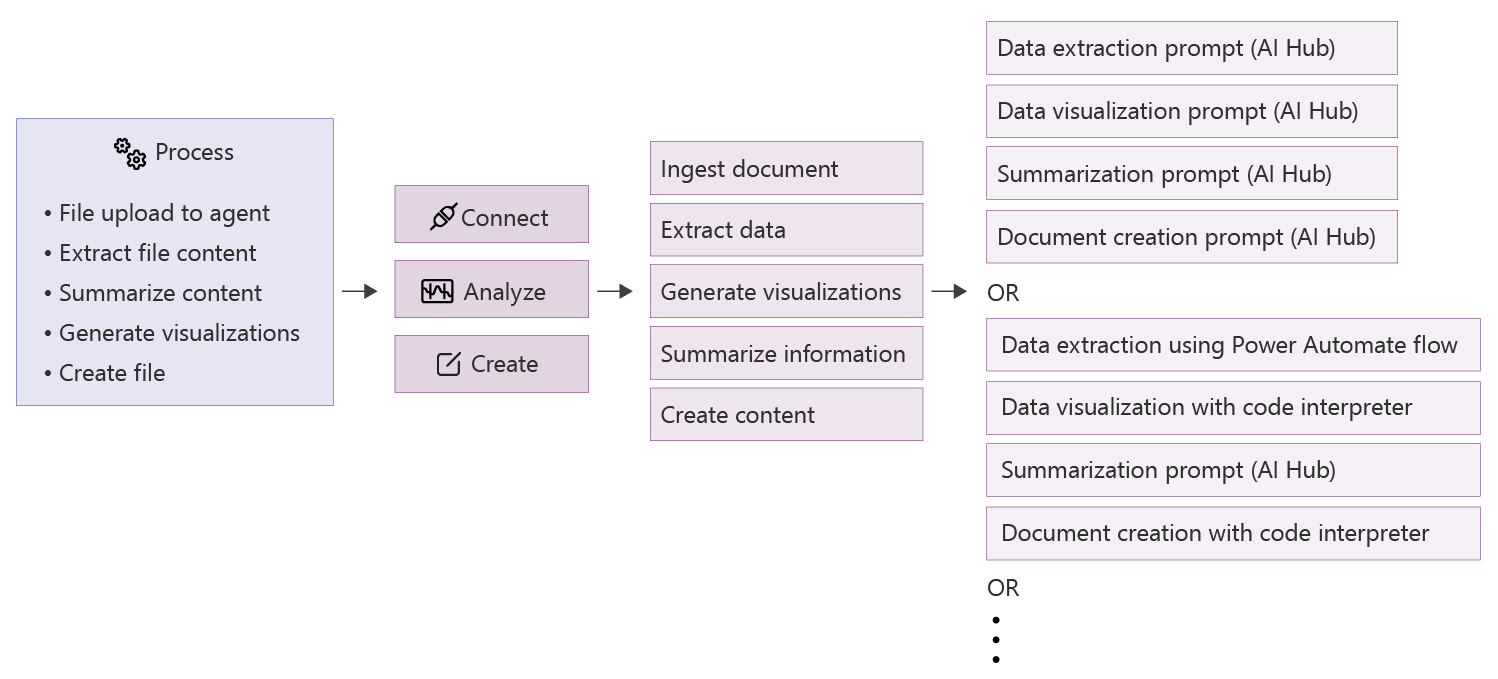
In practice, a team builds this scenario once and shares it with the next team as a documented, reusable pattern instead of a custom solution. This approach scales knowledge across the organization.