Note
Access to this page requires authorization. You can try signing in or changing directories.
Access to this page requires authorization. You can try changing directories.
Agents are specialized AI assistants with custom knowledge, skills, and tools that operate within Copilot and Microsoft 365 Chat. They extend Copilot's functionality by connecting to internal knowledge sources and external APIs, enabling more specialized workflows and increasing productivity.
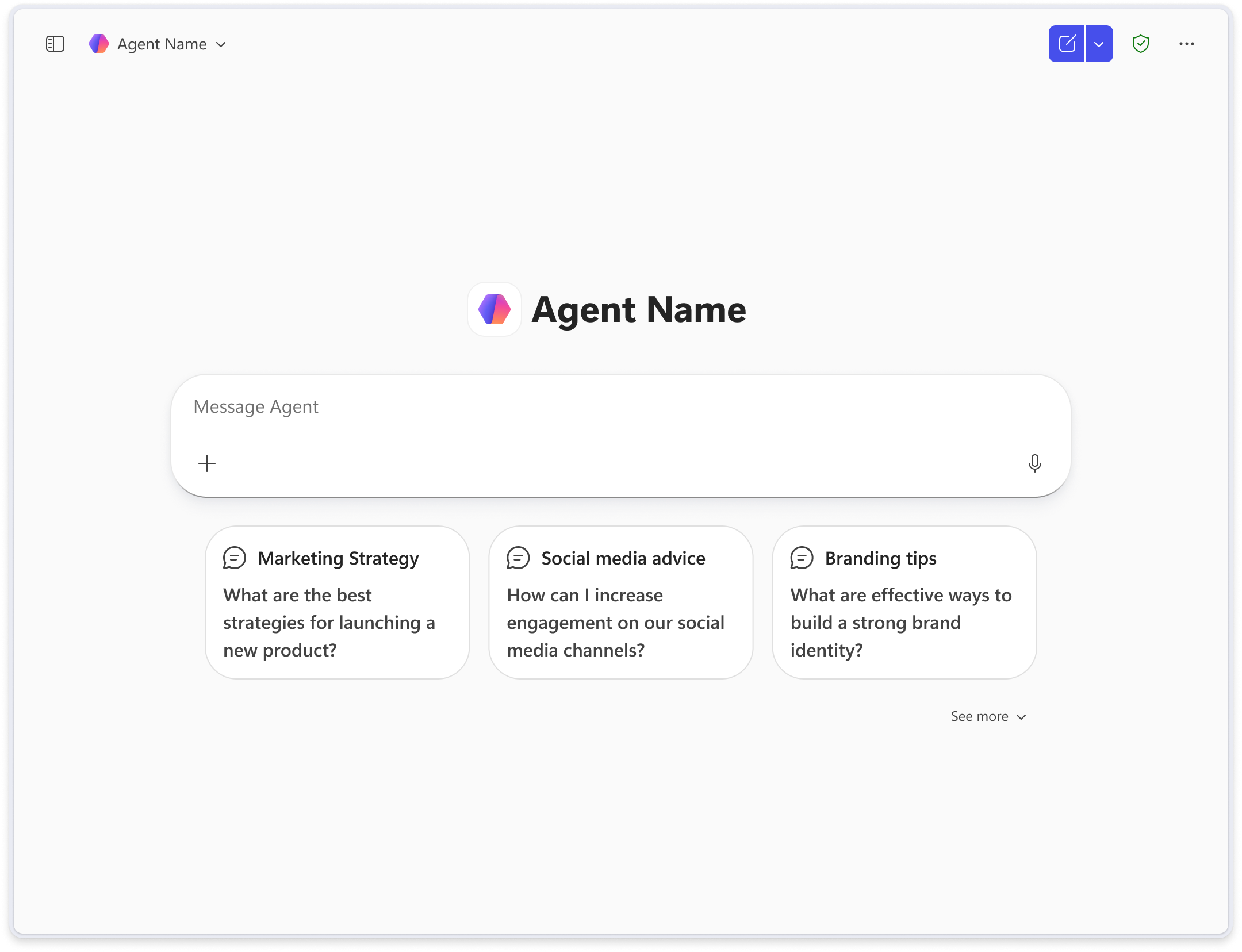
As a designer, understanding what agents are and how they're built helps you make better decisions about layout, interaction patterns, and how users experience agentic workflows. This article introduces you to the core components of an agent and the two types of agents you'll design for.
How agents work
Agents are powered by language models and integrate with existing systems to help users achieve domain-specific goals. Understanding how agents operate behind the scenes helps you design better experiences.
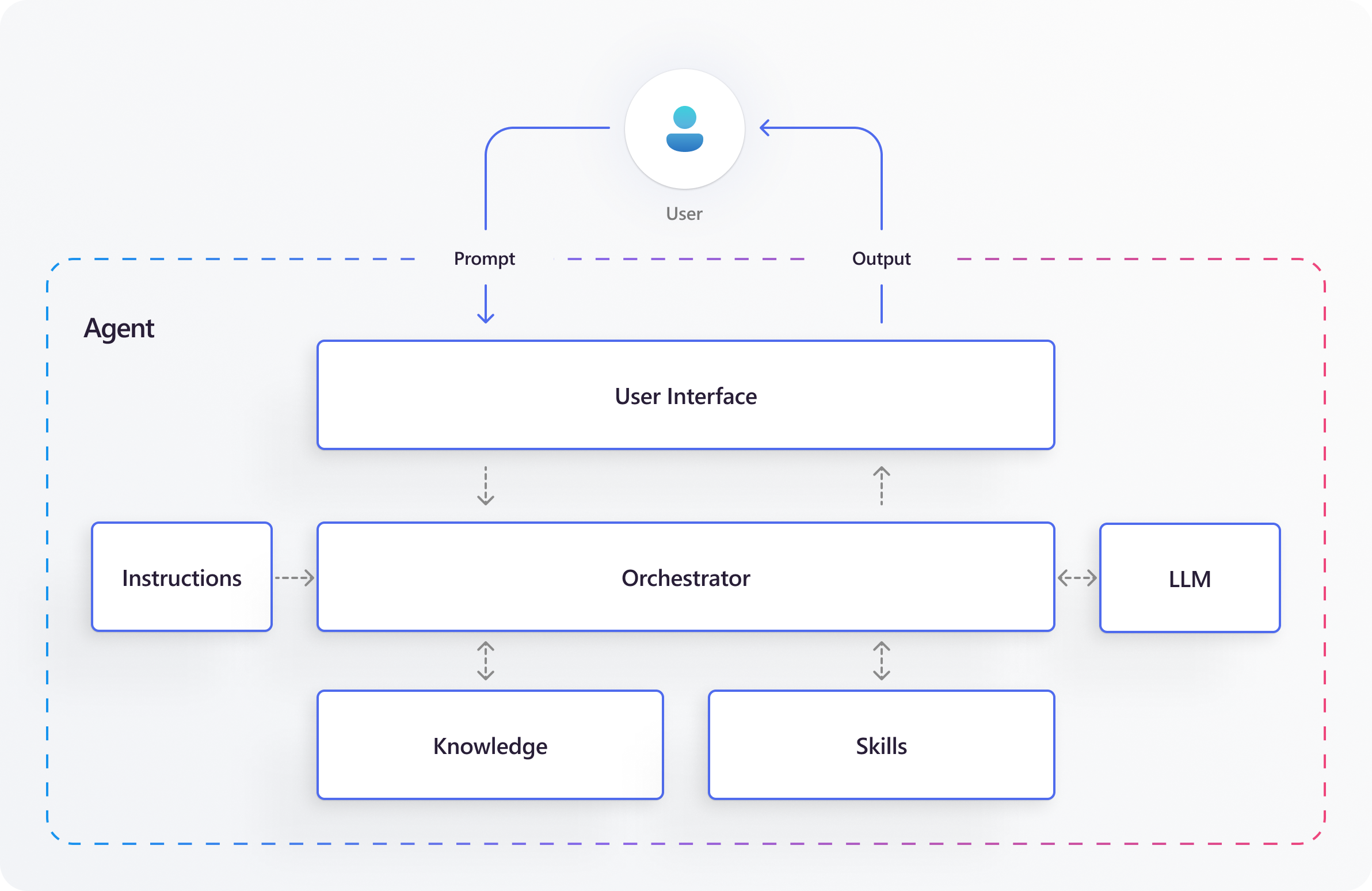
The following diagram shows the core components that shape an agent's behavior, including the agent canvas, knowledge sources, skills, and orchestration layer.
The following table describes each component:
| Component | Description |
|---|---|
| Agent canvas | The visual and interactive layer where users engage with the agent—chat, prompts, buttons, and so on. This typically appears inside Chat or a Copilot panel within the Microsoft 365 suite. |
| Instructions | The rules and goals that guide the agent's behavior, what it should do and how it should respond. These rules come from the agent's creator. |
| LLM | The large language model interprets the natural language prompt that the user sends through the orchestrator, so the orchestrator can determine what steps to take. |
| Orchestrator | A logic engine that interprets user input and coordinates the response process. It selects the most relevant knowledge sources and skills to ensure the final output matches the user's expectations. |
| Knowledge | Internal or external data the agent uses to ground its responses—like emails, SharePoint documents, chat messages, meeting transcripts, or third-party services. |
| Skills | Actions, triggers, and workflows the agent can perform to fulfill user requests—such as summarizing content, scheduling meetings, creating tasks or files, and sending messages. |
Types of agents
Microsoft supports two types of agents: Declarative Agents and Custom Engine Agents. Each type offers a different level of customization and suits different scenarios.
As a designer, you see that both types follow nearly identical interaction patterns and feel similar to users. The key differences are in what you can customize and who controls the underlying infrastructure.
Declarative agents
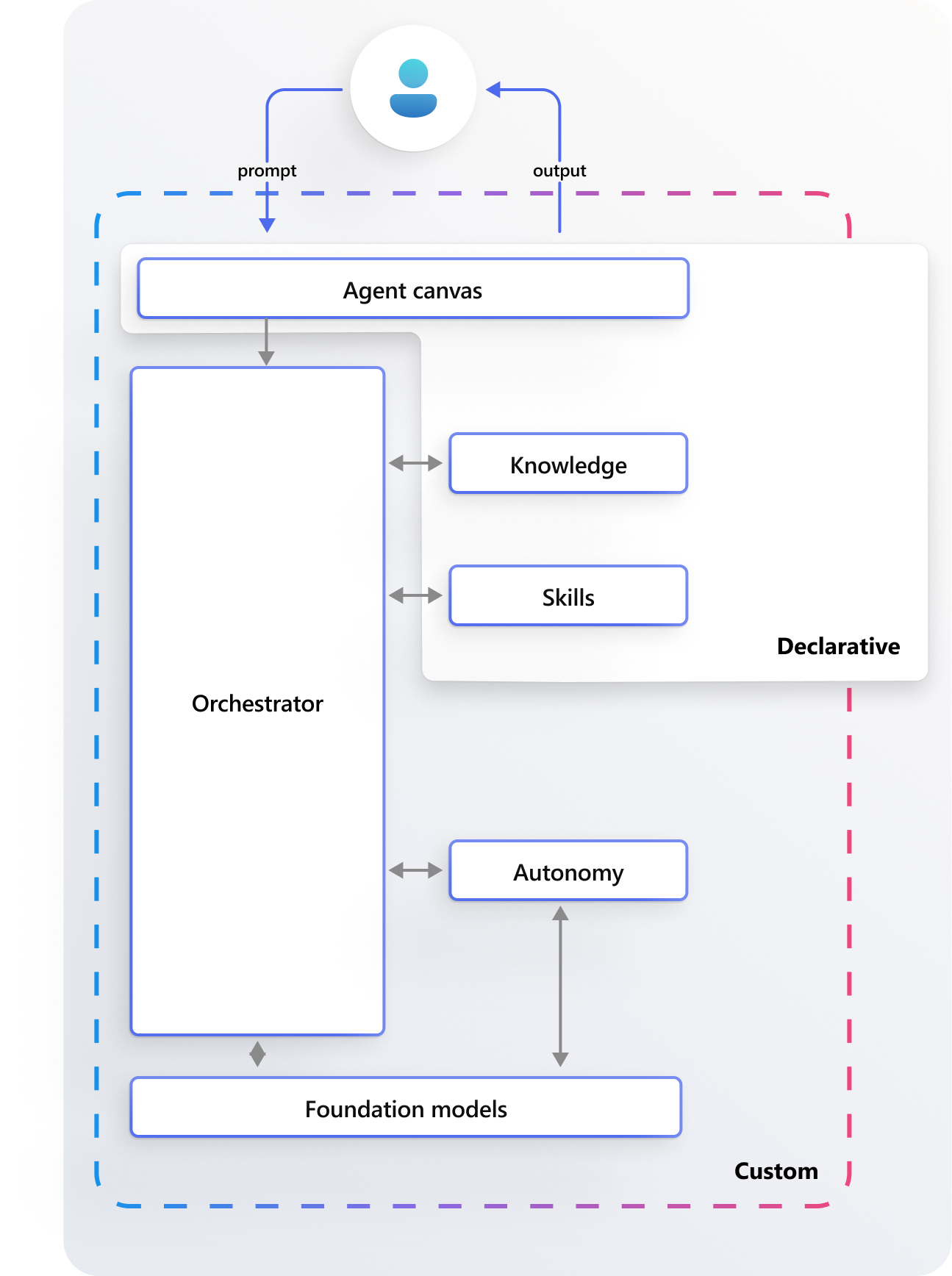
Declarative agents customize Copilot with instructions, data, and actions to automate tasks by using Microsoft's built-in AI infrastructure. They need no extra hosting. Build them by using no-code or low-code tools. They run across Microsoft 365 apps like Teams, Word, and Outlook. They're ideal for straightforward workflows that you can accomplish within Copilot's existing capabilities, such as summarizing information, extracting data, or performing simple actions.
Declarative agents use the Copilot orchestration layer and foundation models, inheriting Microsoft standards for security, compliance, and Responsible AI.
When you design for Declarative agents, you can customize:
- Knowledge sources
- Skills and capabilities
Copilot provides the agent canvas, orchestrator, and foundation models, and you can't modify them. Start with Declarative agents when building agents in Microsoft 365 Copilot.
Custom engine agents
Custom engine agents offer full customization, so teams can tailor the agent canvas, knowledge base, skillset, underlying foundation models, and orchestration logic to meet specific needs. They're well suited for complex workflows where agents need autonomy to plan, make decisions, and operate independently. Additionally, they support agent-to-agent collaboration and can be built by using low-code or pro-code environments.
Unlike declarative agents, custom engine agents require extra hosting and steps for security and responsible AI usage. You can publish them across Microsoft 365 applications, as well as external platforms, internal websites, and organizational dashboards.
When you design custom engine agents, you can customize:
- Knowledge sources
- Skills and capabilities
- Orchestration logic
- Foundation models
- Autonomy behavior
The agent canvas stays within Copilot's or the relevant Microsoft applications' native surface and can't be fully replaced.
Copilot, Microsoft 365 Chat, and agents
People often use the terms Copilot, Microsoft 365 Chat, and agents interchangeably, but they refer to distinct experiences. Understanding the differences helps you design the right experience for the right context.
| Term | Description |
|---|---|
| Copilot | A built-in assistant in Microsoft 365 apps like Outlook, Teams, Word, and Excel that helps users with context-specific tasks. It adapts to the app the user is in—for example, summarizing an email in Outlook or highlighting key points during a Teams meeting. |
| Microsoft 365 Chat | A Copilot-powered conversational assistant that works across your organization's Microsoft 365 data. It pulls information from Outlook, Teams, OneDrive, SharePoint, and the web, so users can ask broad questions and get contextually rich responses by using company content. |
| Agents | Specialized AI assistants within the Microsoft 365 Copilot Chat environment, designed for specific domains or tasks. They extend Copilot's capabilities by connecting to external services or data sources. Agents live inside the Copilot Chat interface, providing expert knowledge and actions in context when users need them. |
You can deploy agents privately within your organization or make them publicly available through the Agents Store.