
Glad to know the script is available and Sidder tool, Please "Accept the answer" if the information helped you. This will help us and others in the community as well.
This browser is no longer supported.
Upgrade to Microsoft Edge to take advantage of the latest features, security updates, and technical support.
' cx='32' cy='32' r='32' /%3E%3Ctext x='50%25' y='55%25' dominant-baseline='middle' text-anchor='middle' fill='%23FFF' %3EM%3C/text%3E%3C/svg%3E)
Hi,
I migrate a 2012 RDS farm to a 2019.
The 2012 uses roaming profiles and we set UPD on the 2019 one.
I need to migrate the document folders from the 2012 roaming profiles to the 2019 UPD profiles
As the Users Profiles Disks are named with the SID and not the usernames I am looking for a tool or a script allowing me to link the SIDs to the usernames
I found Sidder was used on 2012 but not maintained anymore and I can't even find a download link
Thanks
Maxime

Glad to know the script is available and Sidder tool, Please "Accept the answer" if the information helped you. This will help us and others in the community as well.
Thanks for your answers
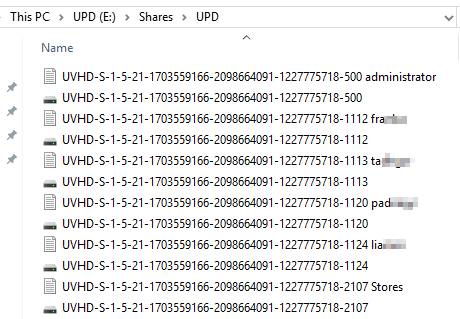
I found an very convenient script
https://www.jeroentielen.nl/add-username-textfile-microsoft-user-profile-disks-fileshare/
$UPD_Location = "\\FILESERVER.LAB.LOCAL\MS_UPD\WS2016" # The location where the Microsoft User Profile Disks are stored and where the txt files will be created.
$DomainName = "LAB" # Pre-Windows2000 Domain name. This part will be stripped in the file name as is also contains a "backslash"

#-------------------------------- Script --------------------------------

$Files = gci $UPD_Location -Name

Foreach ($SID in $Files) {
        If ($SID -match ".vhdx") {
            $SID = $SID.Substring(5) -replace ".vhdx"
            If ($SID-match "template") {
                Write-Host "Template File"
            } Else {
                $objSID = New-Object System.Security.Principal.SecurityIdentifier ($SID)
                $objUser = $objSID.Translate( [System.Security.Principal.NTAccount])
                $UserName = $objUSer.Value.trim("$DomainName\")
                $TextFile = $UPD_Location + "\UVHD-" + $SID + " " + $UserName + ".txt"
                New-Item $TextFile -ItemType file -Force
            }
        }
}
Result :
Best
Maxime
' cx='32' cy='32' r='32' /%3E%3Ctext x='50%25' y='55%25' dominant-baseline='middle' text-anchor='middle' fill='%23FFF' %3EKH%3C/text%3E%3C/svg%3E)
The above script doesn't handle the situation where the owner of the VHDX no longer exists. I have corrected that by initializing the $objUser and $UserName each time.
#-------------------------------- Script --------------------------------
$UPD_Location = "\\server\share" # The location where the Microsoft User Profile Disks are stored and where the txt files will be created.
$DomainName = "CORP" # Pre-Windows2000 Domain name. This part will be stripped in the file name as is also contains a "backslash"
$Files = gci $UPD_Location -Name

Foreach ($SID in $Files) {
        If ($SID -match ".vhdx") {
            $SID = $SID.Substring(5) -replace ".vhdx"
            If ($SID-match "template") {
                Write-Host "Template File"
            } Else {
                $objUser = "UNKNOWN"
                $UserName = "UNKNOWN"
                $objSID = New-Object System.Security.Principal.SecurityIdentifier ($SID)
                $objUser = $objSID.Translate( [System.Security.Principal.NTAccount])
                $UserName = $objUSer.Value.trim("$DomainName\")
                $TextFile = $UPD_Location + "\UVHD-" + $SID + " " + $UserName + ".txt"
                New-Item $TextFile -ItemType file -Force
            }
        }
}
Hi,
There is a download link for sidder and it is very useful tool, great work by Arjan. The link is at the bottom of this link. sidder-v2-6-open-sourced-and-more
==
Please "Accept the answer" if the information helped you. This will help us and others in the community as well.

I don't remember where I got this, but here is a Powershell script that should remove the profiles of deleted user accounts. on a PC
It translates a SID to a user. The -whatif just shows the command to be executed and doesn't actually perform the action.
Get-CimInstance win32_userprofile | foreach {
    ""
    $u = $_          # save our user to delete later
    try {
        $objSID = New-Object System.Security.Principal.SecurityIdentifier($u.sid) -ErrorAction stop
        $objUser = $objSID.Translate( [System.Security.Principal.NTAccount])
        "User={0}" -f $objUser.Value
        "Path={0}" -f $u.LocalPath
        "SID={0}" -f $u.SID
    }
    catch {
        "!!!!!Account Unknown!!!!!"
        "Path={0}" -f $u.LocalPath
        "SID={0}" -f $u.SID
        Remove-CimInstance -inputobject $u -Verbose -WhatIf
    }
}
There is also PsGetSid
https://learn.microsoft.com/en-us/sysinternals/downloads/psgetsid