Microsoft 365 and Office | Install, redeem, activate | For home | Windows
Processes in Microsoft 365 for setting up Office apps, redeeming product keys, and activating licenses.

This browser is no longer supported.
Upgrade to Microsoft Edge to take advantage of the latest features, security updates, and technical support.
' cx='32' cy='32' r='32' /%3E%3Ctext x='50%25' y='55%25' dominant-baseline='middle' text-anchor='middle' fill='%23FFF' %3EA%3C/text%3E%3C/svg%3E)
Original Title : Windows 7
Will Outlook 2016 work on Windows 7 as there appears to be an incompatibility?
Processes in Microsoft 365 for setting up Office apps, redeeming product keys, and activating licenses.
Locked Question. This question was migrated from the Microsoft Support Community. You can vote on whether it's helpful, but you can't add comments or replies or follow the question.
What incompatibility?
from the Office site
Outlook 2016
COMPONENT
REQUIREMENT
Computer and processor
1 gigahertz (GHz) or faster x86-bit or x64-bit processor with SSE2 instruction set
Memory
2 GB RAM
Hard disk
3.0 GB available disk space
Display
1280 x 800 screen resolution
Graphics
Graphics hardware acceleration requires a DirectX 10 graphics card.
Operating system
For the best experience, use the latest version of any operating system.
Browser
The current or immediately previous version of Internet Explorer; the current version of Microsoft Edge, Safari, Chrome, or Firefox. Get more details.
.NET version
.NET 3.5 required. Some features may require .NET 4.0, 4.5, or 4.6 CLR to also be installed.
Patch level
See the Outlook Cumulative Updates.
Other
Outlook 2016 Internet functionality requires an Internet connection. Fees may apply.
Instant Search functionality requires Windows Search 4.0.
Certain advanced functionality may require connectivity to:
Exchange Online, SharePoint Online, Skype for Business Online, and OneDrive for Business are available with qualifying Office 365 subscriptions.
Certain inking features require Windows 10, Windows 8.1, Windows 8, or Windows 7.
Speech recognition functionality requires a close-talk microphone and audio output device.
Rights Management features require access to either a cloud deployment of Microsoft Rights Management (Azure Rights Management) or an on-premises deployment (Active Directory Rights Management Services).
Dynamic calendars require server connectivity.
Microsoft account
is windows 7 compatible with microsoft word 2016? i need it for school
Yes, Yes, Yes!
Yes, it will work. Please describe what happens when you try to use it--what you think of as an incompatibility.
2. Right-click Outlook.exe and then click Properties.
3. On the Compatibility tab,
4. Uncheck the Run this program in compatibility mode for check box.
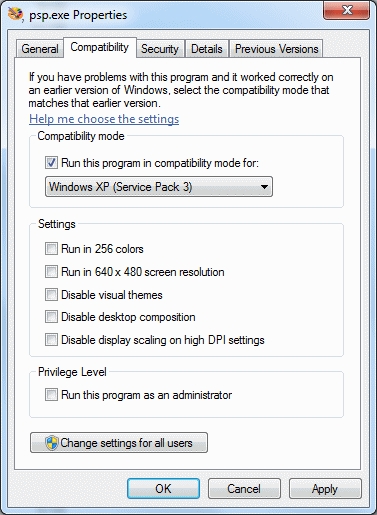
5. Click Apply then OK.
6. Try to start Outlook.