Microsoft 365 and Office | Word | For home | Windows
A family of Microsoft word processing software products for creating web, email, and print documents.

This browser is no longer supported.
Upgrade to Microsoft Edge to take advantage of the latest features, security updates, and technical support.
' cx='32' cy='32' r='32' /%3E%3Ctext x='50%25' y='55%25' dominant-baseline='middle' text-anchor='middle' fill='%23FFF' %3EA%3C/text%3E%3C/svg%3E)
How do I properly set up a document as a B4 paper size? On Google, a B4 paper is 250mm x 353mm. Although in MS Word 2016, a B4 paper is 257mm x 364mm.
Which is the right one?
I have attempted to use a custom paper size with 250mm x 353mm, although the settings do not accept 250mm size. It automatically goes down to 215.9mm.
Any suggestions?
Thanks
A family of Microsoft word processing software products for creating web, email, and print documents.
Locked Question. This question was migrated from the Microsoft Support Community. You can vote on whether it's helpful, but you can't add comments or replies or follow the question.
According to this wiki, MS is closer than google to the standard:
https://en.wikipedia.org/wiki/Paper_size
How are you setting the page size? I don't have 2016, but in 2013 it is easy enough to select predefined page size:
According to this wiki, MS is closer than google to the standard:
https://en.wikipedia.org/wiki/Paper_size
How are you setting the page size? I don't have 2016, but in 2013 it is easy enough to select predefined page size:
- Page Layout tab
- Page Setup group
- Size dropdown
- select B4
Hi! Thank you for the swift reply. I just looked over the wiki page and it says a standard B4 paper size would be 250mm x 353mm ?
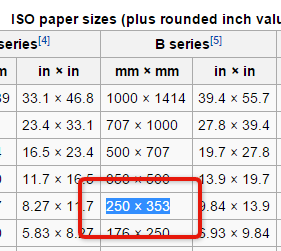
On MS Word 2016, it is a different size.
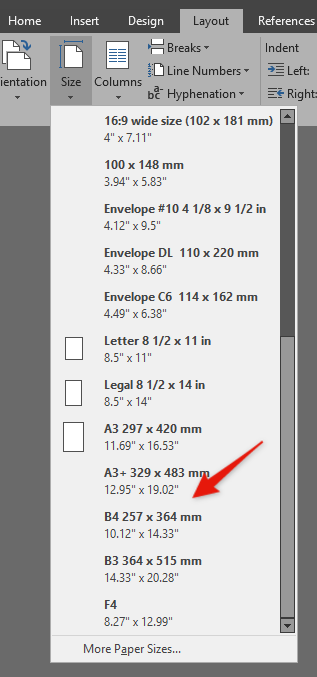
Which size is the correct one?
I've double checked on everything and yes, this is related to my printer. The printer that I have (Epson L220) uses the JIS B4 paper standard and not ISO. I don't see an option to select this. I'm not sure how to change the settings...
It might be default and I can't do anything about it?
I took a second look at the paper size wiki. Farther down it does list the JIS standard, showing your B4 size.
That combined with the Windows 2000 article suggests your computer locale, or maybe Word language, is set to something Japanese related. Is this possible?
I just noticed that 2016 has a scroll bar on the drop down, 2013 doesn't. Is it possible that the "right" B4 is higher up on the list?
In 2013 the "more paper sizes..." option displays the Page Setup dialog > Paper tab. In there I have very limited size options.
That is interesting, it seems that in 2016 MS has redefined the B4 Standard. Here is what I see in 2013:
Which is correct? ... Depends on your location.
I googled several sites, they all agreed with wiki, suggesting MS was being "creative". Then I found this (very old) article:
There B4 is listed same as 2016. BUT, it includes the qualification "JIS". That is a Japanese standard. And when I looked farther down the page, there was also B4 ISO, which is European and the same as Wiki.
SO ...
try clicking on the "More Paper Sizes ..." option
to see if there is also an ISO B4 size listed farther down.
Alternate work around ...
Earlier versions of Word were very tightly connected to the selected Printer driver. It seems to becoming less tightly connected, but maybe this is one setting that is still associated with the Printer driver. Try selecting a different printer to see if that changes the options.
Please VOTE:
MS has created some "UserVoice" sites for us to submit change and feature requests. I have created a suggestion based on your question. Please vote for it in the hope that MS will eventually act on it
"UserVoice.com" - MS Suggestion box sites
If you have an (other) feature suggestions to make for various MS products, here is a longer collection of MS UserVoice.com sites:
Here are links to some of my personal “favorite” suggestions
· Recently Used List Sort order: Date vs Alpha https://word.uservoice.com/forums/304924-word-for-windows-desktop-application/suggestions/10137741-recently-used-list-sort-order-date-vs-alpha
· Petition to MS President to allow Windows Home users control Windows Updateshttps://www.change.org/p/satya-nadella-microsoft-what-computer-users-want-changed-in-windows-10 (The matching UserVoice site has been discontinued by MS)
· 2016 QAT is too Spaced OUT! -http://office.uservoice.com/forums/285186-general/suggestions/9906966-office-2016-quick-access-toolbar-too-wide
· Don’t want Office 2016 tied to Userid -https://office.uservoice.com/forums/285186-general/suggestions/10517283-allow-activation-without-the-need-of-a-ms-mail-acc
· Visio 365 monthly specifically for Consumer licenses -https://office.uservoice.com/forums/285186-general/suggestions/10936428-visio365-monthly-for-consumer-365-users-and-oth
· Recreate the single text margin around page like 2010 and earlier -http://word.uservoice.com/forums/304924-word-for-windows-desktop-application/suggestions/9253599-bring-back-classic-text-boundaries
· Add mind mapping to OneNote -https://onenote.uservoice.com/forums/327186-onenote-for-windows-windows-phone/suggestions/6160979-mindmap-functionality?page=4&per_page=20
· Custom installation from Office 365 (2016) / Return MSI installer option - ****https://office365.uservoice.com/forums/264636-general/suggestions/9939513-custom-installation-from-office-365-2016
· Word 2016 Style Pane bug -mouse pointer wrong https://word.uservoice.com/forums/304924-word-for-windows-desktop-application/suggestions/11196345-word-2016-style-pane-corrupt-or-buggy-after-update
· Add PowerPivot back to Access (and to Excel in all bundles)https://access.uservoice.com/forums/319956-access-desktop/suggestions/10284183-add-pivot-charts-back-to-access
· Add BI/PowerPivot back to Excel in all bundles -https://excel.uservoice.com/forums/304921-excel-for-windows-desktop-application/suggestions/9018823-make-the-power-bi-family-powerpivot-powerquery