Microsoft 365 and Office | Install, redeem, activate | For home | Windows
Processes in Microsoft 365 for setting up Office apps, redeeming product keys, and activating licenses.

This browser is no longer supported.
Upgrade to Microsoft Edge to take advantage of the latest features, security updates, and technical support.
' cx='32' cy='32' r='32' /%3E%3Ctext x='50%25' y='55%25' dominant-baseline='middle' text-anchor='middle' fill='%23FFF' %3EA%3C/text%3E%3C/svg%3E)
I have a Lenovo Yoga2Pro running Windows 10. I am trying to load Office Small Business 2007 however the "Enter your Product Key" box is too small and does not expand to enter your product key. How in the world do I fix this?? I have tried every resolution setting I know on the computer and I'm guessing this is a Lenovo question but maybe someone on this forum can help me.... Please? Thank you! 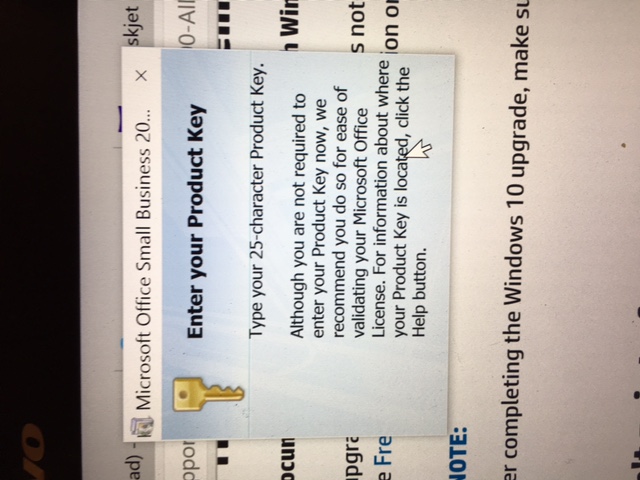
Processes in Microsoft 365 for setting up Office apps, redeeming product keys, and activating licenses.
Locked Question. This question was migrated from the Microsoft Support Community. You can vote on whether it's helpful, but you can't add comments or replies or follow the question.
what finally worked for me was, even though I couldn't see the field, I just started typing in the key (no dashes) then clicked enter, it took me to another small screen to select settings, which I couldn't see, I clicked enter again.
I was able to get the product key screen to come up multiple times to try this by opening Word, going to Word Options>Resources>activate Microsoft Office
I fixed it!!! I decreased the resolution tremendously and wouldn't you know it worked! Or at least I think that's what I did. I run Windows 10 and I think I did it under Settings rather than Control Panel. What a relief to get this done as its not something that folks know how to fix!! Thank you very much for continuing to help!!
You could try a win safe mode with networking restart, see if you are then able to install
Its definitely a win display/resolution issue
It won't let me advance past that point. When I exit out of the "enter your product key box" it ends the install. I get this same box whether I download software from web or via my disks. And can't get around it. It can be fixed as trial and error at Geek Squad conquered it once. But computer needed new hard drive and I'm reloading everything fresh. I have adjusted everything under settings imaginable and can't get that box to change. But I know it can!
And if you continue the install without entering the Key, then start Word and Activate by entering the key, what then?