Microsoft Security | Microsoft Entra | Microsoft Entra ID
A cloud-based identity and access management service for securing user authentication and resource access

This browser is no longer supported.
Upgrade to Microsoft Edge to take advantage of the latest features, security updates, and technical support.
' cx='32' cy='32' r='32' /%3E%3Ctext x='50%25' y='55%25' dominant-baseline='middle' text-anchor='middle' fill='%23FFF' %3EMA%3C/text%3E%3C/svg%3E)
I am Looking for an Script where i can create 500 Security Groups by Bulk Import Power shell cmdlet and Add Group Owners in Azure AD at the same time .
Please help !!!
A cloud-based identity and access management service for securing user authentication and resource access
It seems It is working now and thank so much for your help and for your prompt replies ..

Hi @Mourya, Aditya ,
great to hear.
It's my first script that is working after I modified it (to get rid of my mistake)?
If you found the answer containing my first script helpful, it would be great if you please mark it "Accept as answer". This will help others to find answers in Q&A
----------
Regards
Andreas Baumgarten

@Mourya, Aditya
I'm glad that you were able to resolve your issue!
If you have any other questions, please let me know.
Thank you for your time and patience throughout this issue.
----------
Please remember to "Accept Answer" if any answer/reply helped, so that others in the community facing similar issues can easily find the solution.
Still No Luck ,Got this Error ...
Get-AzureADUser : Cannot bind argument to parameter 'ObjectId' because it is an empty string.
At line:2 char:44
New-AzureADGroup : Cannot bind argument to parameter 'DisplayName' because it is an empty string.
At line:3 char:44
Add-AzureADGroupOwner : Error occurred while executing AddGroupOwner
Code: Request_BadRequest
Message: One or more added object references already exist for the following modified properties: 'owners'.
RequestId: e2945e74-a689-4209-b8ea-2110bb370b37
DateTimeStamp: Sun, 18 Sep 2022 13:44:28 GMT
HttpStatusCode: BadRequest
HttpStatusDescription: Bad Request
HttpResponseStatus: Completed
At line:4 char:2
Get-AzureADUser : Cannot bind argument to parameter 'ObjectId' because it is an empty string.
At line:2 char:44
New-AzureADGroup : Cannot bind argument to parameter 'DisplayName' because it is an empty string.
At line:3 char:44
Add-AzureADGroupOwner : Error occurred while executing AddGroupOwner
Code: Request_BadRequest
Message: One or more added object references already exist for the following modified properties: 'owners'.
RequestId: 82b8d083-4ebd-44b5-b964-470111693e20
DateTimeStamp: Sun, 18 Sep 2022 13:44:28 GMT
HttpStatusCode: BadRequest
HttpStatusDescription: Bad Request
HttpResponseStatus: Completed
At line:4 char:2
Please post the output of this command:
Import-Csv -Path "c:\temp\GroupsC.csv"
----------
(If the reply was helpful please don't forget to upvote and/or accept as answer, thank you)
Regards
Andreas Baumgarten
i Get this Output on running this cmdlet
PS C:\Windows\system32> Import-Csv -Path "C:\temp\GroupsC.csv"
GroupName GroupOwner
--------- ----------
TeamGroup ******@group.com
ClubGroup ******@group.com
Please try this and poist the output:
Import-Csv -Path "C:\temp\GroupsC.csv" | ForEach-Object {
    $_.GroupOwner
    $_.GroupName
}
You should get the 4 lines ...
******@group.com
TeamGroup
******@group.com
ClubGroup
----------
(If the reply was helpful please don't forget to upvote and/or accept as answer, thank you)
Regards
Andreas Baumgarten
Please find the OutPut :
PS C:\Windows\system32> Import-Csv -Path "C:\temp\GroupsC.csv" | ForEach-Object {
$.GroupOwner
$.GroupName
}
******@group.com
TeamGroup
******@group.com
ClubGroup
Next with output please:
Import-Csv -Path "C:\temp\GroupsC.csv" | ForEach-Object {
    Get-AzureADUser -ObjectId $_.GroupOwner
}
You should get 2 lines.
----------
(If the reply was helpful please don't forget to upvote and/or accept as answer, thank you)
Regards
Andreas Baumgarten
I get this Error after running this - Import-Csv -Path "C:\temp\GroupsC.csv" | ForEach-Object {
Get-AzureADUser -ObjectId $_.GroupOwner
}
Get-AzureADUser : Cannot bind argument to parameter 'ObjectId' because it is an empty string.
At line:2 char:32
Get-AzureADUser : Cannot bind argument to parameter 'ObjectId' because it is an empty string.
At line:2 char:32
This is weird .....
Please run each line and post each output:
($PSVersionTable).PSVersion
Get-InstalledModule AzureAD | Select-Object Name, Version, Repository
Import-Module AzureAD # This will not give an output
Get-Module AzureAD | Select-Object Name, Version
(Get-AzureADCurrentSessionInfo).Account
Please verify the user of the last output is a member of the Global Administrator role in your Azure AD.
Also you could run the following command with using your Azure AD Account:
Get-AzureADUser -ObjectId "******@group.com"
----------
(If the reply was helpful please don't forget to upvote and/or accept as answer, thank you)
Regards
Andreas Baumgarten
Please find the result :
PS C:\Windows\system32> ($PSVersionTable).PSVersion
Get-InstalledModule AzureAD | Select-Object Name, Version, Repository
Major Minor Build Revision
----- ----- ----- --------
5 1 19041 1682
Name : AzureAD
Version : 2.0.2.140
Repository : PSGallery
Import-Module AzureAD
PS C:\Windows\system32> Import-Module AzureAD
PS C:\Windows\system32> Get-Module AzureAD | Select-Object Name, Version
(Get-AzureADCurrentSessionInfo).Account
Name Version
---- -------
AzureAD 2.0.2.140
What happens if you please run this now (using your Azure AD account as the ObjectId)?
Get-AzureADUser -ObjectId "******@group.com"
----------
(If the reply was helpful please don't forget to upvote and/or accept as answer, thank you)
Regards
Andreas Baumgarten
I Get this Result :
PS C:\Windows\system32> Get-AzureADUser -ObjectId ******@group.com
ObjectId DisplayName UserPrincipalName UserType
-------- ----------- ----------------- --------
bffsdffc8-43482-4434a-9343a-44555sd Mourya, Aditya ******@group.com Member
Next try please:
Import-Csv -Path "C:\temp\GroupsC.csv" | ForEach-Object {
    Write-Output "Owner: $($_.GroupOwner)"
    $ownerUserObj = Get-AzureADUser -ObjectId ($_.GroupOwner).Trim()
    $ownerUserObj
}
----------
(If the reply was helpful please don't forget to upvote and/or accept as answer, thank you)
Regards
Andreas Baumgarten
I Get this Error :
Get-AzureADUser : Cannot bind argument to parameter 'ObjectId' because it is an empty string.
At line:3 char:48
36d58f5f-d54a-4493-a1a6-b57915cfe624 Mourya,Aditya ******@group.com Member
Owner:
There is a minor mistake in the script. Sorry!
Please try this:
Import-Csv -Path "c:\temp\GroupsC.csv" | ForEach-Object {
$ownerUserObj = Get-AzureADUser -ObjectId $_.GroupOwner
$newGroup = New-AzureADGroup -DisplayName $_.GroupName -SecurityEnabled $true -MailEnabled $false -MailNickName "NotSet"
Add-AzureADGroupOwner -ObjectId $newGroup.ObjectId -RefObjectId $ownerUserObj.ObjectId
}
----------
(If the reply was helpful please don't forget to upvote and/or accept as answer, thank you)
Regards
Andreas Baumgarten
Hi @Mourya, Aditya ,
you wrote earlier the script is working now for you.
If you found the answer helpful, it would be great if you please mark it "Accept as answer". This will help others to find answers in Q&A
Regards
Andreas Baumgarten

Hi Mourya,
Thanks for reaching out to Microsoft Q&A.
Please refer the below links, these has directions and steps.
EDIT
Please ignore the links above as it is related to Azure AD on-prem, I suggest you to refer the link posted by @Andreas Baumgarten
Please Upvote and Accept as answer if the reply was helpful.
Hi @Vinodh247 ,
Just for info: Both links you posted in your answer are related to Active Directory (on premises AD) and not related to Azure Active Directory (AAD).
The question was related to Azure AD as far as I understand.
Bulk Import Power shell cmdlet and Add Group Owners in Azure AD
----------
(If the reply was helpful please don't forget to upvote and/or accept as answer, thank you)
Regards
Andreas Baumgarten
Hi @Andreas Baumgarten : Thanks for correction, I have edited my answer now.
Hi @Mourya, Aditya ,
maybe this helps to get started: https://morgantechspace.com/2021/12/create-security-group-and-add-members-in-azure-ad-using-powershell.html
Do you have a CSV file with the names of the new AD groups and the related AD user (owner)?
----------
(If the reply was helpful please don't forget to upvote and/or accept as answer, thank you)
Regards
Andreas Baumgarten
@Andreas Baumgarten Thank you for sharing the URLs but it didn't helped with my Question .
I want to Create New Azure AD Security Groups by Importing CSV File and also add Group Owners .
Could you please help me with cmdlet or Script .?
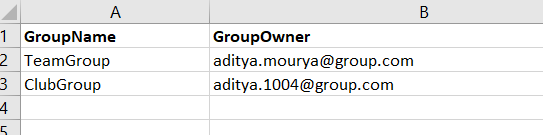
MY CSV file contains Parameters - GroupName ,GroupOwner email address .
Hi @Mourya, Aditya ,
this is a very simple script without any error handling to get the job done:
Import-Csv -Path "Junk\AzureADgroups.csv" | ForEach-Object {
    $ownerUserObj = Get-AzureADUser -ObjectId $_.GroupOwner
    $newGroup = New-AzureADGroup -DisplayName $_.GroupName -SecurityEnabled $true -MailEnabled $false -MailNickName "NotSet"
    Add-AzureADGroupOwner -ObjectId $newGroup.ObjectId -RefObjectId $ownerUserObj.ObjectId
}
CSV file looks like this:
GroupName,GroupOwner
groupPeter,******@contoso.com
groupPaul,******@contoso.com
I would recommend to add some error handling to the script:
"Owner does not exist" and "Group name already exists" with the required output. For instance:
But this is up to your requirements.
----------
(If the reply was helpful please don't forget to upvote and/or accept as answer, thank you)
Regards
Andreas Baumgarten
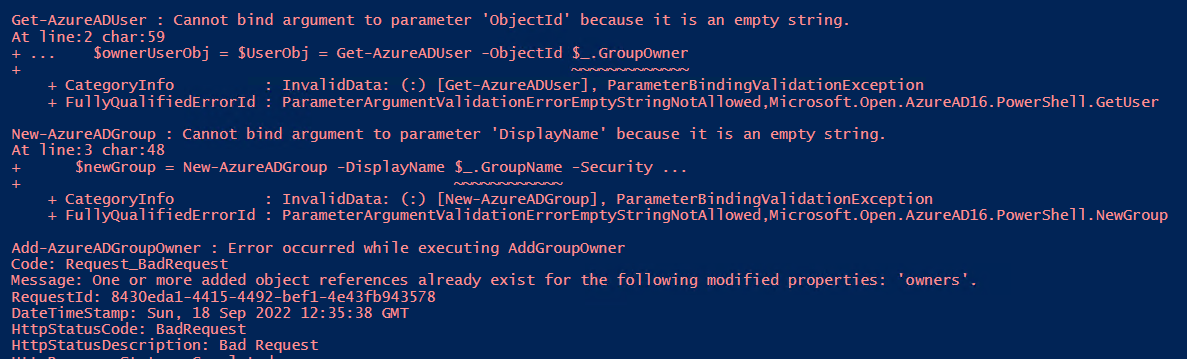
I Tried creating Security Groups but got the attached Error ,Please assist .
I used the Parameters : GroupName , GroupOwner (emails addresses )
@Andreas Baumgarten ,Please help Me
Hi @Mourya, Aditya ,
please take a look on the CSV file content I posted in my answer including the first line with the header details.
How does your CSV file content looks like? It should look like the same (try to avoid spaces in the column header).
----------
(If the reply was helpful please don't forget to upvote and/or accept as answer, thank you)
Regards
Andreas Baumgarten
Hi @Mourya, Aditya ,
please post the output of this line (replace <yourCSVfileName.csv> with the name of your CSV file):
Import-Csv -Path "<yourCSVfileName.csv>"
You should see 2 lines.
If so please try this:
Import-Csv -Path "<yourCSVfileName.csv>" | ForEach-Object {
    $_.GroupOwner
    $_.GroupName
}
You should see 4 lines ...
Owner1 (line 2 in your CSV)
Group1 (line 2 in your CSV)
Owner2 (line 3 in your CSV)
Group2 (line 3 in your CSV)
----------
(If the reply was helpful please don't forget to upvote and/or accept as answer, thank you)
Regards
Andreas Baumgarten
Import-Csv -Path "c:\temp\GroupsC.csv" | ForEach-Object {
$ownerUserObj = $UserObj = Get-AzureADUser -ObjectId $.GroupOwner
$newGroup = New-AzureADGroup -DisplayName $.GroupName -SecurityEnabled $true -MailEnabled $false -MailNickName "NotSet"
Add-AzureADGroupOwner -ObjectId $newGroup.ObjectId -RefObjectId $ownerUserObj.ObjectId
}
I Used this Below cmdlet but get the same error as shared earlier :
Import-Csv -Path "C:\temp\GroupsC.csv" | ForEach-Object {
$ownerUserObj = $UserObj = Get-AzureADUser -ObjectId $.GroupOwner
$newGroup = New-AzureADGroup -DisplayName $.GroupName -SecurityEnabled $true -MailEnabled $false -MailNickName "NotSet"
Add-AzureADGroupOwner -ObjectId $newGroup.ObjectId -RefObjectId $ownerUserObj.ObjectId
}
I made a minor mistake in the script. Sorry!
Please try this:
Import-Csv -Path "c:\temp\GroupsC.csv" | ForEach-Object {
$ownerUserObj = Get-AzureADUser -ObjectId $_.GroupOwner
$newGroup = New-AzureADGroup -DisplayName $_.GroupName -SecurityEnabled $true -MailEnabled $false -MailNickName "NotSet"
Add-AzureADGroupOwner -ObjectId $newGroup.ObjectId -RefObjectId $ownerUserObj.ObjectId
}
----------
(If the reply was helpful please don't forget to upvote and/or accept as answer, thank you)
Regards
Andreas Baumgarten