Microsoft 365 and Office | Word | For home | Windows
A family of Microsoft word processing software products for creating web, email, and print documents.

This browser is no longer supported.
Upgrade to Microsoft Edge to take advantage of the latest features, security updates, and technical support.
' cx='32' cy='32' r='32' /%3E%3Ctext x='50%25' y='55%25' dominant-baseline='middle' text-anchor='middle' fill='%23FFF' %3EA%3C/text%3E%3C/svg%3E)
Hello!
When I fill in the document properties for a Word 2010 file and enter the author's name, the property is automatically filled with that person's email address. I just want to enter the author's name, not the email address since I use this file to create ebooks in several different formats, and I don't want this person's email address included in the ebooks. I haven't found anything in Office help that tells me how to disable this feature.
Any assistance is appreciated.
MT
A family of Microsoft word processing software products for creating web, email, and print documents.
Locked Question. This question was migrated from the Microsoft Support Community. You can vote on whether it's helpful, but you can't add comments or replies or follow the question.
Here's a solution that actually works: http://www.tech-recipes.com/rx/25605/prevent-word-from-including-email-address-when-adding-author/
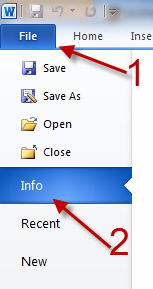
The far right side of the screen shows the detailed properties of the document. Click the Properties button at the top and then choose Advanced Properties.

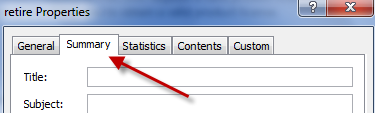
The document’s properties pops up on the screen. Make sure you are in the Summary tab.
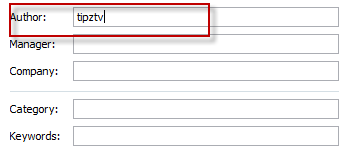
In the author field, fill in the author names. If any emails present there, just replace them with your desired names.
When you are done, click OK to save the changes.
You can override the author field by editing the author in the properties window.
Open the File tab
Click on Info
On the right just below the document preview click the Properties drop-down
Select Advanced Properties
You now see the properties window similar to word 2003 and 2007. Edit the Author field any way you want and refresh your fields to apply the changes.
This does not work if Office includes Outlook with a global contact list. It will display the email address of the author instead of the name.
This is NOT the answer if you are listed in the global contact list.
For me, it does work! (I have Outlook 2010 and Word 2010 installed). You 'll have to select the >>Advanced<< properties from the combo box on top off the properties list.
Hello all
Please use a non-breaking space (Ctrl.+Shift+Space) between the first and last name.
This is a workaround, but it works.
Cheers,
Christian
A workaround for this is to put a '.' (period / full stop) at the end of the author name in the properties pane. This makes it fail the contact lookup and it puts the text in unmodified.