Microsoft 365 and Office | Subscription, account, billing | For home | Windows
Microsoft 365 features that help users manage their subscriptions, account settings, and billing information.

This browser is no longer supported.
Upgrade to Microsoft Edge to take advantage of the latest features, security updates, and technical support.
' cx='32' cy='32' r='32' /%3E%3Ctext x='50%25' y='55%25' dominant-baseline='middle' text-anchor='middle' fill='%23FFF' %3EA%3C/text%3E%3C/svg%3E)
Hi there,
We setup an 'Office 365 email' group and created a group email. We want to add external contacts (not within our organization) to be added to this group but it appears that its not possible. I find it only possible if you use 'Distribution email'.
My question is if it's really possible to add external contacts/emails (outside your organisation) using 'Office 365 group?" see http://prntscr.com/bsn4lq
or is this under development like what I saw here : http://prntscr.com/bsn4sw
Hope you can reply asap.
Thanks
Tony
Microsoft 365 features that help users manage their subscriptions, account settings, and billing information.
Locked Question. This question was migrated from the Microsoft Support Community. You can vote on whether it's helpful, but you can't add comments or replies or follow the question.
Answer accepted by question author
Hi Tony,
Actually, the answer is yes.
First of all, you need to add the external user to the contacts in Exchange admin center. Please follow the steps below:
1.Log into EAC with an admin account.
2.In the Exchange admin center, click recipients>contacts.
3.Click “+”> mail user and fill in the blanks.
4.Click Save.
5.Then you edit member to add this external user to the Office 365 group you have created.
Feel free to post back if anything is unclear.
Best Regards,
Lance
This answer has been deleted due to a violation of our Code of Conduct. The answer was manually reported or identified through automated detection before action was taken. Please refer to our Code of Conduct for more information.
Comments have been turned off. Learn more
Hi Hong,
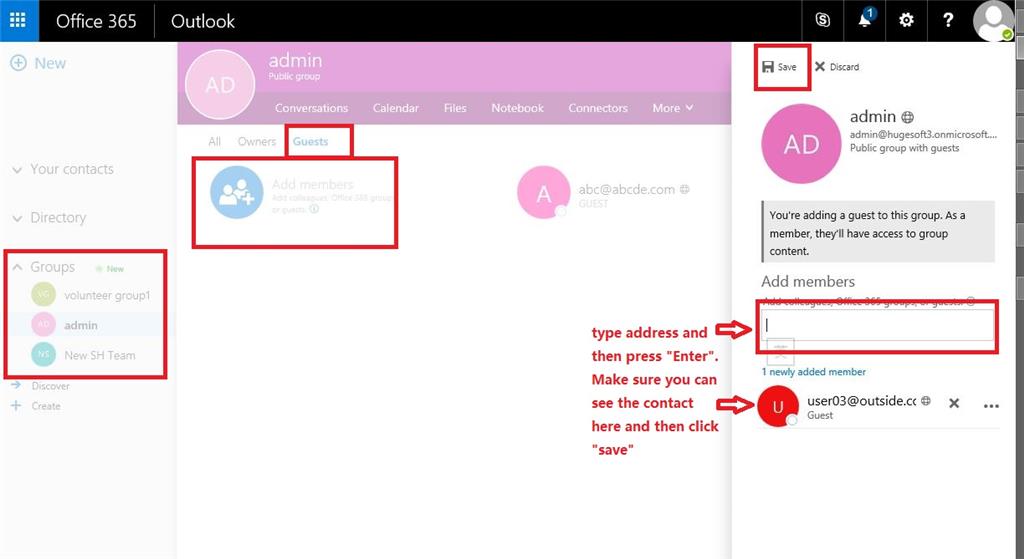
As the owner of an Office 365 group, you can go into that group and then add external users with their address:
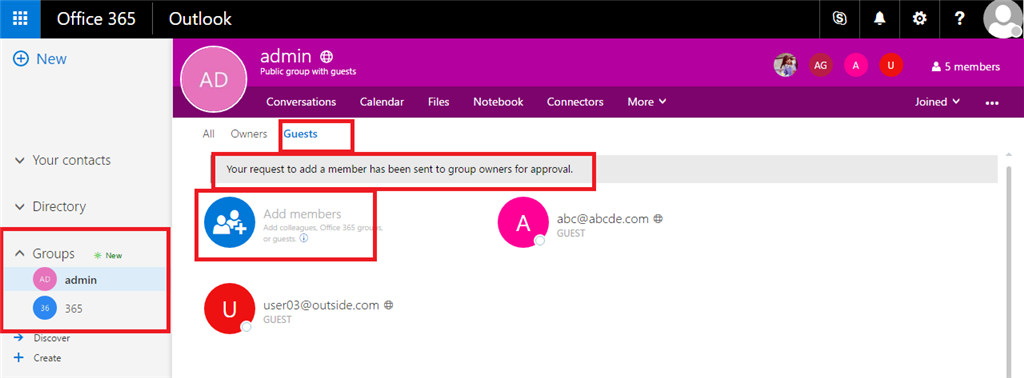
As a normal member, you can also add an external user to this group, but it need to be approved by the group admin
Best,
Alison
Lance, this method only works with "Distribution Groups" not "Office 365 Groups". If you go to an Office 365 Group, you will not see those external contacts you added.
Hi Hong,
As the owner of an Office 365 group, you can go into that group and then add external users with their address:
As a normal member, you can also add an external user to this group, but it need to be approved by the group admin
Best,
Alison I
I can add contacts with external email addresses but they do not show up as an option to add to "Office 365 Groups" My distribution groups allow me to see both internal and external contacts. I keep trying to create a distribution list instead of an "Office 365 Group" and when I save it is a Office 365 Group not a distribution list. Very frustrating and none of the help files are helping.