Microsoft 365 and Office | Word | For home | Windows
A family of Microsoft word processing software products for creating web, email, and print documents.

This browser is no longer supported.
Upgrade to Microsoft Edge to take advantage of the latest features, security updates, and technical support.
' cx='32' cy='32' r='32' /%3E%3Ctext x='50%25' y='55%25' dominant-baseline='middle' text-anchor='middle' fill='%23FFF' %3EA%3C/text%3E%3C/svg%3E)
Split from this thread.
I tried the solution given by Kerjango however gpedit.msc appears to be non-existent on my machine. Perhaps because I have a 'home' instread of 'pro' version of Windows? In any event, I also tried running the command line prompt that Grukdon posted: icacls %windir%\Fonts /grant "ALL APPLICATION PACKAGES":(OI)(CI)RX /Tand received an access is denied to the fonts folder. I assume that by "open an elevated command prompt" you mean to run as administrator? The other symptom I see is that some Word docs are fine and others give the error listed in the topic title. I suppose that all depends on which font the document is calling for?
A family of Microsoft word processing software products for creating web, email, and print documents.
Locked Question. This question was migrated from the Microsoft Support Community. You can vote on whether it's helpful, but you can't add comments or replies or follow the question.
Running these 2 lines fixed it for me, as it restored the permissions on those fonts.
Get-acl C:\Windows\fonts\arial.ttf | Set-Acl -path c:\windows\fonts\*.*
Get-acl C:\Windows\fonts\arial.ttf | Set-Acl -path c:\windows\fonts
No Security Tab in mine (as the picture above). Any help?
Update:
I think I've solved it from this thread
Running these 2 lines fixed it for me, as it restored the permissions on those fonts.
Get-acl C:\Windows\fonts\arial.ttf | Set-Acl -path c:\windows\fonts\*.*
Get-acl C:\Windows\fonts\arial.ttf | Set-Acl -path c:\windows\fonts
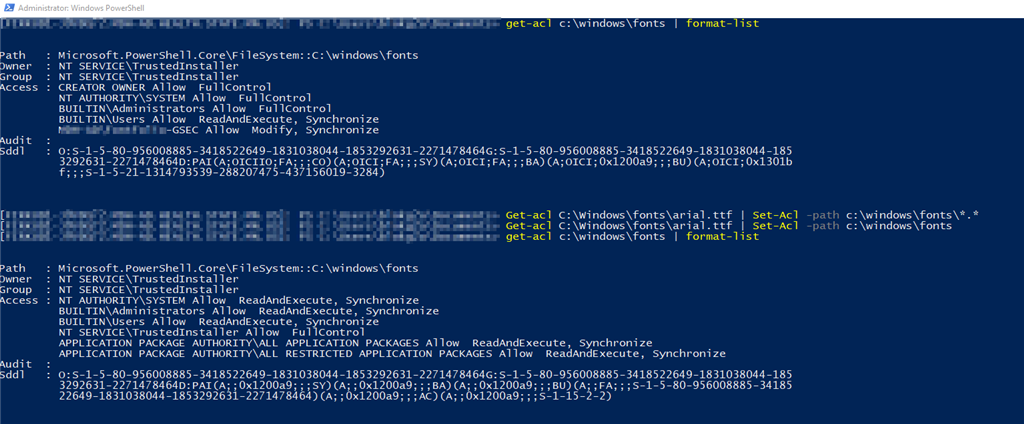
Where do you run the commands?? I tried On Command Prompt and i got ‘Get-acl’ is not recognized as internal or external command’ please clarify where to run it
thanks
Hi Steve,
You are correct; Group Policy Editor is available in the Pro version of Windows. You are also right that Open an elevated command promptmeans to run as administrator. If both of these methods did not work, try manually changing the permissions of the Fonts folder. To do this, follow the steps below:
If the issue persists, we suggest that you create a new local administrator account on your computer and check if you will experience this issue in Word while on the new account
If you need further assistance, please do not hesitate to post a reply.
Use powershell
Thus, type powershell in your command prompt then type the commands.
Thank you. Your method resloved the issue.