Microsoft Teams | Microsoft Teams for business | Other
Additional features, settings, or issues not covered by specific Microsoft Teams categories

This browser is no longer supported.
Upgrade to Microsoft Edge to take advantage of the latest features, security updates, and technical support.
' cx='32' cy='32' r='32' /%3E%3Ctext x='50%25' y='55%25' dominant-baseline='middle' text-anchor='middle' fill='%23FFF' %3ETJ%3C/text%3E%3C/svg%3E)
Hi, I'm using a Mac Mini 3.6 GHz Quad-Core Intel Core i3 with 8GB RAM with a Lenovo FHD webcam. Running MacOS X 12.1 Monterey. Teams version 1.4.00.35562. It was last updated on 19/01/2022.
When on Teams video calls it has been pointed out to me that my video resolution is poor and on inspecting the call health I can see that the camera is sending poor resolution.
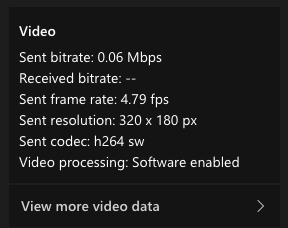 ]1
]1
Internet connection is good as I have recently upgraded to full fibre. I have also tried toggling the 'Disable GPU hardware acceleration (requires restarting Teams)' setting and disconnecting additional monitors.
Problem is only on this machine and only with outgoing video (I can see others fine). If I try on my iMac with built in camera it is fine, also on Lenovo laptop (also with built in camera), iPhone 7 and iPhone 11.
Additional features, settings, or issues not covered by specific Microsoft Teams categories
' cx='32' cy='32' r='32' /%3E%3Ctext x='50%25' y='55%25' dominant-baseline='middle' text-anchor='middle' fill='%23FFF' %3EJM%3C/text%3E%3C/svg%3E)
Does this problem persist all the time?
What kind of network do you use? VPN, WiFi or Ethernet?
It recommends you check if the ports UDP 3478 – 3481 are opened on firewall. Then, optimize your network by referring to this article: https://learn.microsoft.com/en-us/microsoftteams/prepare-network#network-optimization.
If no luck, go to Microsoft 365 admin center > Health > Service health > Microsoft Teams to check if Teams shows any exception status.
Hi, thanks for the response.
Yes, it is persistent, but only on this machine. Originally thought it was due to slow connection but having now upgraded to full fibre it is well below the quality I would expect. This is confirmed by the technical doc you provided which suggests even the old connection of 5Mbps should have been able to support decent quality.
Pretty sure those ports are open but need to double check.
Using WiFi but will try a different method. This has solved problems with VPN previously where my main Internet was blocking every now and then.
May drop onto Apple forum and see if there are any Mac Mini users using Teams to see if they have a similar experience.
Will report back shortly.
All right. If you have any update about this issue, please feel free to post back.
I was redirected to another post that suggests that the Teams application requests video at a lower quality than the webcam is capable of which is the reason for the low quality.
However, the quality it reportedly requests is still well above what I was getting and the suggested fix of launching a FaceTime or Zoom call whilst in a call on Teams does nothing to improve things for me.
I've had some success using the web client which offers a much better picture quality but no permanent fix.
Answer accepted by question author
' cx='32' cy='32' r='32' /%3E%3Ctext x='50%25' y='55%25' dominant-baseline='middle' text-anchor='middle' fill='%23FFF' %3EMS%3C/text%3E%3C/svg%3E)
It seems like a bug in Teams, but not many people with a similar setup. So I guess not too urgent for Microsoft to look into?
Still hoping for a solution for this :)
' cx='32' cy='32' r='32' /%3E%3Ctext x='50%25' y='55%25' dominant-baseline='middle' text-anchor='middle' fill='%23FFF' %3EPR%3C/text%3E%3C/svg%3E)
This is a deep problem from Microsoft Teams and unfortunate that no one can solve this issue... shame on Microsoft Teams Product team.
You can find the latest prevew/rc/beta versions of MS Teams here for download https://github.com/ItzLevvie/MicrosoftTeams-msinternal/blob/master/defconfig2#L21 and my only hope is that the new version 2.1 from MS Teams , that is a revamped version of it, will eventually solve this. Until now the first OSX version was only released yesterday and is still unusable.
Until then I use the web version as is the only way I can get Full HD from my Logitech Brio camera.
So let's hope and pray that Product Managers at Microsoft Teams can orioritize this problem sooner than later.
Hope this helps
' cx='32' cy='32' r='32' /%3E%3Ctext x='50%25' y='55%25' dominant-baseline='middle' text-anchor='middle' fill='%23FFF' %3EKK%3C/text%3E%3C/svg%3E)
I myself am in the exact same position, and am finding it really frustrating to have to use the web version to get my external webcam to work. As a CIO in a company where many of us use macs, its forcing the conversation about switching to a product like Zoom or other which his a shame as we are O365 users and love the rest of the suite.
Will watch this space to see if they come up with a working beta version with fingers crossed
' cx='32' cy='32' r='32' /%3E%3Ctext x='50%25' y='55%25' dominant-baseline='middle' text-anchor='middle' fill='%23FFF' %3EST%3C/text%3E%3C/svg%3E)
I am also having the same problem on my MacBook Pro M1 - Monterey 12.4 - Teams 1.5.00.15861 - Tested with 3 USB webcams - Logitech BRIO 4k, Logitech c920 Pro HD, and eMeet c960 1080p. They all look great using Teams in the web browser.
' cx='32' cy='32' r='32' /%3E%3Ctext x='50%25' y='55%25' dominant-baseline='middle' text-anchor='middle' fill='%23FFF' %3ERY%3C/text%3E%3C/svg%3E)
Same issue here. I have 2019 Macbook Pro 16" and logitech C920 webcam. Teams sends 640 x 480 when using this webcam. Web Teams client improves the quality for me too. Monterey 12.5.1. Teams: 1.5.00.21551
I'm experiencing the exact same issue using a MacBook Pro M1 Max on Monterey 12.3.1 and Teams client 1.5.00.8073. I have been testing a Logitech C920 and a Logitech BRIO 4K. In Facetime and most other clients the resolution quality is perfect, but in the Teams client it is very poor. But when I switch to the built-in webcam, the quality is also perfect?
I'm using my MacBook at home connected to a dock and external monitors, so the built-in webcam is not always preferable.