Microsoft 365 and Office | SharePoint | For business | Windows
A group of Microsoft Products and technologies used for sharing and managing content, knowledge, and applications.

This browser is no longer supported.
Upgrade to Microsoft Edge to take advantage of the latest features, security updates, and technical support.
' cx='32' cy='32' r='32' /%3E%3Ctext x='50%25' y='55%25' dominant-baseline='middle' text-anchor='middle' fill='%23FFF' %3EA%3C/text%3E%3C/svg%3E)
Split from this thread.
Hey Ryan,
Trying to share just the one document in a library to an external as per your response above, and we're receiving the same error:
Your organization's policies don't allow you to share with these users. Go to External Sharing in the Office 365 admin center to enable it.
Any ideas what we are missing?
All permission and settings have been enabled to allow such an action.
Best,
Mark
A group of Microsoft Products and technologies used for sharing and managing content, knowledge, and applications.
Locked Question. This question was migrated from the Microsoft Support Community. You can vote on whether it's helpful, but you can't add comments or replies or follow the question.
Answer accepted by question author
Hi Mark,
The External Sharing settings in the SharePoint admin center is set for tenant level.
Turning external sharing on at the tenant level means that site collections can then be enabled for sharing. However, to allow external sharing, we also need to enable it for each site collection. Please check the information below to see if you have enabled external Sharing for the site collection. Please refer to Turn external sharing on or off for SharePoint Online to check if you have enabled external sharing for the site collection level. Here’s the summary:
Go to the SharePoint admin center>site collections>select the site>click “Sharing” tab>set the sharing policy 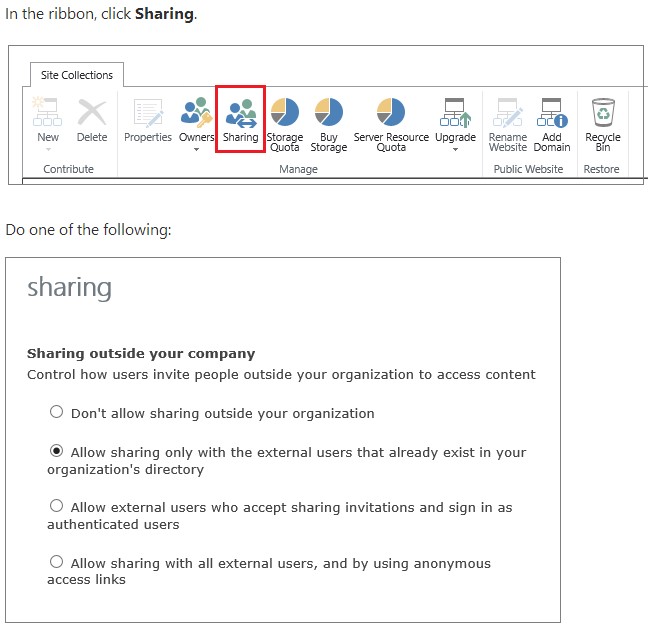
You need to enable the external sharing via PowerShell command for Office 365 group site.
If you have set the settings above but still have the issue, to narrow down the issue, please provide the information below:
Thanks,
Rena
Hi Mark,
Have you checked all the settings above?
Thanks,
Rena