Microsoft 365 and Office | SharePoint | For business | Windows
A group of Microsoft Products and technologies used for sharing and managing content, knowledge, and applications.

This browser is no longer supported.
Upgrade to Microsoft Edge to take advantage of the latest features, security updates, and technical support.
' cx='32' cy='32' r='32' /%3E%3Ctext x='50%25' y='55%25' dominant-baseline='middle' text-anchor='middle' fill='%23FFF' %3EMC%3C/text%3E%3C/svg%3E)
I am having trouble getting this endpoint to work.
https://graph.microsoft.com/beta/security/labels/retentionLabels
The error I receive is
401 - Unauthorized: Access is denied due to invalid credentials.
I am using a service principal with Application permissions
RecordsManagement.Read.All
As required in the documentation.
I am able to use this principal to call many other graph api functions
So I thought maybe we need some sort of role assignment as well.
Role assignments I have added for testing:
Compliance Administrator
Compliance Data Administrator
Global Reader
Still the error persists. I thought maybe I should add the user to a purview role group so I added the service principal to
Compliance Administrator
I even made a custom role group with just RecordManagement role and added the user to that group as well and still the error persists.
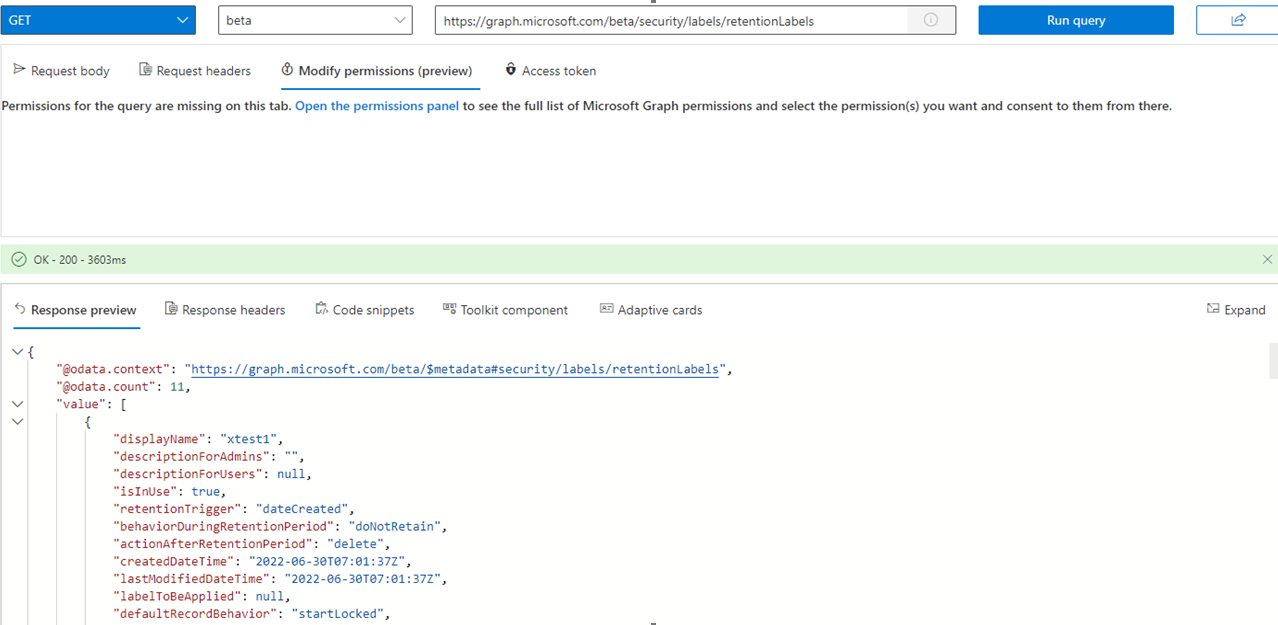
Also I receive an unauthorized error in Graph Explorer using my Global Admin account, and I can definitely manage and view all retention labels with that same account in the Records Mangagment portal.
I am at a loss, What do I need to do to get this to work?
Thanks!
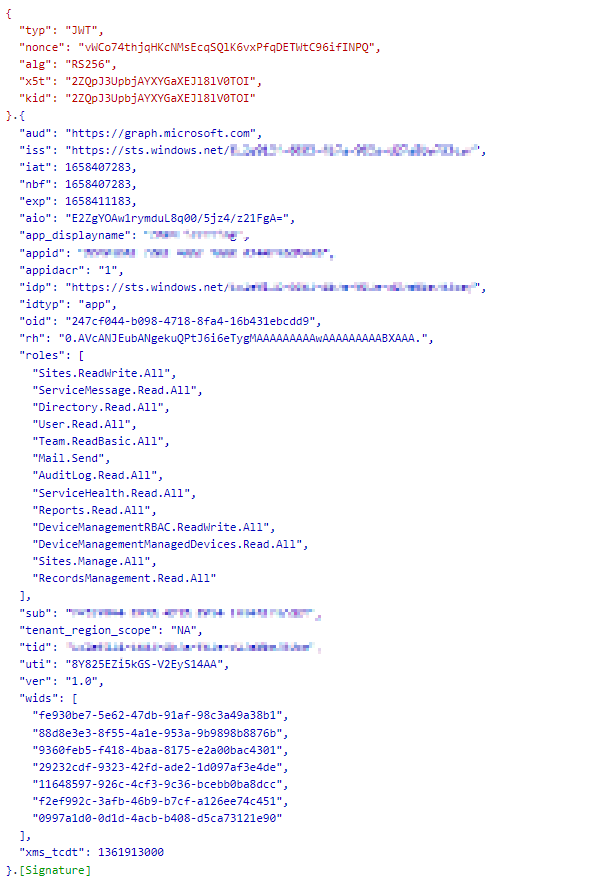
I have attached a decoded JWT
A group of Microsoft Products and technologies used for sharing and managing content, knowledge, and applications.
An API that connects multiple Microsoft services, enabling data access and automation across platforms
A unified data governance solution that helps manage, protect, and discover data across your organization
' cx='32' cy='32' r='32' /%3E%3Ctext x='50%25' y='55%25' dominant-baseline='middle' text-anchor='middle' fill='%23FFF' %3ER%3C/text%3E%3C/svg%3E)
Hi @Mullins, Christopher
I am currently doing some research on this issue, will let you know as soon as possible
' cx='32' cy='32' r='32' /%3E%3Ctext x='50%25' y='55%25' dominant-baseline='middle' text-anchor='middle' fill='%23FFF' %3EJS%3C/text%3E%3C/svg%3E)
I finally was able to get this api to work.
The problem was that I was not using the Delegated RecordsManagement.Read.All, I was using the Application RecordsManagement.Read.All permissions. Both permissions were set up on my application within Active Directory, but the way I was retrieving my tokens was incorrect.
When it wasn't working, I was using a token generated by the following curl request:
# Auth v2.0
curl -X "POST" "https://login.microsoftonline.com/{TENENT_ID}/oauth2/v2.0/token" \
     -H 'Content-Type: application/x-www-form-urlencoded' \
     --data-urlencode "response_type=client_credentials" \
     --data-urlencode "client_id={CLIENT_ID}" \
     --data-urlencode "client_secret={CLIENT_SECRET}" \
     --data-urlencode "grant_type=client_credentials" \
     --data-urlencode "scope=https://graph.microsoft.com/.default"
This generated a token with Application RecordsManagement.Read.All permissions that resulted in a response to
# Get security labels
curl "https://graph.microsoft.com/beta/security/labels/retentionLabels" \
     -H 'Authorization: Bearer {TOKEN}' \
     -H 'Content-Type: application/json'
of
{
  "error": {
    "code": "UnknownError",
    "message": "No MediaTypeFormatter is available to read an object of type 'WorkbenchResponse`1' from content with media type 'application/xml'.",
    "innerError": {
      "date": "2022-10-20T19:01:46",
      "request-id": "a8e82d9a-9887-494f-b76f-2a0b4befd2a5",
      "client-request-id": "a8e82d9a-9887-494f-b76f-2a0b4befd2a5"
    }
  }
}
---
You need to do the following in order to make it work.
Delegated RecordsManagement.Read.All permissions RecordsManagement.Read.All permission.
Hi @Mullins, Christopher ,
Per my test, RecordsManagement.Read.All is the right permission to access List Retention Labels.
Please decode your token in the following web
https://jwt.ms/
Then you can check if there is RecordsManagement.Read.All permission in role claim. If there is no such permission, you can try use client credentials flow to register the token. Please refer to following document
https://learn.microsoft.com/en-us/azure/active-directory/develop/v2-oauth2-client-creds-grant-flow
If the answer is helpful, please click "Accept Answer" and kindly upvote it. If you have extra questions about this answer, please click "Comment".
Note: Please follow the steps in our documentation to enable e-mail notifications if you want to receive the related email notification for this thread.
Thank you for verifying that you are able to get this to work. I have attached the decoded jwt to the original message, as you can see I do have the required permission in the JWT, There must be something else that is blocking me.
Also I receive an unauthorized error in Graph Explorer using my Global Admin account, and I can definitely manage and view all retention labels that same account in the Records Mangagment portal.
Hi @Mullins, Christopher ,
Please make sure your account is not Delegated (personal Microsoft account). Currently it's not supported in List Retention Labels Api
https://learn.microsoft.com/en-us/graph/api/security-retentionlabel-list?view=graph-rest-beta&tabs=http#examples
We are calling this using a App registered service pricipal, and we have selected Application Permissions for RecordsManagement.Read.All.
Getting a weird error today, when I try it, maybe they are working on this endpoint, it is in beta after all. I will check back again later.
|
Hi @Mullins, Christopher ,
would you please provide us with an update on the status of your issue?
I am still receiving the error No MediaTypeFormatter from the server.

Hi @Mullins, Christopher ,
Could you share us with the code?
Here is some Powershell 7 Code that will return the error for me
$tokenHeaders = New-Object "System.Collections.Generic.Dictionary[[String],[String]]"
$tokenHeaders.Add("Content-Type", "application/x-www-form-urlencoded")
$tokenBody = "grant_type=client_credentials&client_id=XXXXX&client_secret=XXXXXX&scope=https%3A%2F%2Fgraph.microsoft.com%2F.default"
$tokenResponse = Invoke-RestMethod 'https://login.microsoftonline.com/XXXXXXX/oauth2/v2.0/token' -Method 'POST' -Headers $tokenHeaders -Body $tokenBody
$access_token = $tokenResponse.access_token
$authorization = "Bearer $access_token"
$authorization
$headers = New-Object "System.Collections.Generic.Dictionary[[String],[String]]"
$headers.Add("Authorization", $authorization)
$headers.Add("Content-Type", "application/json")
$response = Invoke-RestMethod 'https://graph.microsoft.com/beta/security/labels/retentionLabels' -Method 'GET' -Headers $headers -SkipHttpErrorCheck
$response | ConvertTo-Json
 ]1
]1

@Mullins, Christopher Are you able to fix this ? We are also getting same error in POSTMAN
Still same error here. I am glad it is not just me.