Microsoft Security | Intune | Configuration Manager | Other
Other Configuration Manager-related features and issues

This browser is no longer supported.
Upgrade to Microsoft Edge to take advantage of the latest features, security updates, and technical support.
' cx='32' cy='32' r='32' /%3E%3Ctext x='50%25' y='55%25' dominant-baseline='middle' text-anchor='middle' fill='%23FFF' %3EQ5%3C/text%3E%3C/svg%3E)
Recently we have dozens of computers to remove the SCCM client. I don't want to manually uninstall it one by one. Could you please share a method to auto uninstall it?
Other Configuration Manager-related features and issues
Answer accepted by question author

create a package with the uninstall string and deploy it to the computers.

Hi, @QdPooler-5995
Thank you for posting in Microsoft Q&A forum.
An easy way to uninstall the client is run the script for a device collection you want to uninstall the client:
C:\Windows\ccmsetup\ccmsetup.exe /uninstall
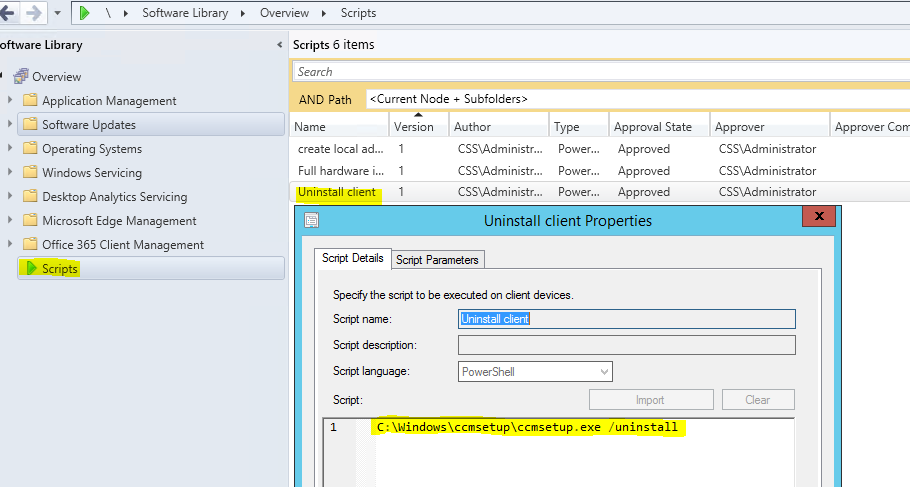
If we want to uninstall the client completely, we need to delete the related folders and registry with another script:
# Delete the folder of the SCCM Client installation: "C:\Windows\CCM"
Remove-Item -Path "$($Env:WinDir)\CCM" -Force -Recurse -Confirm:$false -Verbose

# Delete the folder of the SCCM Client Cache of all the packages and Applications that were downloaded and installed on the Computer: "C:\Windows\ccmcache"
Remove-Item -Path "$($Env:WinDir)\CCMSetup" -Force -Recurse -Confirm:$false -Verbose

# Delete the folder of the SCCM Client Setup files that were used to install the client: "C:\Windows\ccmsetup"
Remove-Item -Path "$($Env:WinDir)\CCMCache" -Force -Recurse -Confirm:$false -Verbose

# Delete the file with the certificate GUID and SMS GUID that current Client was registered with
Remove-Item -Path "$($Env:WinDir)\smscfg.ini" -Force -Confirm:$false -Verbose

# Delete the certificate itself
Remove-Item -Path 'HKLM:\Software\Microsoft\SystemCertificates\SMS\Certificates\*' -Force -Confirm:$false -Verbose

# Remove all the registry keys associated with the SCCM Client that might not be removed by ccmsetup.exe
Remove-Item -Path 'HKLM:\SOFTWARE\Microsoft\CCM' -Force -Recurse -Verbose
Remove-Item -Path 'HKLM:\SOFTWARE\Wow6432Node\Microsoft\CCM' -Force -Recurse -Confirm:$false -Verbose
Remove-Item -Path 'HKLM:\SOFTWARE\Microsoft\SMS' -Force -Recurse -Confirm:$false -Verbose
Remove-Item -Path 'HKLM:\SOFTWARE\Wow6432Node\Microsoft\SMS' -Force -Recurse -Confirm:$false -Verbose
Remove-Item -Path 'HKLM:\Software\Microsoft\CCMSetup' -Force -Recurse -Confirm:$false -Verbose
Remove-Item -Path 'HKLM:\Software\Wow6432Node\Microsoft\CCMSetup' -Force -Confirm:$false -Recurse -Verbose

# Remove the service from "Services"
Remove-Item -Path 'HKLM:\SYSTEM\CurrentControlSet\Services\CcmExec' -Force -Recurse -Confirm:$false -Verbose
Remove-Item -Path 'HKLM:\SYSTEM\CurrentControlSet\Services\ccmsetup' -Force -Recurse -Confirm:$false -Verbose

# Remove the Namespaces from the WMI repository
Get-CimInstance -query "Select * From __Namespace Where Name='CCM'" -Namespace "root" | Remove-CimInstance -Verbose -Confirm:$false
Get-CimInstance -query "Select * From __Namespace Where Name='CCMVDI'" -Namespace "root" | Remove-CimInstance -Verbose -Confirm:$false
Get-CimInstance -query "Select * From __Namespace Where Name='SmsDm'" -Namespace "root" | Remove-CimInstance -Verbose -Confirm:$false
Get-CimInstance -query "Select * From __Namespace Where Name='sms'" -Namespace "root\cimv2" | Remove-CimInstance -Verbose -Confirm:$false

# Alternative command for WMI Removal in case of something goes wrong with the above.
# Get-WmiObject -query "Select * From __Namespace Where Name='CCM'" -Namespace "root" | Remove-WmiObject -Verbose | Out-Host
# Get-WmiObject -query "Select * From __Namespace Where Name='CCMVDI'" -Namespace "root" | Remove-WmiObject -Verbose | Out-Host
# Get-WmiObject -query "Select * From __Namespace Where Name='SmsDm'" -Namespace "root" | Remove-WmiObject -Verbose | Out-Host
# Get-WmiObject -query "Select * From __Namespace Where Name='sms'" -Namespace "root\cimv2" | Remove-WmiObject -Verbose | Out-Host
If the answer is the right solution, please click "Accept Answer" and kindly upvote it. If you have extra questions about this answer, please click "Comment".
Note: Please follow the steps in our documentation to enable e-mail notifications if you want to receive the related email notification for this thread.
Thanks for all your help!