Azure Synapse Analytics
An Azure analytics service that brings together data integration, enterprise data warehousing, and big data analytics. Previously known as Azure SQL Data Warehouse.
This browser is no longer supported.
Upgrade to Microsoft Edge to take advantage of the latest features, security updates, and technical support.
' cx='32' cy='32' r='32' /%3E%3Ctext x='50%25' y='55%25' dominant-baseline='middle' text-anchor='middle' fill='%23FFF' %3ESK%3C/text%3E%3C/svg%3E)
I have created a pipeline in synapse analytics that loops through a list of entities, which is then passed to a foreach activity with a copy data activity inside.
My source is Dynamics 365FO and I am using the Dynamics AX connector. My linked service is working fine and the entity is dynamically passed in the foreach activity. However, I also need to add "?cross-company=true" in the query.
Data is indeed copied from Dynamics 365FO to my Azure SQL db but the "cross-company=true" does not seem to work.
How can I see the entire url sent to Dynamics 365FO? I have tried to look through the monitoring and debugging but I cannot see the complete url used. It should be a mix of the baseurl from the linked service, the entitypath and the query - but I cannot verify this.
In SSIS you could step through debugging and see all variable values at all times - I suppose something similar is available in synapse analytics / adf?
An Azure analytics service that brings together data integration, enterprise data warehousing, and big data analytics. Previously known as Azure SQL Data Warehouse.
An Azure service for ingesting, preparing, and transforming data at scale.

Hi @Stinna Kongsdal Mikkelsen , Just checking in to see if the below answer helped. If this answers your query, do click  and upvote
  for the same. And, if you have any further query do let us know.
Answer accepted by question author
Hi @Stinna Kongsdal Mikkelsen ,
Thank you for posting query in Microsoft Q&A Platform.
It seems you are using Dynamics AX connector as source dataset in Copy activity. Please correct me if I am wrong.
In Copy activity, Source tab using query option you can specify your OData query options for filtering data. For Example:
$select=Name,Description&$top=5
When we use query options the connector copies data from the combined URL in below format.
[URL specified in linked service]/[path specified in dataset][query specified in copy activity source]
For more information see, OData URL components.
In your case, when after using query option in copy activity source tab, still your are facing issue? If yes, could you please share your implementation details along with screenshots once?
Please let me know how it goes.
It is correct that I am using the Dynamics AX connector as a source dataset in copy activity.
'
And I have read the same documentation that you are referring to.
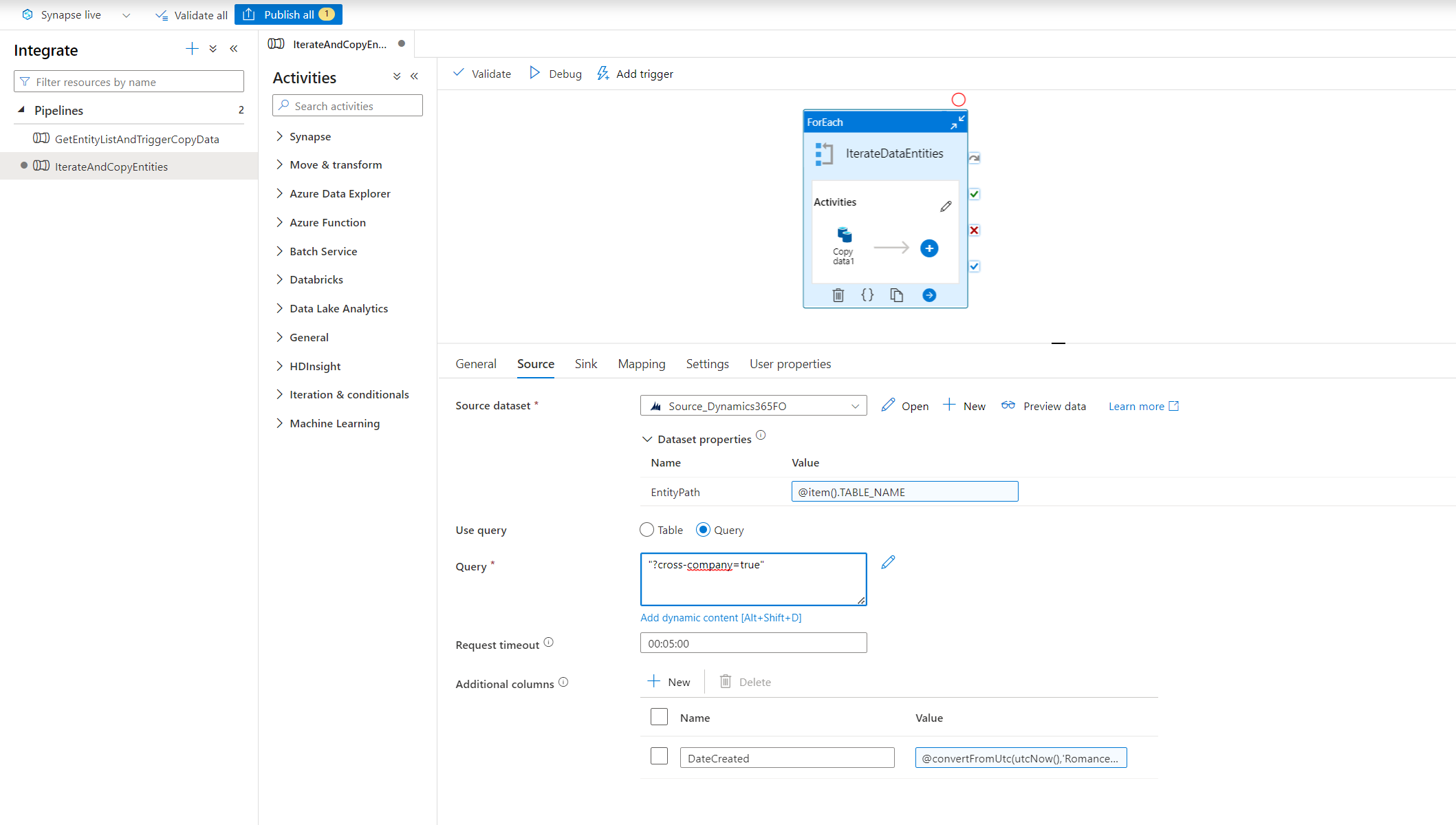
Here is a screenshot of my pipeline. I am getting the right data from the right entities but without the "?cross-company=true". I have checked in D365FO and the user DO have access to cross-company data. And I have tried with and without the quotes and questionmark but nothing seems to work. Isn't it possible to see the complete url that is sent to D365FO? Then it might be more obvious what is going on.
Hi @Stinna Kongsdal Mikkelsen , Could you please remove double quotes from value and use only as ?cross-company=true and see how it behaves? Please let me know how it goes.
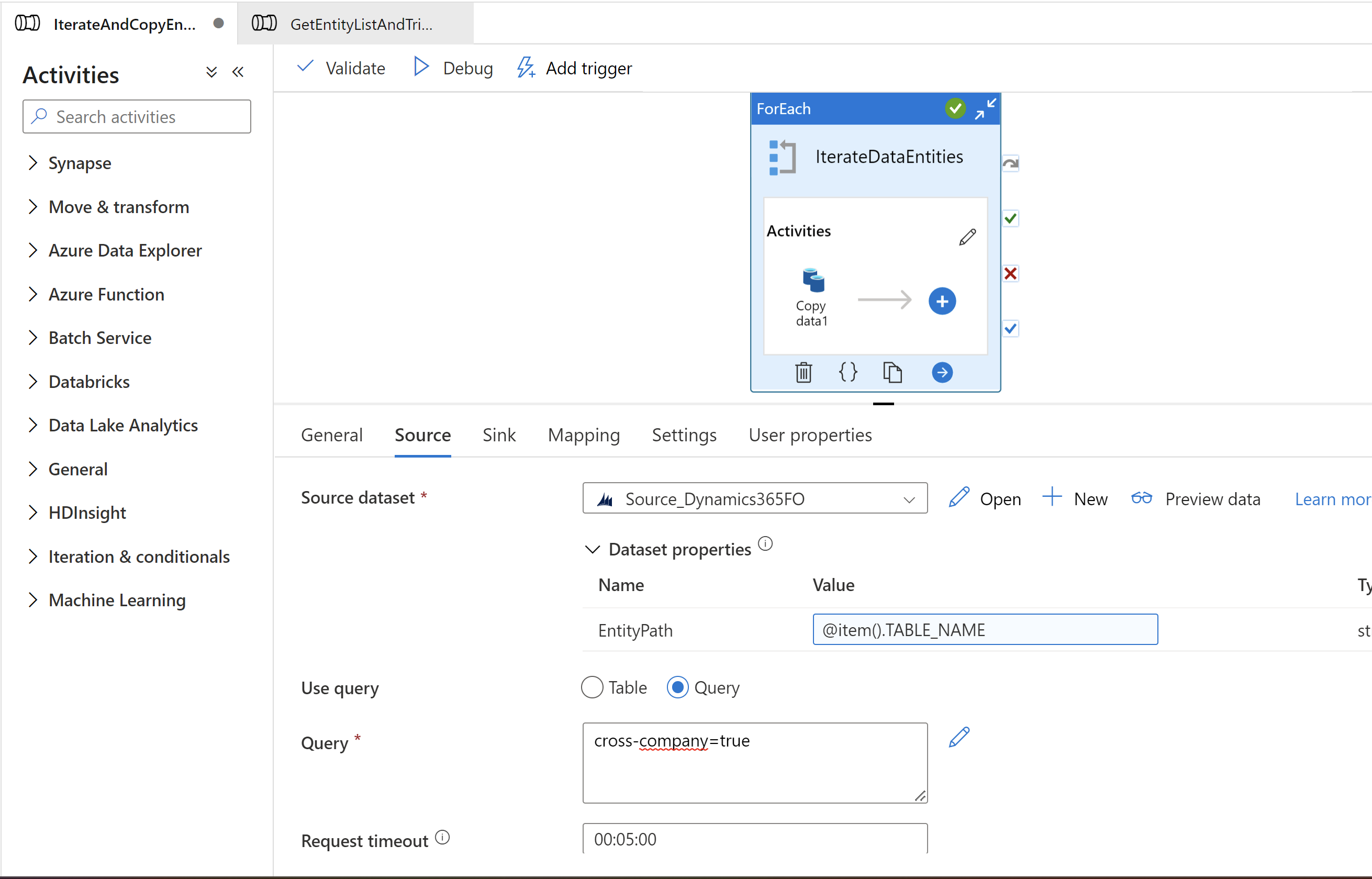
It was not enough to remove the double quotes. I also had to remove the questionmark.
Here is a screenshot of my pipeline, which is working and giving me all the data that I want - including cross-company data.
However, I still would like to know how to check the complete url sent to D365FO - to help with future problems that might arise. Where can I see it? Can I get it dynamically and write it to a variable that I can see in the debugging?
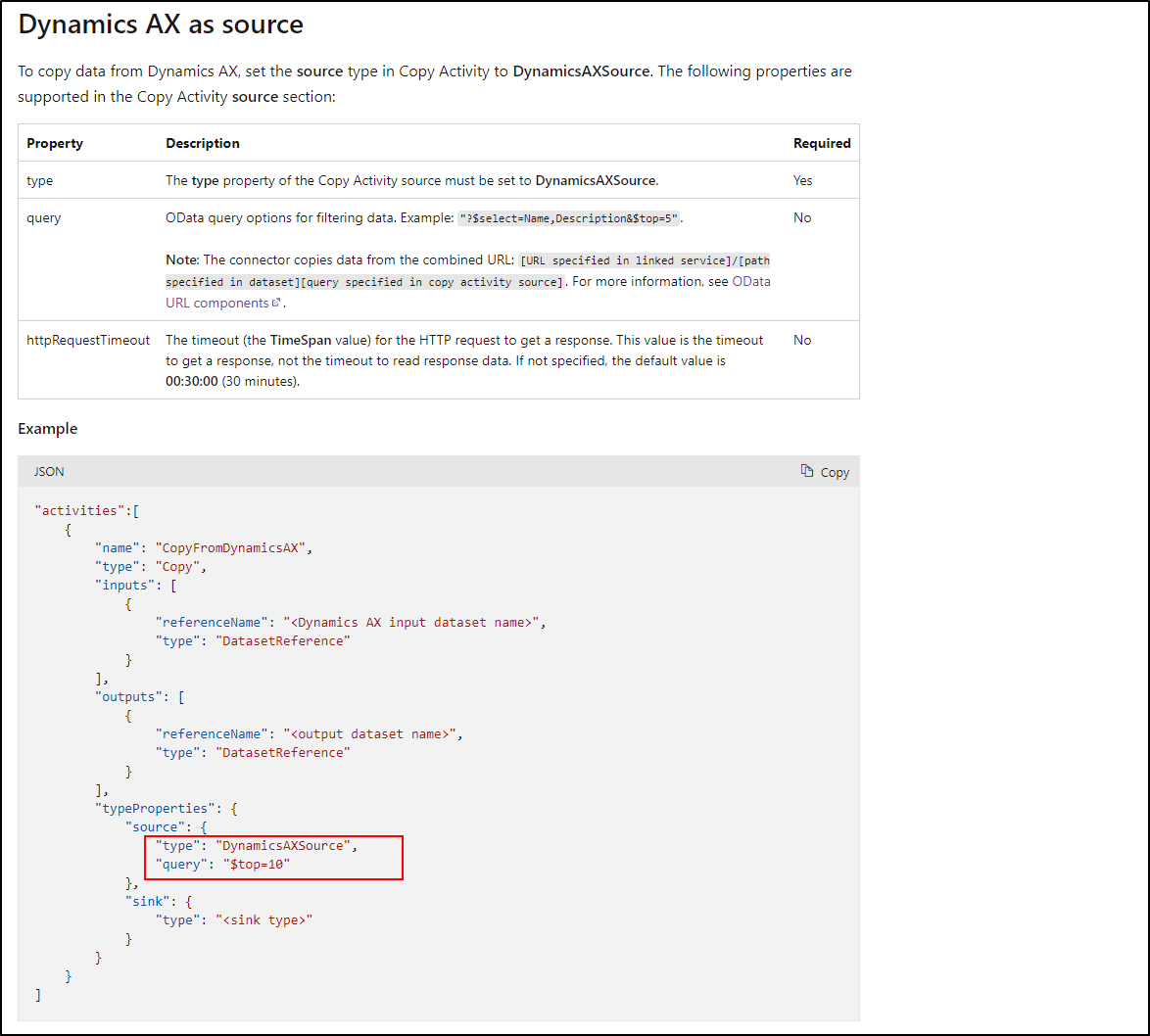
Hi @Stinna Kongsdal Mikkelsen , Awesome. yes you are right. As per documentation also I can see we no need to add ? symbol there. Please check below screenshot.
Regarding checking the complete URL, thats not possible at this moment. ADF service handles formation of URL and sending request all at behind the scenes we will not having control over to it to see the same.
----------------
Please consider hitting Accept Answer button. Accepted answers help community as well. Thank you.