
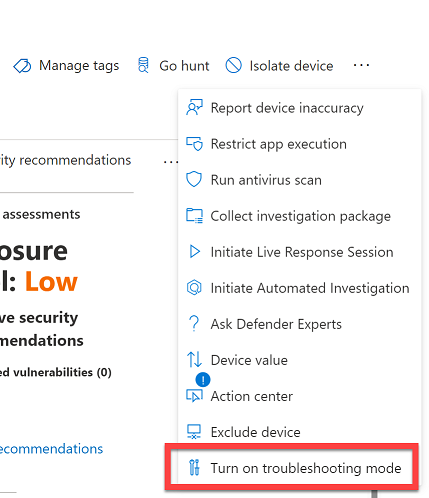
There is a Troubleshooting Mode option from the device page. Is that what you are looking for?
This browser is no longer supported.
Upgrade to Microsoft Edge to take advantage of the latest features, security updates, and technical support.

Hi,
we have a E5 security license recently bought and are implementing most of the features from that package. Since Microsoft Defender is our main AV I need this like the plants need water - I need sometimes to temporary disable/pause the thing for 10min and there is no easy way to do this. Answers like "you should not do this..." please, there is sometimes the need just to pause it like for example our secretary is trying to print one document and the antimalware service is eating up the CPU up to the point that the Windows 10 become unusable because it slows down so much.
Thank you for answers which would enable me to do what I am asking
Cheers
Actually found the fastest way, still not perfect:
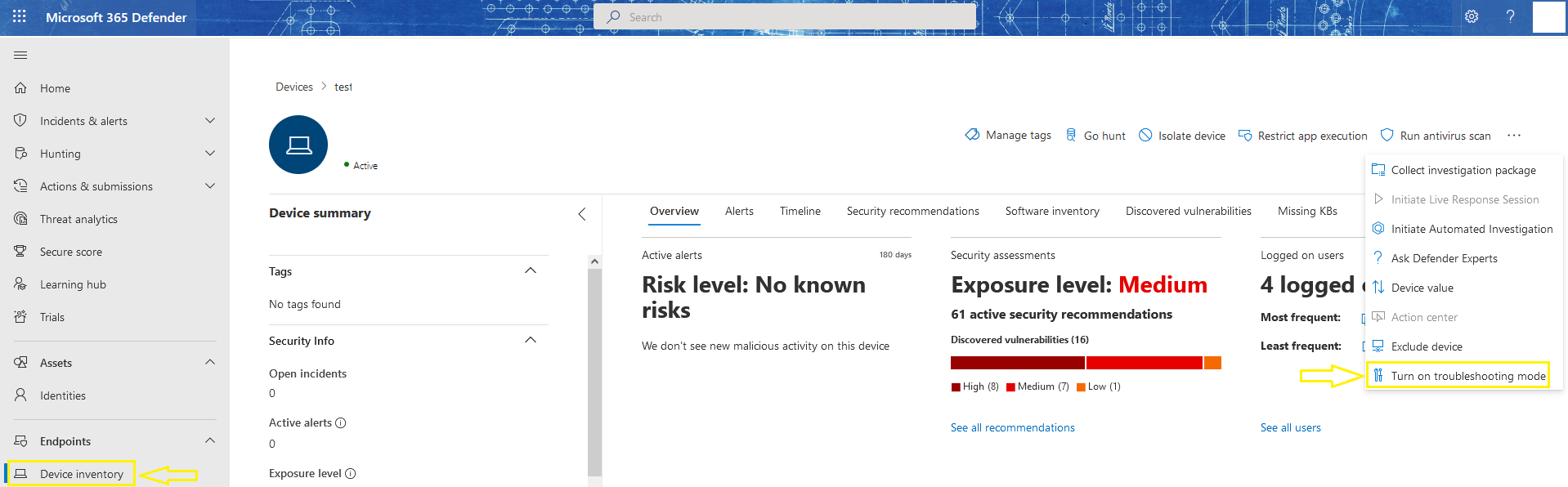
Then on the client which need the defender deactivate run the powershell command: 
Then disable all the "knobs", especially tamper protection.
BR

There is a Troubleshooting Mode option from the device page. Is that what you are looking for?
Hi Andrew,
the troubleshooting mode in combination with these two commands does the trick immediately:
Set-MPPreference -DisableTamperProtection $true
Set-MpPreference DisableRealtimeMonitoring $true
Thank you for pointing me in the right direction.
Cheers!
I am still in awe that Microsoft just decided that the Defender cannot be deactivated. ALL AV can be temporary deactivated, sometimes this is necessary!
Is there a feedback hub for this so I can actually talk to the engineers, at least a forum?
' cx='32' cy='32' r='32' /%3E%3Ctext x='50%25' y='55%25' dominant-baseline='middle' text-anchor='middle' fill='%23FFF' %3ERK%3C/text%3E%3C/svg%3E)
If your administrator has configured local overrides (e.g. local endpoint administrator accounts are allowed to configure override settings on the endpoints) you can change your protection settings as per this article:
Otherwise, you cannot really switch it off.
Regards,
Rosen

Hi there,
You can follow the steps in the below article to turn on and off the defender in your environment.
Turn off Defender antivirus protection in Windows Security https://support.microsoft.com/en-us/windows/turn-off-defender-antivirus-protection-in-windows-security-99e6004f-c54c-8509-773c-a4d776b77960
Turn on Microsoft 365 Defender https://learn.microsoft.com/en-us/microsoft-365/security/defender/m365d-enable?view=o365-worldwide
If you are comfortable with Powershell then you can try out the below article for some insights. Use PowerShell cmdlets to configure and manage Microsoft Defender Antivirus https://learn.microsoft.com/en-us/microsoft-365/security/defender-endpoint/use-powershell-cmdlets-microsoft-defender-antivirus?view=o365-worldwide
---------------------------------------------------------------------------------------------------------------------------------------------------------
--If the reply is helpful, please Upvote and Accept it as an answer–
Hi,
I dont think that you understood what I meant. I meant temporary putting the defender on hold when you have your options disabled from the admin:
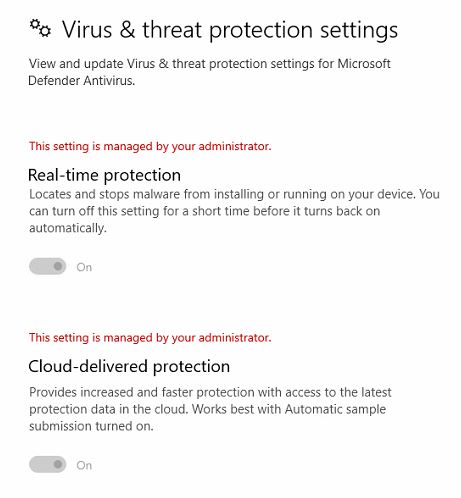
I have to also mention that our users ARE local admins on their machines.
BR