Microsoft 365 and Office | Excel | For home | Windows
A family of Microsoft spreadsheet software with tools for analyzing, charting, and communicating data.

This browser is no longer supported.
Upgrade to Microsoft Edge to take advantage of the latest features, security updates, and technical support.
' cx='32' cy='32' r='32' /%3E%3Ctext x='50%25' y='55%25' dominant-baseline='middle' text-anchor='middle' fill='%23FFF' %3EA%3C/text%3E%3C/svg%3E)
Good morning,
Unfortunately the "copy and paste" option for Excel and Google Sheets have stopped working and instead of pasting the Excel/Sheets table, it only pastes the data.
The "paste as is" no longer working and I now need to copy and paste data from Excel/Sheets to my Numbers program on my Mac and then copy and paste it to the email.
What is even more strange is that I can copy a table from Sheets or Excel and paste it to Microsoft Teams or Word without it giving me any issues.
I would have to imagine that there has been an Outlook update with a glitch because I have also tried changing to Microsoft Edge where it continues to give me the same problem.
Screenshot of Excel Information that needs to be copied:
Pasting to an Outlook Email with no result:
The result of a paste when the "Paste as is" doesn't work:
This is what happens if I copy and paste the same information to a Teams chat with a colleague:
The information is pasted correctly and keeps the table the same as the original copy.
If I want the same result for an email, I have to copy the information first to Numbers:
And then paste it to the email:
I have spoken with the IT Team at my company but there are unable to guess what the problem is and suggested contacting Microsoft directly.
I would say that it has only been this way, maybe for a week or less but it is annoying to have to work this way adds considerable time to what used to be a routine copy and paste procedure. My colleagues have reported having the same problem as well.
I look forward to your feedback on the matter and kind regards.
[PII is masked by Hugo Liang MSFT Support]
A family of Microsoft spreadsheet software with tools for analyzing, charting, and communicating data.
Locked Question. This question was migrated from the Microsoft Support Community. You can vote on whether it's helpful, but you can't add comments or replies or follow the question.
I'm encountering the same issue. Whether it's a copy-paste from Google Sheets or Excel, it's just not adding anything to the Browser version of Outlook. Like yourself Eddy, there is specific information that I extract that will go to specific clients, and so sharing files is not a viable option. I've hidden cells that aren't needed and saved the file as a PDF to send out, but this isn't an efficient way of doing things.
I just discovered this issue today, and have a similar use case as the others in this thread, though I am copying from Google Sheets to Outlook365 email.
I am on a chromebook, so a different browser is not an option. It appears we need to report the bug to Google / Chrome team.
That aside, I found a work around. I copied the cells from the worksheet into a google document, and then copied that table and pasted it into the Outlook365 email. This worked.
Thanks MS team for working with the users to identify the bug.
Johnny
Hi Ahmed,
I just tested with this problem with the Safari browser.
You may need to repeat multiple time to get it work.
Such as, copy, paste, select contents and right-click, etc.
Hope this helps.
Best Regards,
Hugo
Good morning,
Unfortunately the "copy and paste" option for Excel and Google Sheets have stopped working and instead of pasting the Excel/Sheets table, it only pastes the data.
The "paste as is" no longer working and I now need to copy and paste data from Excel/Sheets to my Numbers program on my Mac and then copy and paste it to the email.
What is even more strange is that I can copy a table from Sheets or Excel and paste it to Microsoft Teams or Word without it giving me any issues.
I would have to imagine that there has been an Outlook update with a glitch because I have also tried changing to Microsoft Edge where it continues to give me the same problem.
Screenshot of Excel Information that needs to be copied:
Pasting to an Outlook Email with no result:
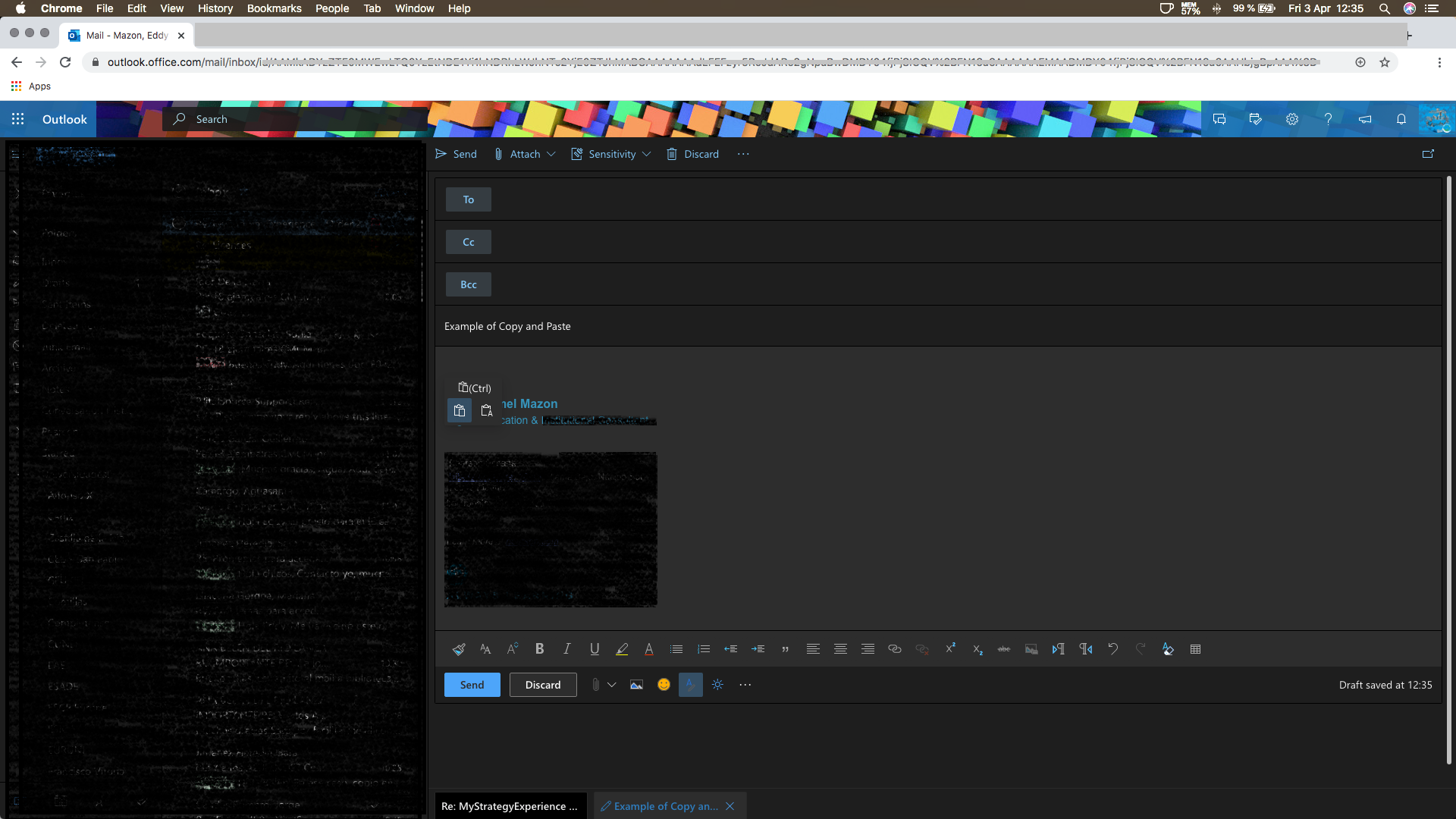
The result of a paste when the "Paste as is" doesn't work:
This is what happens if I copy and paste the same information to a Teams chat with a colleague:
The information is pasted correctly and keeps the table the same as the original copy.
If I want the same result for an email, I have to copy the information first to Numbers:
And then paste it to the email:
I have spoken with the IT Team at my company but there are unable to guess what the problem is and suggested contacting Microsoft directly.
I would say that it has only been this way, maybe for a week or less but it is annoying to have to work this way adds considerable time to what used to be a routine copy and paste procedure. My colleagues have reported having the same problem as well.
I look forward to your feedback on the matter and kind regards.
[PII is masked by Hugo Liang MSFT Support]
excel won"t open
Hi Eddy,
Really appreciate your feedback and understanding.
Today I updated Google Chrome from 80.0.3987.163(Official Build) (64-bit) to the latest 81.0.4044.113(Official Build) (64-bit) and reproduced this issue. Only text can be pasted whatever using the Paste text (T) option or using the Paste as is (P) option.
I also tested with the latest 13.1 (15609.1.20.111.8) version of Safari but cannot reproduce this issue, it seems this issue is specific to the latest Chrome browser. You may have a try and check the outcomes.
Have a nice day. :)
Best Regards,
Hugo