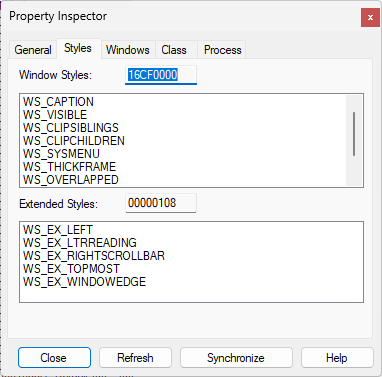
The window of the "inspect.exe" application can always stay on top of other windows, even when it is not focused. Its window will even be on the taskbar, above the application switching window of Alt + Tab. What technology is used in this magic?
Only when "inspect.exe" app stays on top of other windows when it's on C drive, when I put "inspect.exe" app on D drive it becomes mediocre (only its window gets focus It will be on top of other windows, which is the same as the general top window), if it is not on the C drive, even if I run it with administrator privileges, it does not have the magic of always being on the top
What parameters should be used when creating a window using win32 C++ API to achieve the same features as "inspect.exe"?
The performance of CreateWindowEx with WS_EX_TOPMOST is not the same. If I do this, I can only reach the state when "inspect.exe" is not in the C drive.
I am working on a screenshot tool, and I hope that the translucent mask window can cover other windows, so that there will be a better user experience.
I hope that friends who understand technology will share the inside story of technology, thank you very much
' cx='32' cy='32' r='32' /%3E%3Ctext x='50%25' y='55%25' dominant-baseline='middle' text-anchor='middle' fill='%23FFF' %3EA%3C/text%3E%3C/svg%3E)

' cx='32' cy='32' r='32' /%3E%3Ctext x='50%25' y='55%25' dominant-baseline='middle' text-anchor='middle' fill='%23FFF' %3EXY%3C/text%3E%3C/svg%3E)