Developer technologies | ASP.NET Core | Other
A set of technologies in .NET for building web applications and web services. Miscellaneous topics that do not fit into specific categories.
This browser is no longer supported.
Upgrade to Microsoft Edge to take advantage of the latest features, security updates, and technical support.
' cx='32' cy='32' r='32' /%3E%3Ctext x='50%25' y='55%25' dominant-baseline='middle' text-anchor='middle' fill='%23FFF' %3EBE%3C/text%3E%3C/svg%3E)
Hi Team
I have a SQL table as shown below
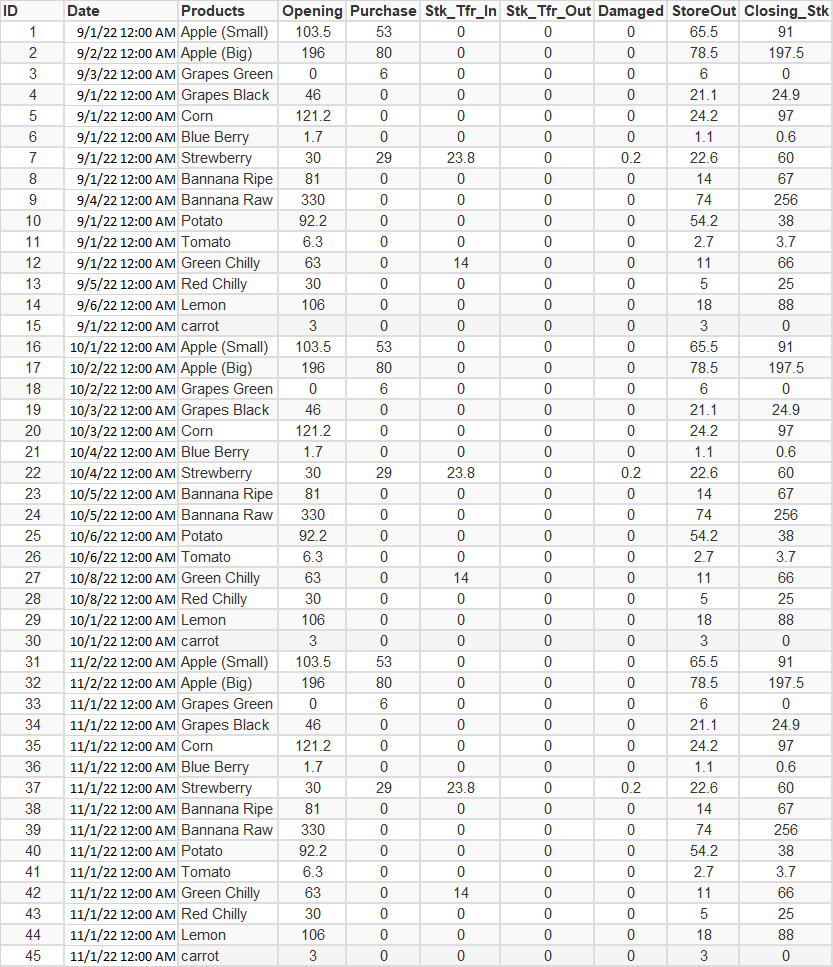
I tried below query but i was not able to proceed
SELECT sum (Opening) as Opening, sum (Purchase) as Purchase, sum (Stk_Tfr_In) as Stk_Tfr_In,sum (Stk_Tfr_Out) as Stk_tfr_Out,sum (Damaged) as Damaged,sum (StoreOut) as StoreOut,sum (Closing_Stk) as Closing_Stk
FROM prodsample
WHERE MONTH(DATE)='9'
I got the output like this

I wanted an output like this

Please guide me
A set of technologies in .NET for building web applications and web services. Miscellaneous topics that do not fit into specific categories.
Answer accepted by question author
' cx='32' cy='32' r='32' /%3E%3Ctext x='50%25' y='55%25' dominant-baseline='middle' text-anchor='middle' fill='%23FFF' %3EAK%3C/text%3E%3C/svg%3E)
Ok, so your smple data has 3 months. (of course they are all the same - no doubt just for this example and testing).
So, drop a gridview on your page.
So, we have this:

And then in code behind, we can add a group by "month" to allow totals and a row for each month.
So, this code:
    Protected Sub Page_Load(ByVal sender As Object, ByVal e As System.EventArgs) Handles Me.Load

        If Not IsPostBack Then
            LoadGrid()
        End If

    End Sub


    Sub LoadGrid()

        Dim strSQL As String =
            "SELECT month(date) As MyMonth, sum (Opening) as Opening,  sum (Purchase) as Purchase,
            sum (Stk_Tfr_In) as Stk_Tfr_In,sum (Stk_Tfr_Out) as Stk_tfr_Out,
            sum (Damaged) as Damaged,sum (StoreOut) as StoreOut,sum (Closing_Stk) as Closing_Stk
            FROM data1
            WHERE MONTH(DATE) in (9,10,11)
            group by month(date)"

        Using conn As New SqlConnection(My.Settings.TEST4)
            Using cmdSQL As New SqlCommand(strSQL, conn)
                conn.Open()
                GridView1.DataSource = cmdSQL.ExecuteReader()
                GridView1.DataBind()
            End Using
        End Using
And now the results are this:
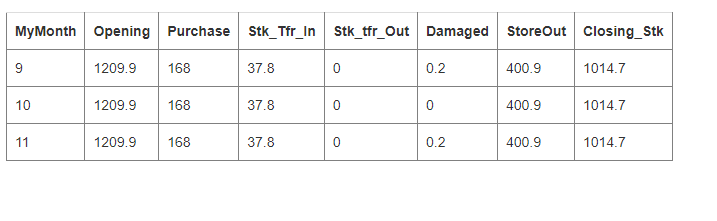
so you can add a group-by month, and it will split out the totals for each month.
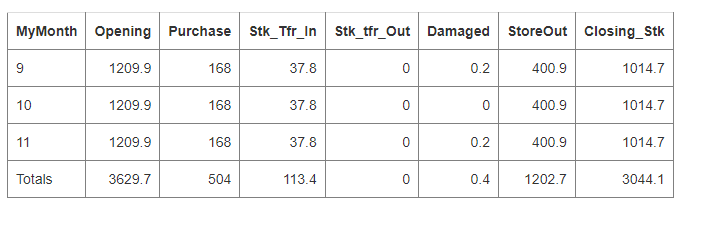
if you want a sum (footer), then to gv, add ShowFooter="true"
and then this:
        Using conn As New SqlConnection(My.Settings.TEST4)
            Using cmdSQL As New SqlCommand(strSQL, conn)
                conn.Open()
                rstData.Load(cmdSQL.ExecuteReader)
                GridView1.DataSource = rstData
                GridView1.DataBind()
            End Using
        End Using

        Dim gF = GridView1.FooterRow
        gF.Cells(0).Text = "Totals"
        For i = 1 To rstData.Columns.Count - 1
            gF.Cells(i).Text = rstData.Compute("SUM(" & rstData.Columns(i).ColumnName & ")", "")
        Next
And if you want all cells right justifed, then add a item row bound like this:
    Protected Sub GridView1_RowDataBound(sender As Object, e As GridViewRowEventArgs) Handles GridView1.RowDataBound

        If e.Row.RowType = DataControlRowType.DataRow Or
            e.Row.RowType = DataControlRowType.Footer Then

            For i = 1 To rstData.Columns.Count - 1
                e.Row.Cells(i).HorizontalAlign = HorizontalAlign.Right
            Next

        End If

    End Sub
And now you have this:
Regards,
Albert D. Kallal (Access MVP 2003-2017)
Edmonton, Alberta, Canada
' cx='32' cy='32' r='32' /%3E%3Ctext x='50%25' y='55%25' dominant-baseline='middle' text-anchor='middle' fill='%23FFF' %3ELH%3C/text%3E%3C/svg%3E)
Hi @Baiju EP ,
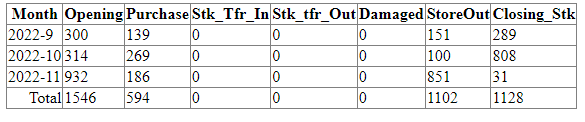
I wrote example according to your needs.
First, you can use the DATEPART function to specify the date part, then group the year and month, and then use the CONCAT function to combine the year and month to display the month and year at the same time.
The Total section can be displayed through the GridView footer.
For details, you can check the code below.
<div>
            <asp:GridView ID="GridView1" runat="server" ShowFooter="true"></asp:GridView>
        </div>
Protected Sub Page_Load(ByVal sender As Object, ByVal e As System.EventArgs) Handles Me.Load
        If Not Me.IsPostBack Then
            Dim con As SqlConnection = New SqlConnection(ConfigurationManager.ConnectionStrings("DBCS").ConnectionString)

 Dim adp As SqlDataAdapter = New SqlDataAdapter(SelectQuery, con)
        Dim dt As DataTable = New DataTable()
        adp.Fill(dt)
        GridView1.DataSource = dt
        GridView1.DataBind()
        Dim totOpening As Decimal = dt.AsEnumerable().Sum(Function(row) row.Field(Of Decimal)("Opening"))
        Dim totPurchase As Decimal = dt.AsEnumerable().Sum(Function(row) row.Field(Of Decimal)("Purchase"))
        Dim totStk_Tfr_In As Decimal = dt.AsEnumerable().Sum(Function(row) row.Field(Of Decimal)("Stk_Tfr_In"))
        Dim totStk_Tfr_Out As Decimal = dt.AsEnumerable().Sum(Function(row) row.Field(Of Decimal)("Stk_Tfr_Out"))
        Dim totDamaged As Decimal = dt.AsEnumerable().Sum(Function(row) row.Field(Of Decimal)("Damaged"))
        Dim totStoreOut As Decimal = dt.AsEnumerable().Sum(Function(row) row.Field(Of Decimal)("StoreOut"))
        Dim totClosing_Stk As Decimal = dt.AsEnumerable().Sum(Function(row) row.Field(Of Decimal)("Closing_Stk"))
        GridView1.FooterRow.Cells(0).Text = "Total"
        GridView1.FooterRow.Cells(0).HorizontalAlign = HorizontalAlign.Right
        GridView1.FooterRow.Cells(1).Text = totOpening.ToString()
        GridView1.FooterRow.Cells(2).Text = totPurchase.ToString()
        GridView1.FooterRow.Cells(3).Text = totStk_Tfr_In.ToString()
        GridView1.FooterRow.Cells(4).Text = totStk_Tfr_Out.ToString()
        GridView1.FooterRow.Cells(5).Text = totDamaged.ToString()
        GridView1.FooterRow.Cells(6).Text = totStoreOut.ToString()
        GridView1.FooterRow.Cells(7).Text = totClosing_Stk.ToString()
        con.Close()
        adp.Dispose()
        dt.Dispose()
    End If
End Sub
Best regards,
Lan Huang
If the answer is the right solution, please click "Accept Answer" and kindly upvote it. If you have extra questions about this answer, please click "Comment".
Note: Please follow the steps in our documentation to enable e-mail notifications if you want to receive the related email notification for this thread.