Share via

Inserted video does not play in full screen

Anonymous
2022-01-13T12:18:01+00:00

I inserted a video in a presentation file and resized it small. I checked Play Full Screen in Playback menu upon selecting the video. But the video is not playing in fullscreen.

Also, how do enable a play button to play this inserted video? It only accepts a URL or other file on your computer NOT an inserted video in the current project.

Microsoft 365 and Office | PowerPoint | For business | Windows

Locked Question. This question was migrated from the Microsoft Support Community. You can vote on whether it's helpful, but you can't add comments or replies or follow the question.

0 comments No comments

8 answers

Sort by: Most helpful
  1. Anonymous
    2022-01-13T14:50:52+00:00

    Hi wise_fool,

    First, my pleasure to assist you.

    As per your description, please don’t worry, we can work together to narrow down and resolve the situation.

    First please don’t worry, I will help you to fix your issue.

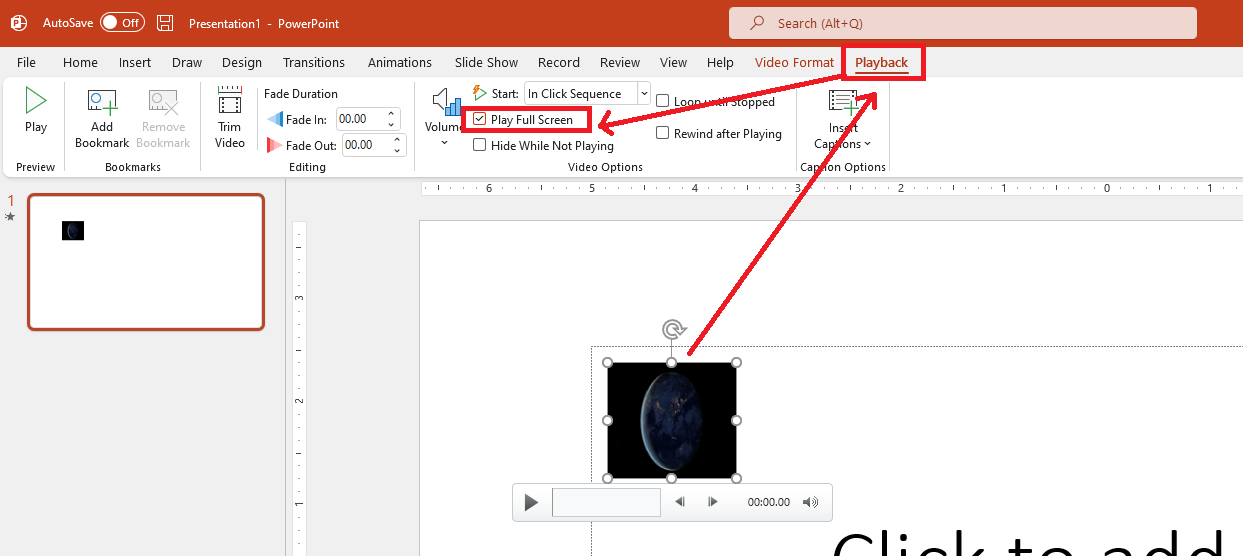
    Based on my test result, when we click on “Play Full Screen” after inserted a video it will play in full screen when you present your PowerPoint slide (not in normal mode). See image below for your reference:
    Image

    Image

    After insert Video into PowerPoint slide and click on Play Full Screen” option**,** please try to click on present mode in a slide show tab, it will play video in full mode (it fills the entire slide screen).

    For your reference: Play a video full screen

    Regarding to, “Also, how do enable a play button to play this inserted video? “As your inserted video button in a PowerPoint slide is different than mine, may I know which video format you inserted into PowerPoint slide? also please confirm  are you insert online  video or video file from pc into your PowerPoint slide. 

    In the meantime, to confirm whether this is a bug in a specific version, please provide us the version information. To check version: Open PowerPoint>File>Account>Product Information and capture a full screenshot and share here (Please mask your private message for protecting your private message) and we will be tested on that version and verify the result with you

    I appreciate your understanding and stay safe!!

    Best regards

    Waqas Muhammad

    1 person found this answer helpful.
    0 comments No comments
  2. Anonymous
    2022-01-17T21:40:13+00:00

    Hi wise_fool,

    Thanks for sharing updates with us and I really appreciate your effort and your precious time doing those tests. First, please accept my apologize you meet such an issue and I understand it effort on your daily work.

    We appreciate your understanding that sometimes the initial suggestions may not resolve the problem very soon. However, we can work together to narrow down and resolve the situation.

    Since issue issue only occur in your organization presentation template. if you don't mind (I request please don't mind) could you please confirm does you are using customization PowerPoint template.

    I appreciate your understanding and stay safe!!                         

    Best Regards

    Waqas Muhammad

    0 comments No comments
  3. Anonymous
    2022-01-17T05:02:24+00:00

    So, I figured out that it only happens with the Organizational Presentation Template I am using. I tried with other blank and downloaded Powerpoint templates and the video (.mp4) inserted from my PC plays in full screen. Any suggestion?

    Image

    0 comments No comments
  4. Anonymous
    2022-01-16T19:40:01+00:00

    Are you playing your video in edit mode by clicking the play arrow? This will NOT go to fullscreen, this only works in slideshow mode.

    To create a play button link goto Animations >Animation Pane

    Right Click the entry for your video and choose Timing

    Select TRIGHGERS > Play on click of (your play button name)

    0 comments No comments
  5. Anonymous
    2022-01-15T20:16:12+00:00

    Hi wise_fool,

    May I know have any updates regarding to this issue? Feel free to post back if you need further assistance.

    Best Regards,

    Waqas Muhammad

    0 comments No comments