Share via

Subscripts in power point presentation formula change after save and reopen

Anonymous
2021-12-30T17:58:28+00:00

Formula in power point presentation with subscripts change after saving and reopening the document. Occurs in several different files. Not consistent or predictable about which character will stay as subscript.

Microsoft 365 and Office | PowerPoint | For business | Windows

Locked Question. This question was migrated from the Microsoft Support Community. You can vote on whether it's helpful, but you can't add comments or replies or follow the question.

0 comments No comments

7 answers

Sort by: Most helpful
  1. Anonymous
    2022-01-04T15:02:47+00:00

    I am using power point version in Microsoft 365 Apps for enterprise.

    I have this same problem in multiple different files (more than 15). Your suggestion has not resolved the problem.

    Happy New Year,

    4 people found this answer helpful.
    0 comments No comments
  2. Anonymous
    2021-12-30T20:49:22+00:00

    I am using power point version 2111

    Before saving the file the formula looked like this:

    After saving the power point presentation and reopening the file the formula had some characters no longer subscript (highlights added):

    2 people found this answer helpful.
    0 comments No comments
  3. Anonymous
    2021-12-30T21:25:10+00:00

    I saved the file to onedrive, and opened it in a webbrowser instead of on my local app. It also had subscript errors

    I searched online and found a thread that seems to conclude that this problem is a MS bug that is unresolved.

    see

    PowerPoint 2016 Equations - some superscripts and subscripts do not "survive" saving

    1 person found this answer helpful.
    0 comments No comments
  4. Anonymous
    2021-12-30T21:09:16+00:00

    Hi slid_314:

    Thank you for the screenshot. I can see the difference from your screenshot. I also tested it in the same version of the Office application. But I did not find the same problem:
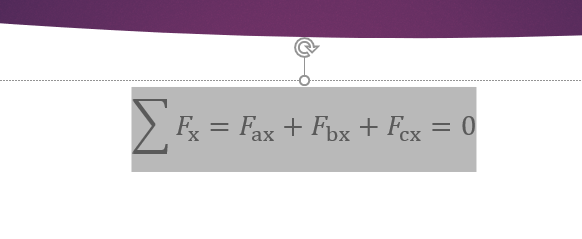
    If it is convenient for you, please try to upload the file to OneDrive, open the file from the web side to see if there is any problem.

    If there is no problem on the web page,you can try repairing Office from the Control Panel:

    Go to Control Panel -> Programs -> right-click on Office applications’ icon -> Change -> Online Repair.

    Also, please try Opening Office apps in safe mode to check whether there is an add-in or extension that may be causing a problem on startup. 

    Hope this will help you.

    Tin

    0 comments No comments
  5. Anonymous
    2021-12-30T20:14:18+00:00

    Hi slid_314:

    Thank you for posting in our forum.

    Have you used the functions shown in the figure below to operate:

    Could you please provide a screenshot of the question and the formula involved so that we can understand your situation more specifically?

    At the same time, please also inform the version of PowerPoint you are using.

    Tin

    0 comments No comments