Share via

Bullet points won't change list level when I hit tab in power point like they do in word. (365 enterprise)

Anonymous
2021-11-30T03:00:02+00:00

How do I get this to work like WORD?

Bullet points won't change list level when I hit tab in power point like they do in word. (365 enterprise). it lets me set each level, but it won't remember it. I used word to set this SOP up. the list levels changed perfectly.

Microsoft 365 and Office | PowerPoint | For education | Windows

Locked Question. This question was migrated from the Microsoft Support Community. You can vote on whether it's helpful, but you can't add comments or replies or follow the question.

0 comments No comments

Answer accepted by question author

  1. Steve Rindsberg 99,161 Reputation points MVP Volunteer Moderator
    2021-11-30T16:57:19+00:00

    Text in Content placeholders (the boxes that start out with Click Here To ... whatever) behaves differently from regular text boxes and text inside shapes like rectangles.

    Text in Content placeholders will work as you expect; tab will indent the text one bullet level and assume that bullet level's formatting (as defined in the layout the slide is based on). Conversely, Shift+Tab will move the text one indent level to the left.

    Text in regular text boxes won't behave this way. There's an Increase Indent Level and a Decrease Indent Level button on the ribbon which goes maybe 1/4 of the way to producing the kind of indents you'd like. It's in the Paragraph group of the Home tab:

    2 people found this answer helpful.
    0 comments No comments

3 additional answers

Sort by: Most helpful
  1. Anonymous
    2021-12-02T13:02:44+00:00

    Hi Michall Caudle – Business,

    May I know if you need further help?

    If so, please feel free to contact me. And I will further assist  you.

    Best Regards,

    May

    0 comments No comments
  2. Steve Rindsberg 99,161 Reputation points MVP Volunteer Moderator
    2021-11-30T16:58:27+00:00

    May, this only works with text in content placeholders and such.

    It doesn't work at all for text in regular text shapes or inserted shapes like rectangles and so on.

    0 comments No comments
  3. Anonymous
    2021-11-30T11:30:15+00:00

    Hi Michall Caudle – Business,

    Thank you for posting in this community and I am sorry for this inconvenience caused to you.

    According to my research and tests, I am afraid that there is not an option in PowerPoint to change the list level like it in Word and Outlook.

    For your information:

    Define new bullets, numbers, and multilevel lists (microsoft.com)

    Adjust indents in paragraph text in PowerPoint (microsoft.com)

    And if we press Enter and Tab keys in PowerPoint, it decreases the list level. Like shown below:
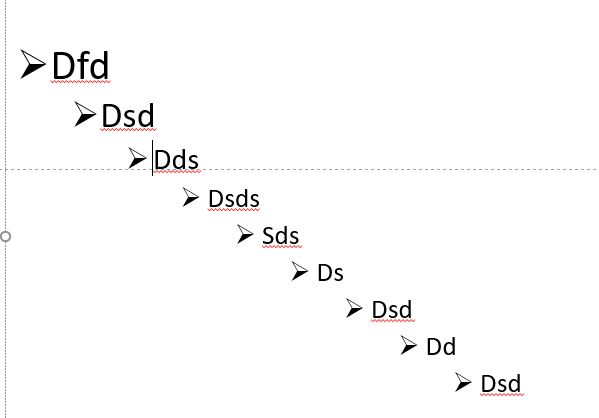
     

    So, in case of any misunderstanding, could you please share a screenshot about your slide using the bullets?

    Best Regards,

    May

    0 comments No comments