Share via

Project Managers have access to view and edit all projects

Anonymous
2022-02-10T00:04:27+00:00

The project managers are able to view and edit all projects within the PWA site. This was not always the case as originally they were only able to see the specific projects that they were the owner, team member, or supplied permissions too. I have not made any changes within the security settings section or am aware of any others making changes. Current server settings are set for 'Project Permission Mode'. I have reviewed the different categories and groups (with their associated categories) and they all appear that they should not be allowing the Project Managers to see the other projects. I only noticed this when acting as a delegate (note i am an admin) on a users behalf to confirm something and stumbled upon them being able to see all the projects when they should of only had a few.

I've tried looking through and making some changes to settings but no matter what i do when acting as a delegate it appears that the Project Manager can see all of the projects and can open, view, and edit them. I even tested as being a delegate for two other users and it functions the same.

I'm really at a loss on where things might have been changed or gone wrong and would like to get it back to the original setup of only seeing projects they are owners of or team members too.

Microsoft 365 and Office | Project | For business | Windows

Locked Question. This question was migrated from the Microsoft Support Community. You can vote on whether it's helpful, but you can't add comments or replies or follow the question.

0 comments No comments

Answer accepted by question author

Dale Howard [MVP] 29,865 Reputation points MVP Volunteer Moderator
2022-02-11T20:52:53+00:00

Chad --

If you are a Global Admin, then those permissions will trump the permissions in the Delegation session. That means YOU will be able to see every project, even though the person for whom you are delegating can only see their own projects. Would that explain the behavior you are seeing? Let us know.

Was this answer helpful?

2 people found this answer helpful.
0 comments No comments

7 additional answers

Sort by: Most helpful
  1. Anonymous
    2022-02-10T05:30:26+00:00

    Jazlyn,

    Thank you for the reply. However, i don't recall this being the case before while acting on behalf of someone, as i believe it always acted the way PWA would be that you were acting on behalf of. In the below screenshot i am a delegate for one of our project managers. They are able to see all projects, when they shouldn't. I therefore filtered down to a couple of projects that they do not have any ties too and therefore should not be able to see, let alone, open and checkout the project:

    Image

    While acting as a delegate i was able to open and checkout the project:

    Image

    And then when i go to the 'check in my projects' from the project center it shows the project as being checked out to the individual i was acting on behalf of:

    Image

    I will try to see if i can work with one of our Project Managers to see what they officially see, but this appears to be a change from how i remember it acting before when acting as a delegate.

    Was this answer helpful?

    1 person found this answer helpful.
    0 comments No comments
  2. Anonymous
    2022-02-10T04:47:14+00:00

    Hi Chad,

    Thank you for posting your query in our community.

    Per your description, when you act as delegate for other Project managers, you could see that they could see all the projects.

    And I tested it on my side, when I (it is global admin account) act as delegate for a user Adele (she is a project manager), you can see below picture, I could see all the projects on my side:
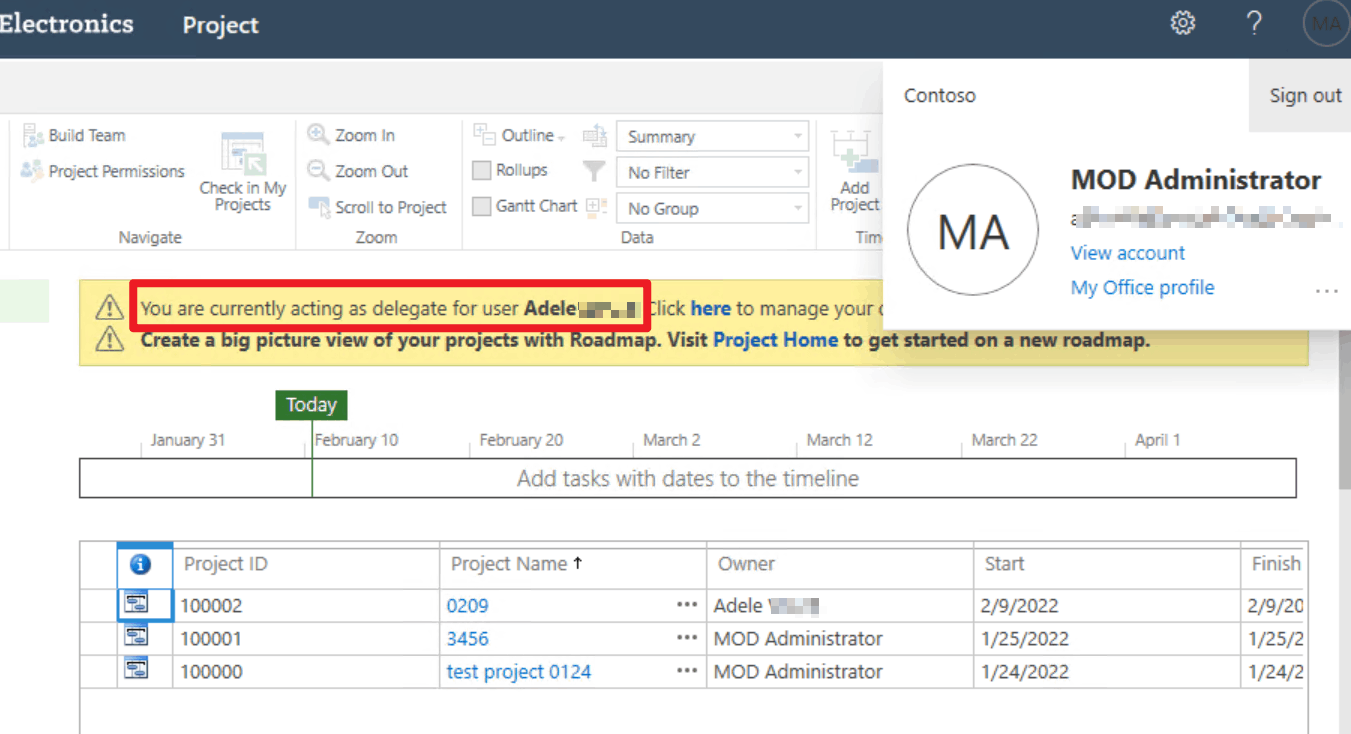
    However, when I login PWA page with Adele user account, you could see below, she still could only see the project she created by herself:
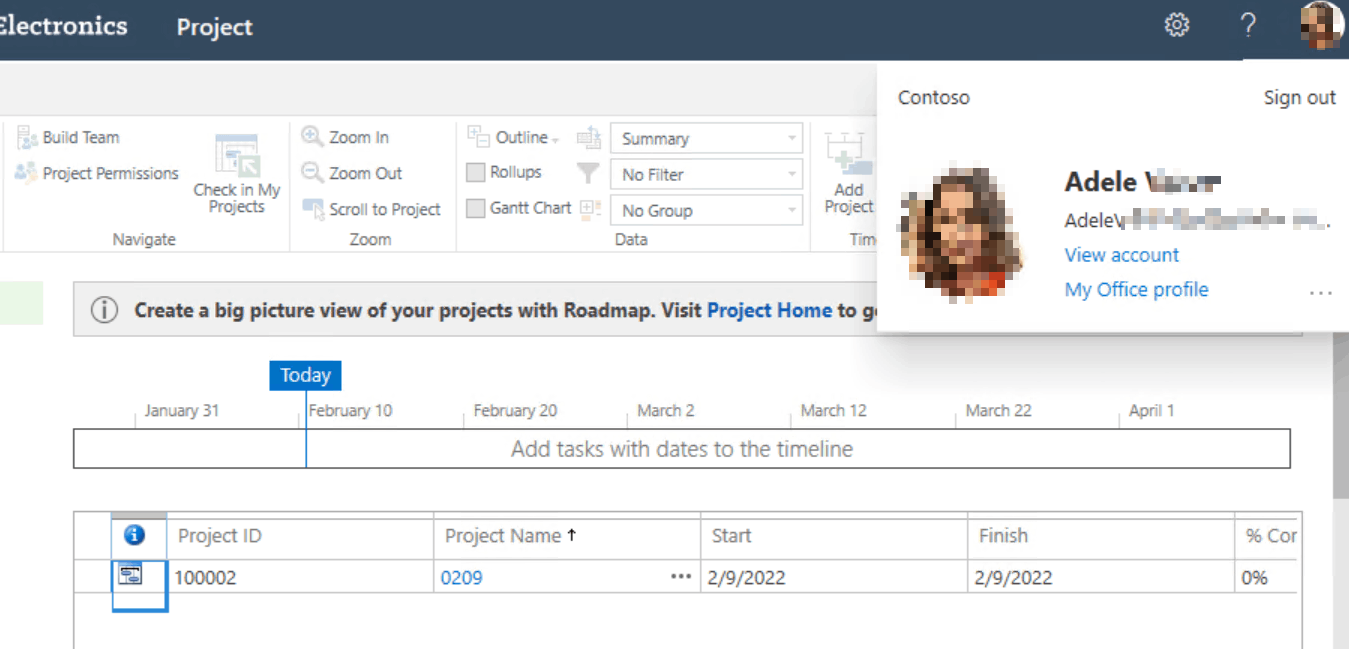
    At the same time, I also tested opening the project page created by the admin account and logging in with Adele user account, it will show below error:

    So, based on my test result, we can know that even we could see all the projects when acting as delegate for other Project managers, they still couldn't see these projects on their own side.

    Best regards,

    Jazlyn

    Was this answer helpful?

    1 person found this answer helpful.
    0 comments No comments
  3. Anonymous
    2022-02-11T16:30:51+00:00

    Jazlyn,

    Thank you for reaching out. I followed up with a couple of my Project Managers and they are in fact only able to see the projects that they are associated with. So it appears that the system is still operating correctly.

    I was just thrown for a loop in that i feel like there was a change within how acting as a delegate for someone appears (perhaps only for Admin). I want to say that in the past when i acted as a delegate for one of the PMs that i then only saw what they would see, but am now able to see everything regardless of me acting as a delegate for that PM.

    Do you know if this was a change that happened recently? I actually preferred the setup where i would see exactly what the PM would see when acting as a delegate as it helped in trouble shooting. Is there an option to revert back to a setup like that again? Otherwise i now have to get on a call with the PM so that i can see what they see rather than working on the backend and not have to utilize their time in trouble shooting.

    Was this answer helpful?

    0 comments No comments
  4. Anonymous
    2022-02-11T07:41:21+00:00

    Hi Chad,

    Please feel free to post back if you have any updates.

    Best regards,

    Jazlyn

    Was this answer helpful?

    0 comments No comments